
REST API
The built-in REST API interface provides you with a way to visualize RESTful web services. The API documentation is built using Swagger, where you can test API operations and instantly view the results to help you scan your applications faster.
About this task
Learn how to use the interactive framework by following this example to import an application inventory by using the /api/v4/Apps/ImportFile REST API.
Procedure
- Select .
- Click the Swagger link on the right side of the page. You are automatically logged in to Swagger.
-
Create an asset group:
-
Replace the
"string"parameters with a name and description for the asset group. Keep the quotation marks.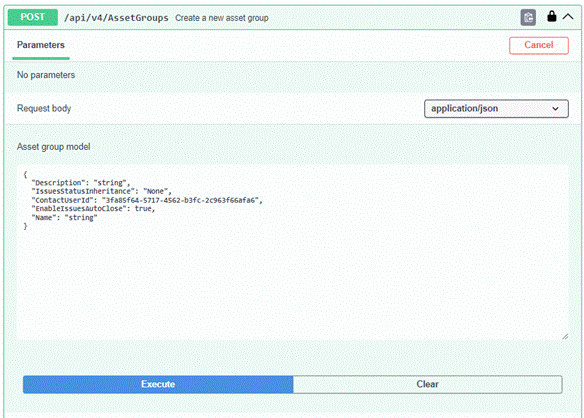
-
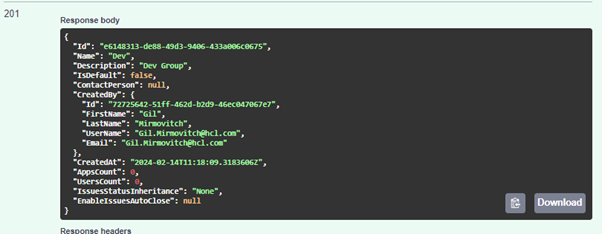
Make note of the ID in the Response Body
section; you'll need to use that ID in the next API.
-
Replace the
-
Import an application inventory file:
-
Click Execute.
A successful import appears as follows:

-
Click Execute.
Example
You can import a scan file, including the results, without running the
scan in AppScan 360° by following these steps:
- Make sure you are logged in to Swagger using the API: api/v4/Account/ApiKeyLogin.
- Upload the scan file using the API: api/v4/FileUpload and
save the FileId for later. For example,
"FileId": "274bd3a7-a231-41d0-80f6-d22d684af50d" - Expand the Scans API and click POST
/api/v4/Scans/Dast. Update the following parameters to
generate only the reports without running the scan.
- ScanOrTemplateFileId:: Update the
FileId you copied in step 2.
"ScanOrTemplateFileId": "274bd3a7-a231-41d0-80f6-d22d684af50d" - TestOperation: Set this to
ReportOnly
"TestOperation":
                                    "ReportOnly"
Note: Make sure you have mapped the AppID, ScanName, and other required parameters to run the API POST /api/v4/Scans/Dast. - ScanOrTemplateFileId:: Update the
FileId you copied in step 2.