
Course of action if the agent type is External MCP
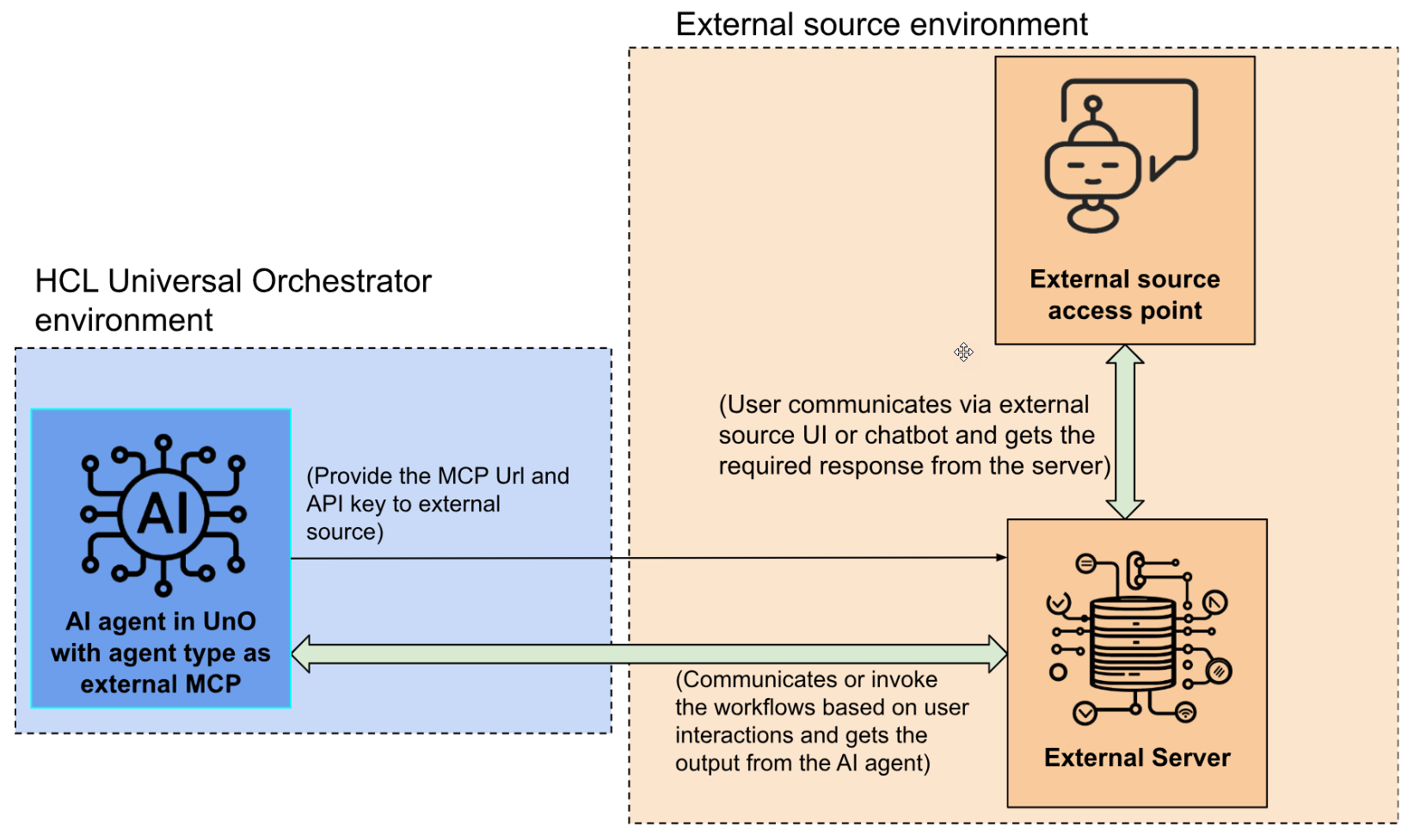
Figure 1. Flow of work for External MCP agent type
You can configure the AI agent to connect it with any external MCP server. This permits you to communicate with the HCL Universal Orchestrator resources via your chosen external source. You can access the external server through its entry points, such as a UI or a chat bot interface, which in turn can run job streams directly or invoke the necessary job streams in the universal orchestrator environment based on the user queries. The specific interaction method or access interfaces of the external source depends on its technical specifications.
To establish the connection between the external source and the HCL Universal Orchestrator environment, you need two key components:
  • External MCP server URL
    This URL is auto generated in the External MCP server URL field when you select the agent type as External (MCP) or Agentic AI Builder while creating an AI agent.
  • API key
    Create an API key with your Universal orchestrator account. For more information, see steps 1 and 2 described in Managing API Keys from the UI.
    Add the URL and the API key in the MCP source environment to create the connection. After the connection is established, the external MCP server can access the AI agent resources to manage the operations based on user inputs.