
Integrating HCL Discover and HCL CDP
From 12.2.0, you can integrate HCL Discover with HCL CDP. You can use this integration to send events fired in HCL Discover to HCL CDP with configurable attributes.
About this task
The HCL Discover - HCL CDP integration is established using the REST API-based approach to post data into HCL CDP. To consume the data, you do not have to create events in CDP. The integration approach ensures events created and fired in Discover to be posted to CDP. To integrate Discover and CDP, complete the following steps:
Procedure
-
Access HCL CDP and create a new Data Pipeline of source
type REST API.
CDP provides the following details that you must use to configure on Discover :
x-api-key
x-api-passkey
Source Id (mapped to writekey in Discover configuration)
Tenant id (in the url – mapped to srcid in Discover Configuration)
For more information, see HCL CDP documentation.
-
Access the config file DiscoverEventBus.cfg and add the
following lines within the CDP section:
OutputType=HCLCDP # HCL CDP config HCLCDPAPIUrl=https://crux.dev.hxcd.now.hclsoftware.cloud/v3/data srcid=<source ID from CDP> writekey=<WriteKey from CDP> #The loglevel can be changed to ERROR once implemented successfully. HCLCDPLogLevel=TRACE apikey=<API Key from CDP for the newly created REST API Data Source for Discover> apipasskey=<API pass Key from CDP for the newly created REST API Data Source for Discover> - Create Events in Discover.
- In Options, set Send to EventBus to YES for the created Event.
- Save the EventIDs in a text editor.
-
Configure the CEPCustomFields.cfg file and add a new
section [HCLCDP].
[HCLCDP]
Type=HCLCDP
#Session Level config
#vizid is required for HCLCDP - map to a Cookie ID
vizid=tltsid

#primaryidentifier - LoginID, etc - SessionAttribute
primaryidentifier=customvar0

#Event Level Config Format (dcxeventid, cdpeventname, type are REQUIRED)
#Event<x>=dcxeventid:<DiscoverEventId>,cdpeventname:<CDPEventName>,type=<track_type>,<cdpattributename1>:<discoverattributename1>,<cdpattributename2>:<discoverattributename2>
#Eg :
#Event1=dcxeventid:1668,cdpeventname:OrderTotal,type:track,ordervalue:CustomVar3
Map vizid to a CDP Cookie ID to uniquely identify an end-user in the Profiles. For example, _vizid cookie ID.
-
Assign the following highlighted fields in each Event Mapping (the highlighted
fields are reserved words and it has to be used as mentioned without
modifications):
Event<x>=dcxeventid:<DiscoverEventId>,cdpeventname:<CDPEventName>,type=<track_type>,<cdpattributename1>:<discoverattributename1>,<cdpattributename2>:<discoverattributename2>Note:track_type- accepts either of the following values: identify | track.- The
<cdpattributename1>:<discoverattributename1>pairs can be configured up to 100.
#Event1=dcxeventid:1668,cdpeventname:OrderTotal,type:track,ordervalue:CustomVar3Here, Discover Event ID is 1668. CDP receives it as
OrderTotalof typetrackand includeordervalueas an attribute. - Restart Canister Manager service.
-
Test by firing sample events and confirming that CDP has received it.
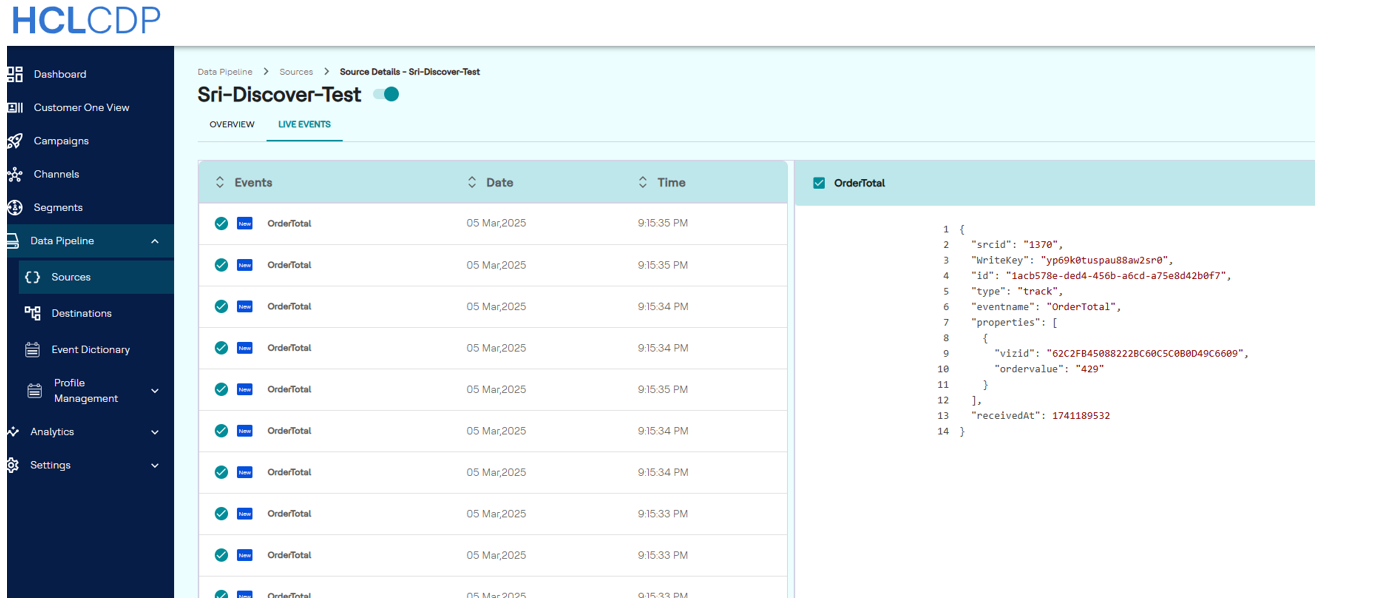 Note: Ensure that Discover Processing has a connection established with the CDP URL.