
Runtime properties files
- The runtime.properties file is used by ZIETrans in the runtime environment and in the local test environment running in Run on Server mode (for Web applications).
- The runtime-debug.properties file is used by ZIETrans in the local test environment in Debug on Server mode (for Web applications).
For more information about how to administer runtime settings for Web applications, see Administering problem determination components.
The runtime.properties and runtime-debug.properties files contain the following properties.
- adminPortNum
- The adminPortNum is the default value used by the ZIETrans administrative console when the management scope is to be changed. The port value must be an active WebSphere® BOOTSTRAP_ADDRESS port. The default is 2809, which is the default BOOTSTRAP_ADDRESS port of server1 for a WebSphere® base installation, or of the nodeagent server when you federate an application server node into a deployment manager cell.
- ioPatternKey (Web-only)
- One or more patterns specifying the Integration Objects
to be traced. See the description of trace.INTEGRATIONOBJECT below.
Each pattern can contain one or more wildcard (*) character. For example, IntegrationObject.Callup* specifies that tracing is enabled for all Integration Objects that start with the letters
Callup. To trace all Integration Objects, specify IntegrationObject.*If multiple patterns are specified, they should be delimited with commas.
- numLicenses
- Specifies the number of licenses you purchased.
ZIETrans tracks the number of
ZIETrans connections to host
resources and logs a message when the value exceeds the number of licenses purchased.
The value is an integer. There is no default. Valid values for Authorized User licenses are 1 - 50000. For Value Unit licenses, the value must be -1.
- licenseHardLimit
- An encrypted field containing ZIETrans licensing entitlement. Do not manually alter this field.
- licenseTracking
- Specifies whether ZIETrans records
license usage or not. The value is binary. The default is 0.
- 0
- ZIETrans does not record license usage.
- 1
- ZIETrans records license usage for all application servers in a node.
ZIETrans tracks the number of ZIETrans connections to host or database resources and
logs a message when the value exceeds the number of licenses purchased. The license
usage information is written to a file named licensex.txt
in the
logdirectory of the ZIETrans installation directory on the server, where the x is either 1 or 2.The maximum size of the license usage files is 512 KB. When the file size of the license1.txt file reaches 512 KB or if the ZIETrans server is restarted, the file is renamed to license2.txt, and a new license1.txt file is created. The new license1.txt file contains the most recent license usage information. When the new license1.txt reaches 512 KB and is renamed, the old license2.txt is deleted.
The license usage files contain the following information, arranged in rows, with each row representing one hour of operation. The values are separated by a space ( ).- Date
- Time
- The highest license count since the server was started
- The highest license count in the last hour (the maximum of the last 60 entries)
- The license count for each minute (1–60)
- licenseFile
- The name used as a template to generate names for the license files for license usage information. The default value for this property is license.txt.
- logFile
- The name used as a template to generate names for each set of application server files to which log messages are written. The default base name for a log file is messages.txt.
- logMask
- Certain macro errors cause an image of a host
screen (screen dump) to be placed into the ZIETrans log files.
Screen dumps are classified as INFO messages. To control which types of messages are placed in the ZIETrans log, use this setting. For example, if you do not wish to have screens appear in the ZIETrans log due to security concerns, set logMask=6 to prevent INFO messages (including screen dumps) from being placed in the log.
You cannot shut off ERROR messages with the logMask setting.
- 4
- Log ERROR messages
- 5
- Log ERROR and INFO messages
- 6
- Log ERROR and WARNING messages
- 7
- Log ERROR and WARNING and INFO messages
- maxLogFiles
- The maximum number of message files. The default is
2.
The base log file name in runtime.properties is used as a template to generate unique sets of message log files for each application server. The default base name for a log file can be changed in runtime.properties. The application server running ZIETrans is the concatenation of: the underscore (_) character, followed by the name of the ZIETrans instance, followed by another underscore (_) character.
The ZIETrans instance ID (for example _SSS_) is then appended to the base file name to generate the template for the log files for an application server. For the log file, this becomes messages _SSS_.txt. Finally, an index (1, 2, 3, and so on) is added to this name to distinguish multiple files. So, for example, if the ZIETrans instance ID is cell_node_server, the log file for the application server is named messages_cell_node_server_.txt. With multiple log files configured, the log file names for this application server are messages_cell_node_server_1.txt, messages_cell_node_server_2.txt, and so on.
When messages_cell_node_server_1.txt reaches maxLogFileSize, it is closed and renamed to messages_cell_node_server_2.txt. A new messages_cell_node_server_1.txt is opened.
When messages_cell_node_server_1.txt reaches maxLogFileSize again, previous log files are renamed—for example, messages_cell_node_server_2.txt is renamed to messages_cell_node_server_3.txt. Then messages_cell_node_server_1.txt is renamed to messages_cell_node_server_2.txt, and a new messages_cell_node_server_1.txt file is opened.
When the maxLogFiles number is exceeded, the oldest file is deleted.Note: When running on WebSphere® Application Server for z/OS®, the server portion of the log file name also includes the Address Space ID of the Servant which is writing to the log (example: messages_asid_1.txt). See Log and trace file names for details. - maxLogFileSize
- Specifies the maximum size, in kilobytes, that a message
log file reaches before an additional log file is opened.
The value is an integer. The default is 512 KB.
- traceFile
- The name used as a template to generate file names to which ZIETrans trace messages are written. The default base name for a trace file is trace.txt.
- maxTraceFiles
- The maximum number of trace information files. The
default is 5.
The base trace file name in server.properties is used as a template to generate unique sets of trace files for each application server. The default base name for a trace file can be changed in runtime.properties. The application server running ZIETrans is the concatenation of: the underscore (_) character, followed by the name of the ZIETrans server instance, followed by another underscore (_) character.
The ZIETrans server instance ID (for example _SSS_) is then appended to the base file name to generate the template for the trace files for an application server, which becomes trace _SSS_.txt. Finally, an index (1, 2, 3, and so on) is added to this name to distinguish multiple trace files. So, for example, if the ZIETrans server instance ID is cell_node_server, the trace file for the application server is named trace_cell_node_server_.txt. With multiple trace files configured, the trace file names for this application server are trace_cell_node_server_1.txt, trace_cell_node_server_2.txt, and so on.
When trace_cell_node_server_1.txt reaches maxTraceFileSize, it is closed and renamed to trace_cell_node_server_2.txt. A new trace_cell_node_server_1.txt is opened.
When trace_cell_node_server_1.txt reaches maxTraceFileSize again, previous trace files are renamed—for example, trace_cell_node_server_2.txt is renamed to trace_cell_node_server_3.txt. Then trace_cell_node_server_1.txt is renamed to trace_cell_node_server_2.txt, and a new trace_cell_node_server_1.txt file is opened.
When the maxTraceFiles number is exceeded, the oldest file is deleted.Note: When running on WebSphere® Application Server for z/OS®, the server portion of the trace file name also includes the Address Space ID of the Servant which is writing to the log (example: trace_asid_1.txt). See Log and trace file names for details. - maxTraceFileSize
- Specifies the maximum size, in kilobytes, that a trace
file reaches before an additional trace file is opened.
The value is an integer. The default is 10240 KB.
- traceLogDirectory
- Sets the directory to be used for writing log and trace output when the application EAR is deployed. If this keyword is not specified, or the value specified is not valid, the directory used is logs, and it placed under the EAR's installed directory. This value is only used when the EAR is deployed to an application server. It has no effect within the Toolkit environment.
- maxHODThreadManagerThreads
- Specifies the maximum number of threads that can be created in the Host On-Demand ThreadManager thread pool. You can specify a value between 10 and 10000. If you specify a value outside of this range, the setting is ignored and the default Host On-Demand value of 10000 is used.
- Configuring External Path for Runtime Properties File
During the creation of the ZIETrans project, the "runtime.properties" and "runtime-debug.properties" files are generated within the ear/war. The changes affect the runtime files inside the ear whenever modifications are made to the ZIETrans admin console. However, all previously set runtime properties are lost when the application is redeployed.
To address this issue, use an environment variable to specify the path for "runtime.properties" and "runtime-debug.properties" files outside ear/war. Users can set the external path using ZIETRANS_RUNTIME_CFG_ENV=C:/runtimeFiles.
If no environment variable is provided, the default runtime properties location continues to be used as before, depending on the runtime server.
Execute the following steps to configure an external path:- Create a ZIETrans project with the supported runtime server (WAS, Liberty, WebLogic, JBoss).
- Set ZIETRANS_RUNTIME_CFG_ENV as the environment variable and provide the
runtime path containing the runtime/ runtime-debug.properties
file.
Example: ZIETRANS_RUNTIME_CFG_ENV=C:/runtimeFiles
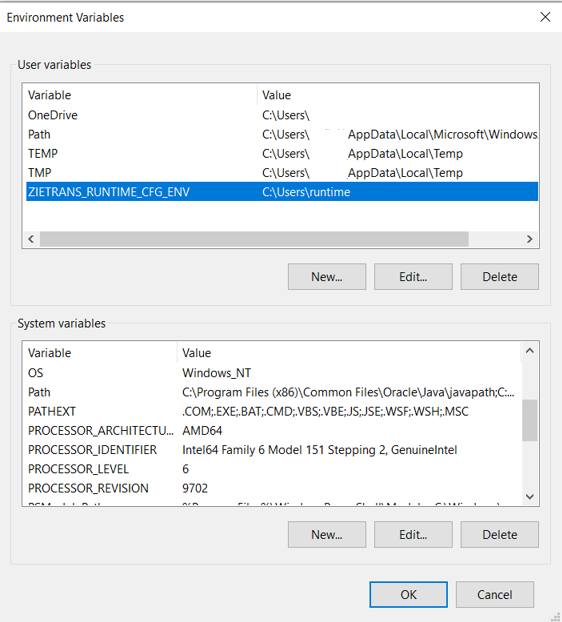
- Inside the ZIETRANS_RUNTIME_CFG_ENV path, the project context root must configure the runtime properties files. Multiple projects can be configured under the same path by context root.
- To avoid system restart, the user can set an environment variable at the application server level.
Note: Ensure that the files are placed as per the structure mentioned above. Otherwise, the runtime properties file will not be updated outside the ear/war file.- External Log Directory Configuration for ZIETrans applications
By default, application logs, including message logs, trace files, and host simulation traces, are stored within the deployment location. However, users have the flexibility to exert control over log locations. By configuring the environment variable 'ZIETRANS_LOG_ENV' to a valid path, users can direct logs to their desired directory, ensuring the ZIETrans runtime possesses the necessary write access."
Execute the following steps to save the log files outside the ear/war:- Set ZIETRANS_LOG_ENV as the environment variable and provide the desired location.
Example: ZIETRANS_LOG_ENV=D:/zietranslogs
- Create and run the ZIETrans project with the supported runtime server.
- Messages and Trace files will be saved under the following directory structure:
ZIETRANS_LOG_ENV\logs\Proj_Name\
Note: Here, Proj_Name is the context root of the deployed application.
- Hostsimulation trace files will be saved under the following directory structure:
ZIETRANS_LOG_ENV\logs\Proj_Name\hostsimulations\Note: Here, Proj_Name is the context root of the deployed application.
Note: Configuring environment variables at the application server level can eliminate the need for a system restart.- Set ZIETRANS_LOG_ENV as the environment variable and provide the desired location.