Customizing the workbench window toolbar
To demonstrate how the HostAccessActionBarAdvisor class
can be extended, the following steps show how
to add a toolbar item to the main coolbar area of the workbench window.
When clicked, a new instance of a specified ZIETrans rich client application
opens.
- Update the
HostAccessWorkbenchWindowAdvisor.preOpen()method to show the workbench window's coolbar area. This method has already been implemented, so you only need to add the call to thesetShowCoolBar(boolean)method:public void preWindowOpen() { ... configurer.setShowCoolBar(true); ... } - Add a new private member to the HostAccessActionBarAdvisor:
private LaunchApplicationAction launchAppAction; - Add code to the
HostAccessActionBarAdvisor.makeActions()method to create a new instance of the LaunchApplicationAction class. The constructor for this class takes two arguments:- The ID of the ZIETrans rich client application
- The IWorkbenchWindow object, which is passed into the
makeActions()method):protected void makeActions(final IWorkbenchWindow window) { ... launchAppAction = new LaunchApplicationAction("myPlugin", window); }
- Add or update the
ApplicationActionBarAdvsior.fillCoolBar()method to create a toolbar, add the new launcher action to the toolbar, and then add the toolbar to the coolbar:protected void fillCoolBar(ICoolBarManager coolBar) { // Create toolbar manager IToolBarManager mainToolbar = new ToolBarManager(SWT.FLAT | SWT.RIGHT); // Add the launch action to the toolbar manager mainToolbar.add(launchAppAction); // Add the main toolbar to the window coolbar coolBar.add(new ToolBarContributionItem(mainToolbar, "main")); } - Launch a new Eclipse workbench. You should have a new toolbar item that, when clicked, will open a new instance of the transformation view associated with this plug-in.
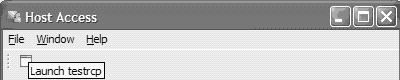
Note: You can change both the default image and text displayed
for the launch action by calling the
setText() and setImageDescriptor() methods
on the launchAppAction object. See the Eclipse API for the org.eclipse.jface.action.Action class for more
information.