As an example, this chapter uses a scenario from a macro. This
macro contains only two macro screens, Screen1 and Screen2.
The scenario begins at the point at which the macro runtime has
performed all the actions in Screen1 and is ready to search for the
next macro screen to be processed.
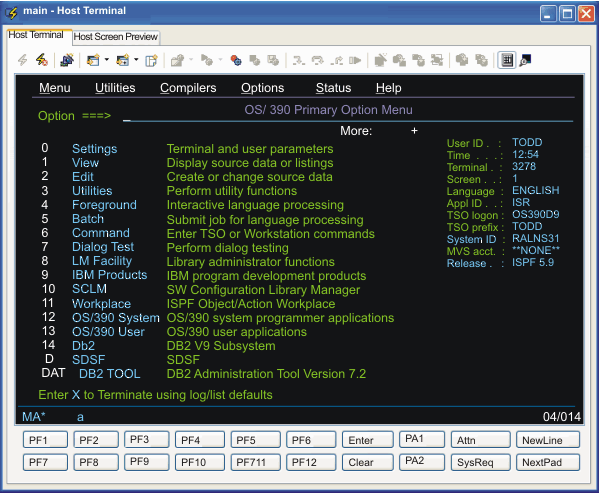
Screen1 is the macro screen that handles the OS/390® ISPF Primary Option
Menu (see The OS/390 ISPF Primary Option Menu).
Figure 1. The OS/390® ISPF Primary Option Menu
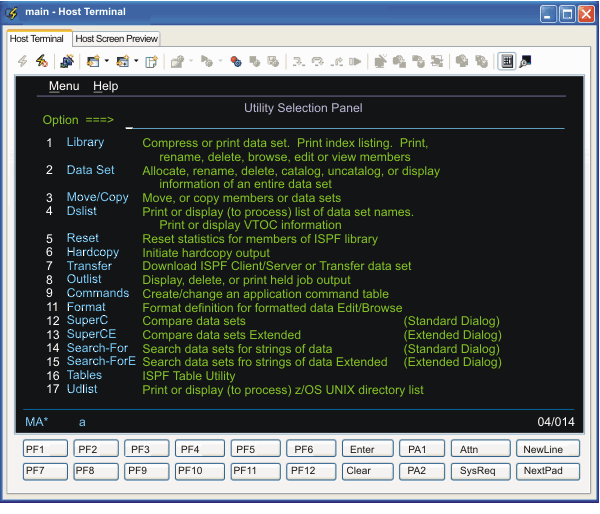
XML element contained in <screen>
element Screen2:
Contents of XML element:
<description>
Descriptors:
The input inhibited indicator is cleared (input is not inhibited).
There are 80 fields.
There are 3 input fields.
<actions>
Actions (the host application positions the
text cursor in the correct input field):
Type '4[enter]'.
<nextscreens>
Names of macro screens that can validly occur
after this macro screen:
(None. This is the last macro screen in the macro.)
Have feedback?
Google Analytics is used to store comments and ratings. To provide a comment or rating for a topic, click Accept All Cookies or Allow All in Cookie Preferences in the footer of this page.