Recovering from a system failure on the local site
You might want to replicate the configuration that you set on your local site system also on the remote site. Then, if a system failure occurs on your local site, your workload schedule can continue to run on the remote site.
To replicate your local site system configuration on the remote site, specify a remote alternate workstation for each workstation that exists locally. Configuring the local site and remote site in the same way shows a local site system whose configuration is replicated on the remote site.
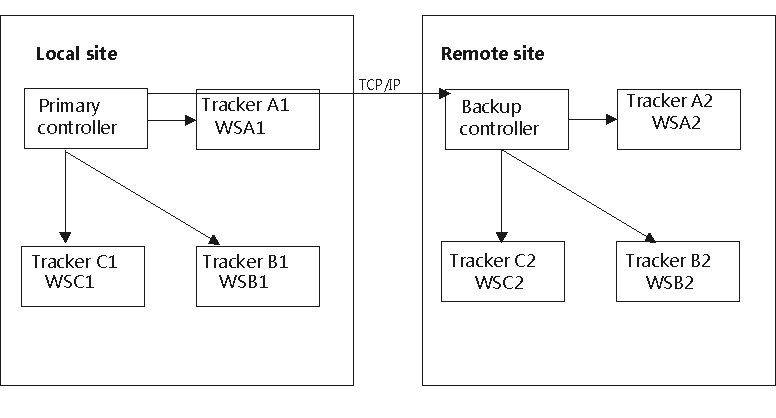
In this configuration:
- You defined the alternate workstations as follows:
- On WSA1 you defined WSA2 as the alternate workstation, on WSA2 you defined WSB1 as the alternate workstation.
- On WSB1 you defined WSB2 as the alternate workstation, on WSB2 you defined WSC1 as the alternate workstation.
- On WSC1 you defined WSC2 as the alternate workstation, on WSC2 you defined WSA1 as the alternate workstation.
- When the system on the local site is up and running
- If WSA1 is down, the work is redirected to WSB1.
- If WSB1 is down, the work is redirected to WSC1.
- If WSC1 is down, the work is redirected to WSA1.
- If the system on the local site fails and the backup controller takes over from the primary controller
- The work that was scheduled to run on WSA1 is redirected to WSA2.
- The work that was scheduled to run on WSB1 is redirected to WSB2.
- The work that was scheduled to run on WSC1 is redirected to WSC2.