z-Centric agent gateway installation examples
The following scenarios describe how to configure a local or remote gateway on z-centric workstations that reside in the same or different network zones. You are also provided with the twsinst script syntax to install the z-centric agents that support the scenarios.
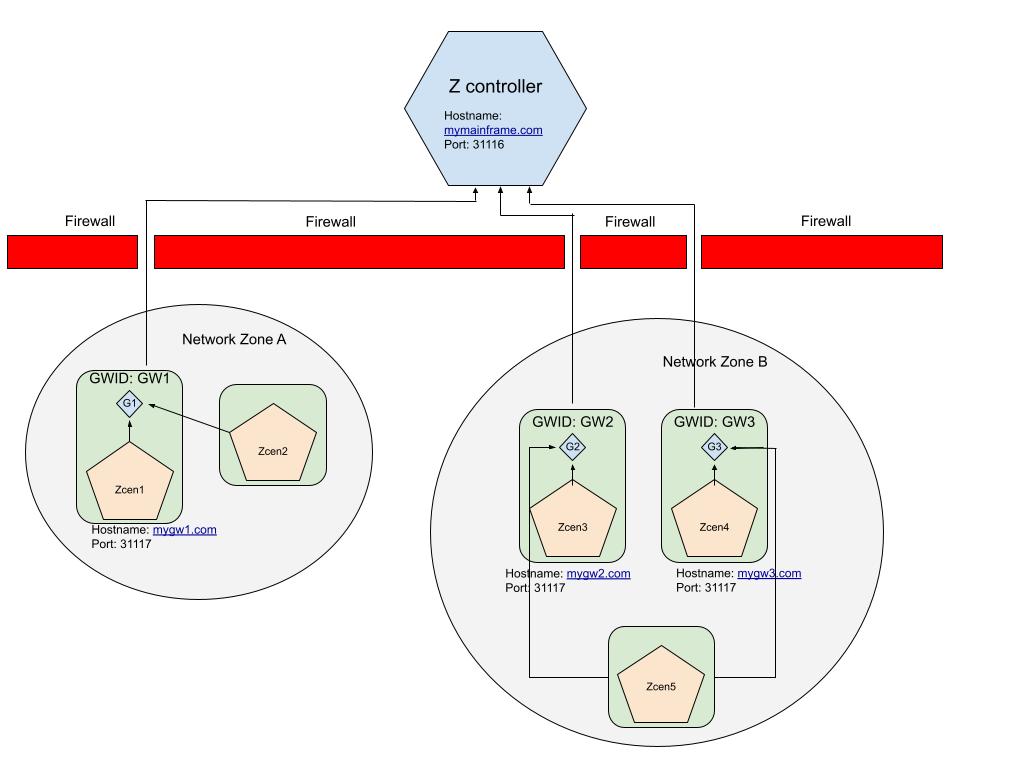
Scenario 1: Same network zone
The workstations where you install the z-centric agents named Zcen1 and Zcen2 can communicate with each other and are located in the same network zone, but only one agent workstation (Zcen1) can connect to the Z controller.
| z-centric agent workstation | twsinst syntax |
|---|---|
| Zcen1 |
|
| Zcen2 |
|
- Zcen1
-
- -gateway local
- The gateway through which Zcen1 communicates with the Z controller is local to the agent.
- -gwid GW1
- Name that identifies the gateway site on Zcen1. In this scenario, GW1 (the default value).
- -tdwbport 31116
- Port number of the Z controller to which Zcen1 is registering. It must be coincident with the port that you specified in either the HTTPPORTNUMBER or SSLPORT parameter of the HTTPOPTS statement.
- -tdwbhostname mymainframe.com
- The fully qualified host name or IP address of the Z controller to which Zcen1 is registering.
- Zcen2
-
- -gateway remote
- The gateway through which Zcen2 can connect to the Z controller is installed on a different agent, in this scenario is Zcen1.
- -tdwbport 31117
- The port number of the z-centric agent workstation where the gateway resides. In this scenario, the port number of Zcen1 is 31117.
- -tdwbhostname mygw1.com
- The fully qualified host name of the z-centric agent workstation where the gateway resides on Zcen1 and to which Zcen2 connects.
Scenario 2: Different network zones
The workstations where you install the z-centric agents cannot communicate with each other and are in different network zones (Network Zone A and Network Zone B). However, one agent workstation in each network zone can successfully connect to the Z controller. In Network Zone B, two parallel gateways are configured.
| z-centric agent workstation | twsinst syntax |
|---|---|
| Zcen3 |
|
| Zcen4 |
|
| Zcen5 |
|
- Zcen 3
-
- -gateway local
- Indicates that Zcen 3 can communicate with the Z controllerdirectly, and a gateway is installed on Zcen 3 to route the communications from the z-centric agent workstations that cannot directly communicate with the controller.
- -gwid GW3
- The name that identifies the gateway on Zcen3. Gateways with the same
gateway_id can mutually take over in routing communications
to the agents connected to them. Specify a different
gateway_id if the gateways do not communicate with each
other. In addition, you can configure the two gateways in parallel to take over routing communications from the agents connected to them, should one of the gateways become unavailable. Edit the JobManagerGW.ini file on Zcen3 and set the JobManagerGWURIs property as follows:
JobManagerGWURIs = https://mygw2.com:31118/ita/JobManagerGW/ JobManagerRESTWeb/JobScheduler/resource,https://mygw3.com: 31118/ita/JobManagerGW/JobManagerRESTWeb/JobScheduler/resource - -tdwbport 31116
- The port number of the Z controller.
- -tdwbhostname mymainframe.com
- The fully qualified host name of the Z controller.
- Zcen 4
-
- -gateway local
- Indicates that Zcen4 can communicate with the Z controller directly, and a gateway is installed on Zcen4 to route communications from the z-centric agent workstations that cannot directly communicate with the controller (in this scenario, Zcen 5).
- -gwid GWADMIN
- The name that identifies the gateway site on Zcen4. Gateways with the same
gateway_id can mutually take over in routing communications
to the agents connected to them. Specify a different
gateway_id if the gateways do not communicate with each
other. In addition, you can configure the two gateways in parallel to take over routing communications from the agents connected to them, should one of the gateways become unavailable. Edit the JobManagerGW.ini file on Dynamic agent 4 and set the JobManagerGWURIs property as follows:
JobManagerGWURIs = https://mygw2.com:31118/ita/JobManagerGW/ JobManagerRESTWeb/JobScheduler/resource,https://mygw3.com: 31118/ita/JobManagerGW/JobManagerRESTWeb/JobScheduler/resource - -tdwbport 31116
- The port number of the Z controller.
- -tdwbhostname mymainframe.com
- The fully qualified host name of the Z controller.
- Zcen5
-
- -gateway remote
- The gateway through which Zcen5 connects to the Z controller is installed on a different agent, in this scenario Zcen4.
- -tdwbport 31118
- The port number of the z-centric agent workstation where the gateway resides. In this scenario, the port number of Zcen4 is 31118.
- -tdwbhostname mygw3.com
- The fully qualified host name of the z-centric agent workstation where the gateway resides and to which the agent connects.
For details about configuring the z-centric agent communication through a gateway, see the ROUTOPTS statement.