Specifying local variables and passwords in the job definitions
After defining a variable and its value with the
param command,
to add it within a job definition so that it is resolved locally on
the agent at runtime, use the following syntax:${agent:variable_name}After defining a password with the
param command,
to add it within a job definition so that it is resolved locally on
the agent at runtime, use the following syntax:${agent:password.user_name}You
can nest variables within passwords. If you used a variable to define
a user, enter the password as follows within the job definition:
${agent:password.${agent:variable_name}} param command.An HCL Workload Automation administrator needs to
define a file transfer job that downloads a file from a remote server to one of the dynamic agents
making up a pool of agents. The administrator wants to parametrize in the job definition:
- The name with which the remote file will be saved locally
- The remote user name and its password
The administrator proceeds in the following way on one
of the agents:
- Defines a variable named
localfile. The variable is given a value equal to./npp.5.1.1.Installer.DW.exeand is created in a new variables file namedFTPvars(no section). The command to do this is:E:\IBM\TWA\TWS\CLI\bin>param -c FTPvars..localfile ./npp.5.1.1.Installer.DW.exe - Defines a variable named
remoteUser. The variable is given a value equal toFTPuserand is created in theFTPvarsfile (no section). The command to do this is:E:\HCL\TWA\TWS\CLI\bin>param -c FTPvars..remoteUser FTPuser - Defines the password for
FTPuser. The password value istdwb8nxtand is created in thepasswordsection of theFTPvarsfile. The command to do this is:E:\HCL\TWA\TWS\CLI\bin>param -c FTPvars.password.FTPuser tdwb8nxt - With a text editor opens file
and checks its contents:E:\HCL\TWA\TWS\ITA\cpa\config\jm_variables_files\FTPvarslocalfile = ./npp.5.1.1.Installer.DW.exe remoteuser = FTPuser [password] FTPuser = {aes}XMMYMY2zBHvDEDBo5DdZVmwOJao60pX1K6x2HhRcovA= - Copies file
FTPvarsin the agent_installation_path\TWA\TWS\ITA\cpa\config\jm_variables_files> path of every other agent defined in the pool. - Starts defining the new file transfer job in the Workload Designer
panel of Dynamic Workload Console.
In the
FileTransferwindow:- Enters
${agent:FTPvars..localfile}in theLocal filefield. - Enters
${agent:FTPvars..remoteuser}in theRemote Credentials→User Namefield. - Clicks the
...button next to theRemote Credentials→Passwordfield. ThePassword typewindow pops up and the administrator selectsAgent User.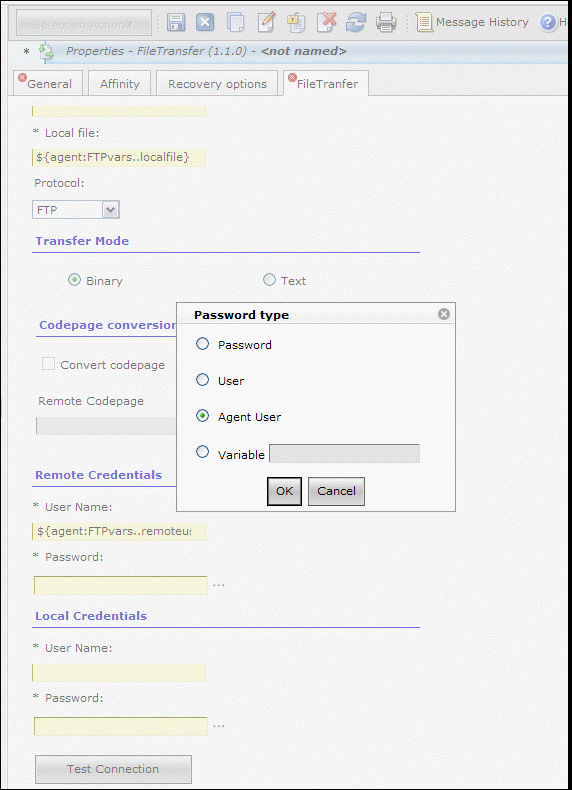
- After the administrator clicks the
OKbutton for confirmation in the popup window, theRemote Credentials→Passwordfield is filled with the${agent:password.${agent:FTPvars..remoteuser}}value.
- Enters
- Fills in all the other fields to complete the job definition.
FTPvars file.