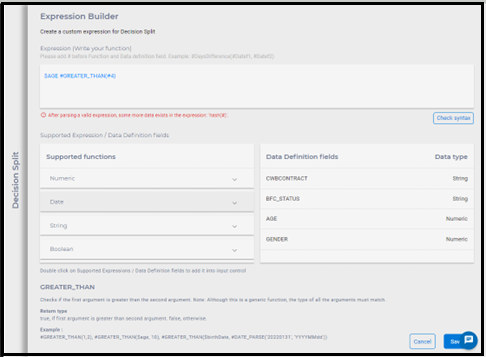
Decision Split supports custom macro building through expression builder
A complex expression builder allows users to create complex expressions by combining simple expressions and functions. The enhanced expression builder is designed to help the user to create complex custom expressions easily. The Expression builder will allow the user to design the matching criteria for the Decision split. It can be used to build a simple to complex nested set of criteria. Some quick wins when you use expression builders may be:
- Calculations on data: Use complex expressions to filter a dataset to only include where the value of a certain column is greater than a certain value.
- Calculations on numeric, date data: Use complex expressions to calculate the greater than the value of a column or to identify the different age values in a column.
- Calculations over boolean and string data: Use complex expressions to find and
execute the journey path only if the name from a column that contains a specific
keyword like JOE is available.Following are the supported expressions and data types that expression builder supports:
Numeric Date String Boolean - GREATER_THAN
- LESS_THAN
- IN
- NOT_IN
- EQUALS
- NOT_EQUALS
- IS_NULL
- IS_NOT_NULL
- GREATER_THAN_EQUALS
- LESS_THAN_EQUALS
- TO_NUMBER
- TO_STRING
- NOT_BETWEEN
- BETWEEN
- MULT
- SUBSTRACT
- DIVIDE
- SUM
- GREATER_THAN
- LESS_THAN
- IN
- EQUALS
- NOT_EQUALS
- IS_NULL
- IS_NOT_NULL
- GREATER_THAN_EQUALS
- LESS_THAN_EQUALS
- TO_DATE
- DATEDD
- CURRENT_DATE
- DATE_FORMAT
- DATE_PARSE
- DATE_DAYDIFF
- CURRENT_DAY
- CURRENT_MONTH
- CURRENT_YEAR
- CURRENT_WEEK
- CURRENT_DAYOFTHEWEEK
- IN
- NOT_IN
- EQUALS
- NOT_EQUALS
- IS_NULL
- IS_NOT_NULL
- TO_NUMBER
- STRING_UPPER
- STARTS_WITH
- ENDS_WITH
- STRING_CONTAINS
- TO_STRING
- STRING_LENGTH
- STRING_CONCAT
- STRING_LOCATE
- STRING_SUBSTR
- STRING_LOWER
- STRING_REPLACE
- IF
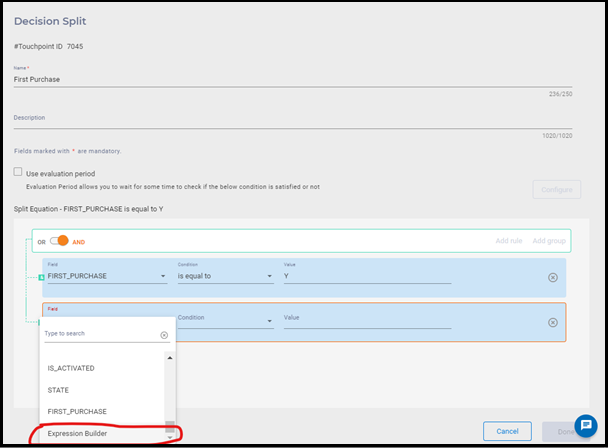
User can find/access expression builder on Decision Split screen. Select Expression Builder option from Field dropdown.
Expression Builder page appears. Set the required values in the respective fields and click on Save.