
Setting up multiple partitions for the Unica Interact environment
In the Unica Campaign family of products, partitions provide a way to secure the data that is associated with different groups of users. You can create multiple partitions only for the Interact design time and Interact Runtime environments.
About this task
You can create multiple partitions to use with Unica Campaign, the Interact design time environment, and Interact Runtime environment. You can use partitions to configure Unica Interact and Unica Campaign so that different groups of users have access to different sets of Unica Interact and Unica Campaign data.
If you set up multiple partitions with Unica Campaign, you set up multiple partitions for Interact. You must configure each partition in the design time environment to communicate with a separate Unica Interact runtime environment, including separate Unica Platform and runtime tables. You can also configure the corresponding Unica Interact Design time partition to communicate with the Unica Interact Runtime environment with multi-partition support. There will be a mechanism to initialize specific partitions in the Unica Interact Runtime instance.
Example:
Runtime Instance-A can initialize only partition1.
Runtime Instance-B can initialize both partition1 and partition2.
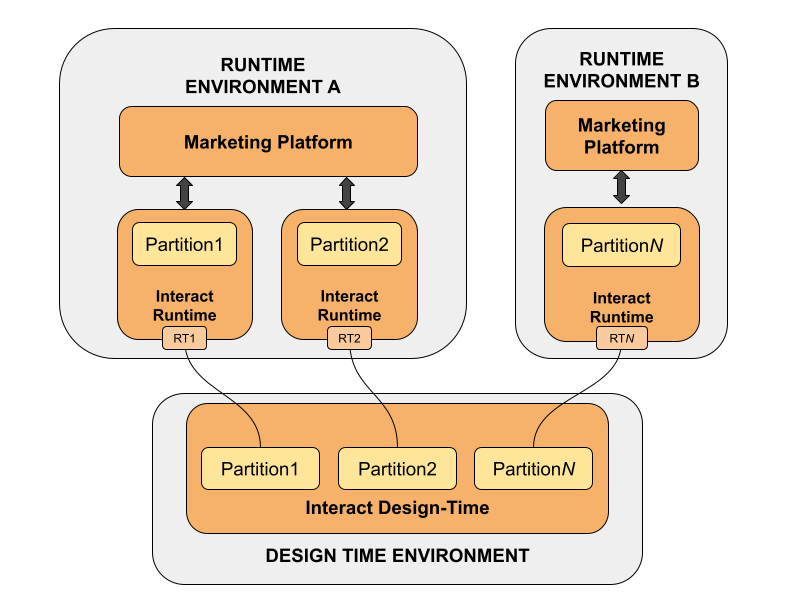
Setting up multiple partitions for the UnicaInteract design time environment
Procedure
- You must manually enable Unica Interact for each partition by setting the interactInstalled configuration property in the to yes.
-
Complete the following configuration steps for each partition:
- Configure the test run data source
- Add server groups
- Select a server group for interactive flowchart test runs
- Configure the contact and response history module
Setting up multiple partitions for the UnicaInteract Runtime environment
Procedure
-
Configure the all the data-sources.
- systemTablesDataSource
- prodUserDataSource
- testRunDataSource
- learningTablesDataSource
- contactAndResponseHistoryDataSource
- Configure Audience Levels.
- Configure the triggered messages and activity orchestrator module (Optional).