
Solution
- Open HCL IEM Web URL and login with Admin credentials.
- Create merge two Entities in Entity.
- Click the customer onboard section, for customers click on the customer action edit section. Click on the Entity page, click +New Entity.
- Click on the check boxes next to the entities to be merged. Like while deleting, as entities are selected, all icons in the footer will be enabled.
- Click on the Merge icon.
Figure 1. Merge Entities 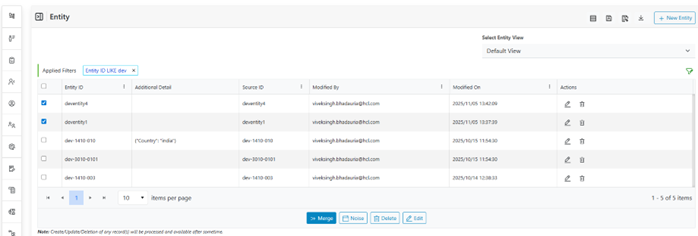
- A pop up appears with the names of all selected entities appearing in the dropdown.
- Select the name which will be primarily used for identifying these selected entities. For this example, parse, let me choose “myappname”.
- Click Submit, a confirmation box will be displayed.
- Click Close and refresh the grid. All the entities, entity ID field will start
appearing the same.Note:
Source entity field is not changed, just the entity name changes to the referenced entity name.