Creation of a Node
- Information Node: Information node contains information and does not execute. Go to
Netbot Troubleshooting à Manage DAG. Click on New. Select the Detection Procedure as
‘information’ and fill in all the details. Click Ok.
Figure 1. DAG - Create Information Node 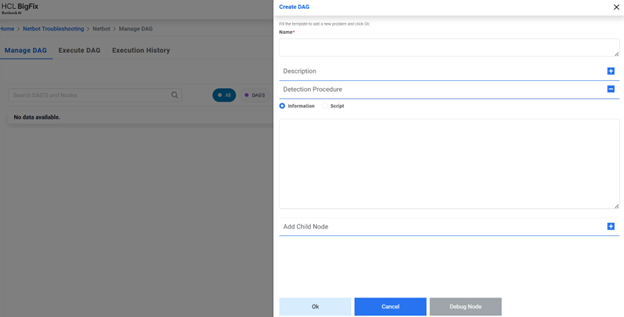
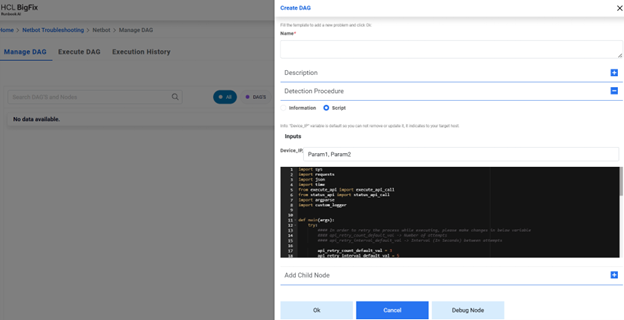
- Script Node: Script node contains python script and related parameters that execute
by API. Go to Netbot Troubleshooting, then Manage DAG. Click on New. Select the Detection
Procedure as ‘Script’ and fill in all the details. By default, a script is populated on the
screen. If the command to be executed needs to be changed, then in the already defined
script, search for “command_to_execute” and update its value to the command that you want to
execute.
Eg: payload = {"extra_vars": {"command_to_execute": "<Command to execute>", "target_host": target_host}}
If the command needs to have some parameters, then define those parameters (comma separated) under ‘Inputs’ field along with Device_IP.
Figure 2. DAG - Define Parameters 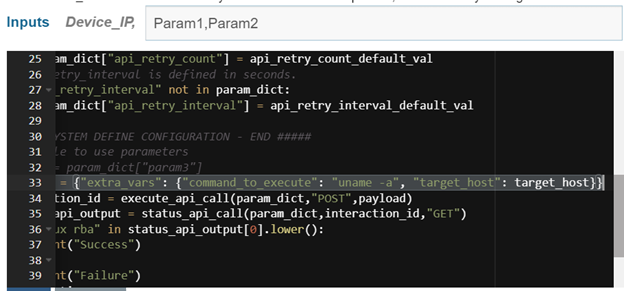
Figure 3. DAG - Create Script Node