Write the Size function to always return
a different value as a bounding box expands or shrinks by the addition
or removal of objects inside it. This means that you should add a
compensating factor when calculating the size to take care of degenerate
bounding boxes. A degenerate bounding box is one that
has one or more sides of 0 length.
Assume your data is in a
two-dimensional space and you decide to use a simple length times width calculation
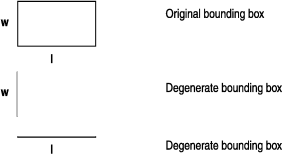
to compute the size of a bounding box. If the width of the bounding
box subsequently shrinks to 0, then the size of the bounding box is
0. However, if it was the length of the original bounding box that
shrunk to 0, then the size would also be 0, breaking the rule that
different bounding boxes return different sizes. The following figure
describes this situation. Figure 1. Size calculation of degenerate bounding boxes
In this situation, a better formula for calculating the
size of a bounding box would be:
(length times width) plus (length plus width)
This
formula for the Size function always returns a
larger value if the box changes by the inclusion of a new item and
returns a smaller value if it shrinks because something inside was
removed.