Customer One View Settings
Use the Customer One View settings page to map property names to profile attributes, enabling a consolidated view of customer data within the HCL CDP platform.
Overview
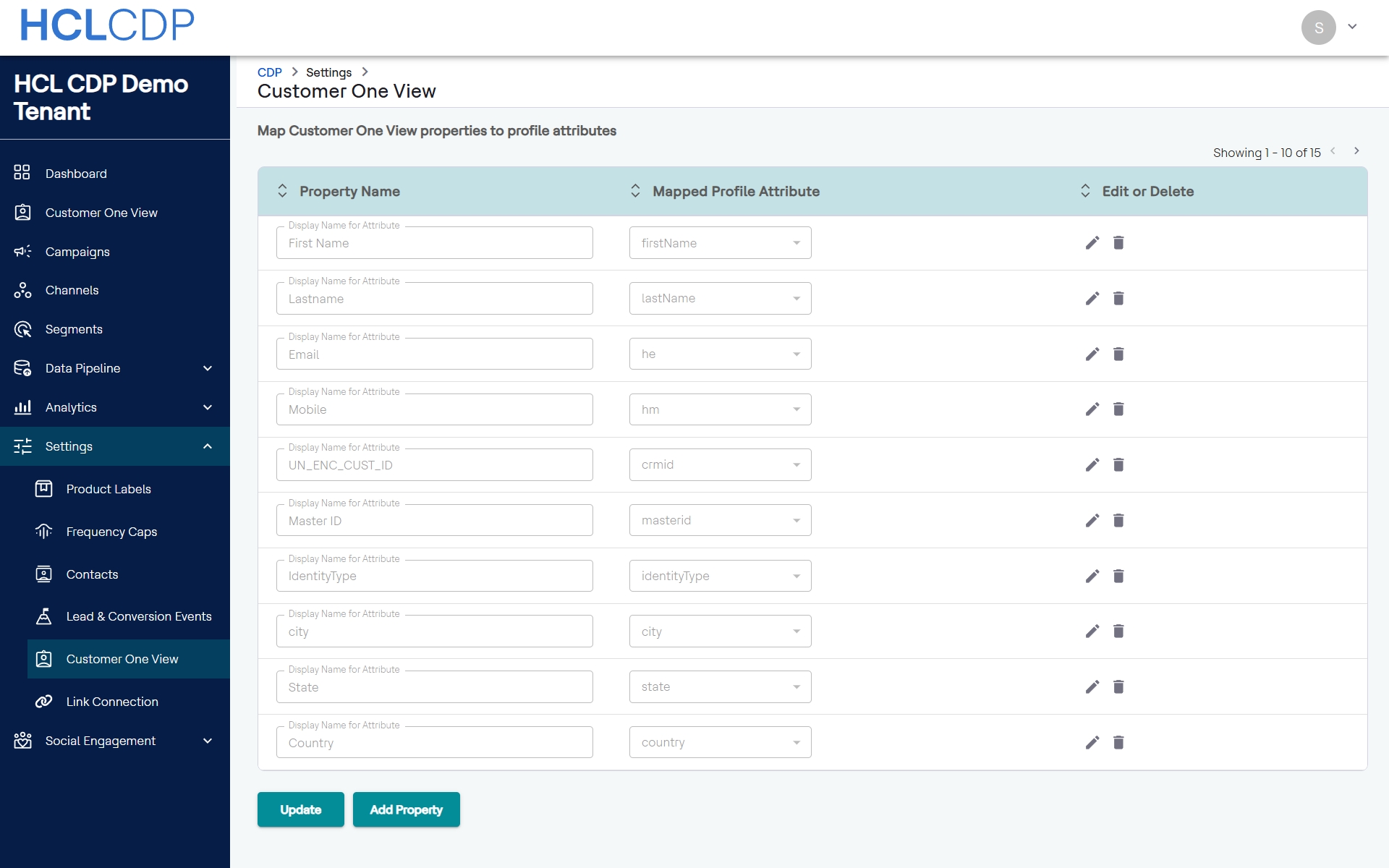
The Customer One View configuration page under the Settings menu allows you to define and manage how specific attribute data is labeled and mapped across your tenant profile. This ensures consistency when customer properties are visualized or analyzed across different dashboards and pipelines.
Mapped Profile Attributes Table
The main interface displays a data grid containing existing mappings.
Page Actions
The following buttons control the state of the configuration grid:
- Update: Saves any modifications made directly to the inline properties list.
- Add Property: Opens the Add Property modal dialog box to append a new record mapping to the system.
Add Property Modal Dialog Box
Clicking the Add Property button displays an overlay dialog box containing the following configuration fields:
- Display Name for Attribute
- A text entry field where you specify the human-readable label for the property as it will appear in the system UI panels.
- Profile Attributes
- A drop-down selection menu used to bind the custom display name to a core backend profile attribute field.
- Save Button
- Commits the new property pair mapping and closes the modal view.