Tell daosmgr commands for tier 2 storage
The following tell daosmgr commands are available for DAOS tier 2
storage.
About this task
| Command | Description |
|---|---|
| tell daosmgr S3 storecred <filename> |
Stores S3 credentials specified in <filename> in a Domino® credential store. For example: tell daosmgr S3 storecred dominocred.txt |
| tell daosmgr S3 deletecred <named credential> | Deletes S3 named credentials from a Domino® credential store. For example: tell daosmgr S3 deletecred dominocos |
| tell daosmgr S3 show | Shows S3 named credentials in the credential store. |
| tell daosmgr objectinfo <scope> -prefix <string> -olderthan <days> | Shows information about attachment objects, where:
Note: When scope is all, tier1, or tier2,
output is sent to the file objectinfo.txt in the Domino data directory rather
to the console due to the length of output. Use the -o <filename> option to
give the file a different name or location. For
example: |
tell daosmgr objectinfo all produces output similar to the
following: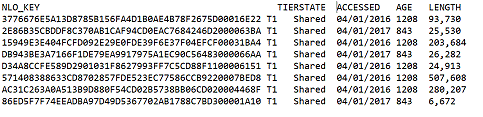
Additional
tell daosmgr objectinfo command examples:tell daosmgr objectinfo all -prefix abshows information for all attachment objects with an NLO key that starts with the stringab.tell daosmgr objectinfo all -prefix ab -olderthan 10shows information for all attachment objects with an NLO key that starts with the stringaband that are more than 10 days old.tell daosmgr objectinfo tier2 -olderthan 250shows information for attachments objects in S3 storage that are more than 250 days old.