

Framework
The framework is the structure of the page that data sits in.
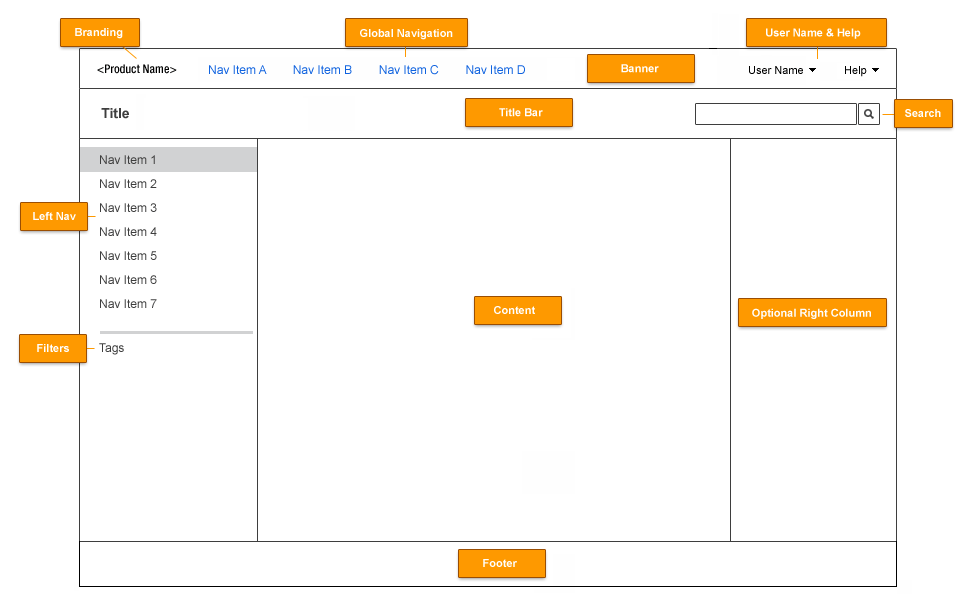
Classes
| class | component | notes |
|---|---|---|
| lotusFrame | container "frame" | This wraps the entire page and gives us more flexibility with our layout. Additional layout classes can share this DOM node like lotusFluid or lotusFixed for fluid or fixed-width layouts. |
| lotusBanner | banner | This is the part of the UI the customer can customize. Contains primary navigation. |
| lotusBannerExt | below banner | Contains the optional breadcrumb. |
| lotusTitleBar2 | title bar | Contains secondary navigation and search. |
| lotusTitleBarExt | below title bar | Contains action links. |
| lotusMain | main area | This contains the main data in one or more columns. It is a wrapping div for the columns. |
| lotusColLeft | navigation area | Contains tertiary navigation (menu, filters). |
| lotusColRight | sidebar | Contains extra information pertinant to the page you are on (lists). |
| lotusContent | content | Contains the main data for the page. |
| lotusFooter | footer | Contains relevant links for the page. |
| lotusLegal | legal information | If this is on the page, it sits under the footer. |
Basic Implementation
The outermost div is the lotusFrame. Inside it you'll find the following, in the following order: banner, extended banner for the breadcrumb, title bar, extended title bar for the action links, main area, footer, and legal information (optional).
Within the main area, the following divs appear in this order: lotusLeftCol, lotusRightCol, lotusContent. On screen they appear as left column, content, right column.
Variations
You can leave the left and right columns in place with no data to keep the space they occupy free, or you can remove them. The center column is always there.
See individual components for more information.
Examples
- Three columns, summary view
- Three columns, with sections
- Two columns, grid view
- Two columns, detail view
- One column (the width is controlled by css, not by leaving an empty right column)
See a template to understand how to construct a page. Additionally, read the information on the pages listed in the See also section below.
The page was initially layed out using ids rather than classes (because each part of the page structure was unique. This has caused some issues, programmatically, so we have switched to using classes. Please use classes moving forward, because the ids are obsolete.
1/24/11: The place bar was removed and action buttons were added to the title bar.
September 2011: An optional breadcrumb was added between the banner and title bar. Action buttons were moved to action links that are below the title bar.