
Documents quick reference
The following tables help you discover or remember how to do certain document tasks.
| How Do I... | Action |
|---|---|
| Change the zoom size? | Click the Zoom icon  on the toolbar. on the toolbar. |
| Show or hide the formatting marks? | Click . |
| Change the font size? | Select the text, and click the Select
Font Size icon  on the toolbar. on the toolbar. |
| Change the font color? | Select the text and click the Set
Font Color icon  on the toolbar. on the toolbar. |
| Highlight text with color? | Select the text and click the Set
Highlight Color icon  on the toolbar. on the toolbar. |
| Change the indentation of text? | Select the text that you want to indent and
click the Increase Indent icon  or Decrease Indent icon or Decrease Indent icon  on the toolbar. on the toolbar. |
| Change the line spacing? | Select the text that you want to change the line spacing, click , and select the line spacing that you want. |
| Align text? | Select the text that you want to align and click
the alignment icon. 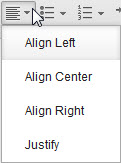 on the toolbar.
Select the alignment that you want from the list. on the toolbar.
Select the alignment that you want from the list. |
| Apply a heading style to text? | Select the text to which you want to apply heading style and click . Then, select the heading style that you want. |
| Add numbering and bullets to text? | To add numbering, click the Add Numbering
or Change Numbering Style icon  on the toolbar. To add bullets,
click the Add Bullets or Change Bullet Style icon on the toolbar. To add bullets,
click the Add Bullets or Change Bullet Style icon  on the toolbar. on the toolbar. |
| Return to normal paragraph formatting after a bulleted or numbered list? | Press Enter twice. |
| Create a document header or footer? | Click or . |
| Copy formatting from selected text and apply to other text? | Select the text, click the Copy Formatting icon  , and select the target text. , and select the target text. |
| Remove formatting? | Click . |
| Insert date and time in text? | Click . |
| Insert a link in text? | Click . |
| Insert section breaks? | Click . |
| Insert page breaks? | Click . |
| Insert special characters? | Click . |
| Spell check text? | Click . |
| Add a table of contents? | Click to apply a heading style to each heading, click where you want to add the table of contents, and then click . |
| Edit a table of contents? | Change the headings in the document, right-click the table of contents, and click Update. |
| Remove a table of contents? | Right-click the table of contents, and click Delete. |
| How Do I... | Action |
|---|---|
| Create a table? | To create a simple table, click . To create a table with predefined styles, click . |
| Add or delete a row in a table? | Click the row and click the arrow on the Insert
or Delete Row icon  on the toolbar, and then
select an option. on the toolbar, and then
select an option. |
| Add or delete a column in a table? | Click the column and click the arrow on the Insert
or Delete Column icon  on the toolbar, and
then select an option. on the toolbar, and
then select an option. |
| Change column width? | Hover over the column boundary until it becomes a resize pointer. Drag the boundary to the new location. |
| Change row height? | Hover over the row boundary until it becomes a resize pointer. Drag the boundary to the new location. |
| Resize an entire table? | Hover over the end of the table until the resize
handle and a double-sided arrow  displays.
Drag the table to the size that you want. displays.
Drag the table to the size that you want. |
| Merge cells? | Select the cells that you want to merge, right-click, and then select . |
| Split a cell? | Right-click the cell, select , and enter the number of rows and columns to split the cell into. |
| Set background colors for the cells? | Select the cells, right-click, select , and select a color from the panel. If you want more colors, click More Colors. |
| How Do I... | Action |
|---|---|
| Insert an image? | Click . |
| Set image properties such as image width, height, and alternative text? | Right-click the image and click Image Properties. |
| Quickly change the image size? | Hover over the end of the image until the resize
handle and a double-sided arrow displays.
Drag the image to the size that you want. The aspect ratio is not
preserved. |
| How Do I... | Action |
|---|---|
| Hide co-editing highlights in a document? | Click . |
| Share the current document with others as editors? | Click . |
| Make updates available to people that you shared with as readers | Make sure is selected, or click . |
| Add a comment? | Place the cursor where you want to add a comment and click . |