IQ limitations
This page lists the known limitations of IQ.
User interface
Websocket connectivity
- Experiencing network disruptions, reloading the page, or closing the browser window during active operations can cause incomplete or inconsistent data because background MCP server processes might not terminate immediately. To safely stop an operation, click Cancel. If a process is interrupted, you can use the chat feature to correct or revert any partial changes.
Conversation history
- Conversation history is not available in the user interface.
- Resetting a session or closing the interface permanently clears the active context. Conversations cannot be recovered.
- Exporting and reviewing previous conversations are not supported.
Localization
- The UI displays text in English only. Non-English locales display the UI text in English.
Input and output
- The interface supports text input only. Rich text, file attachments, images, and documents are not supported.
- Voice input and text-to-speech are not supported.
Accessibility
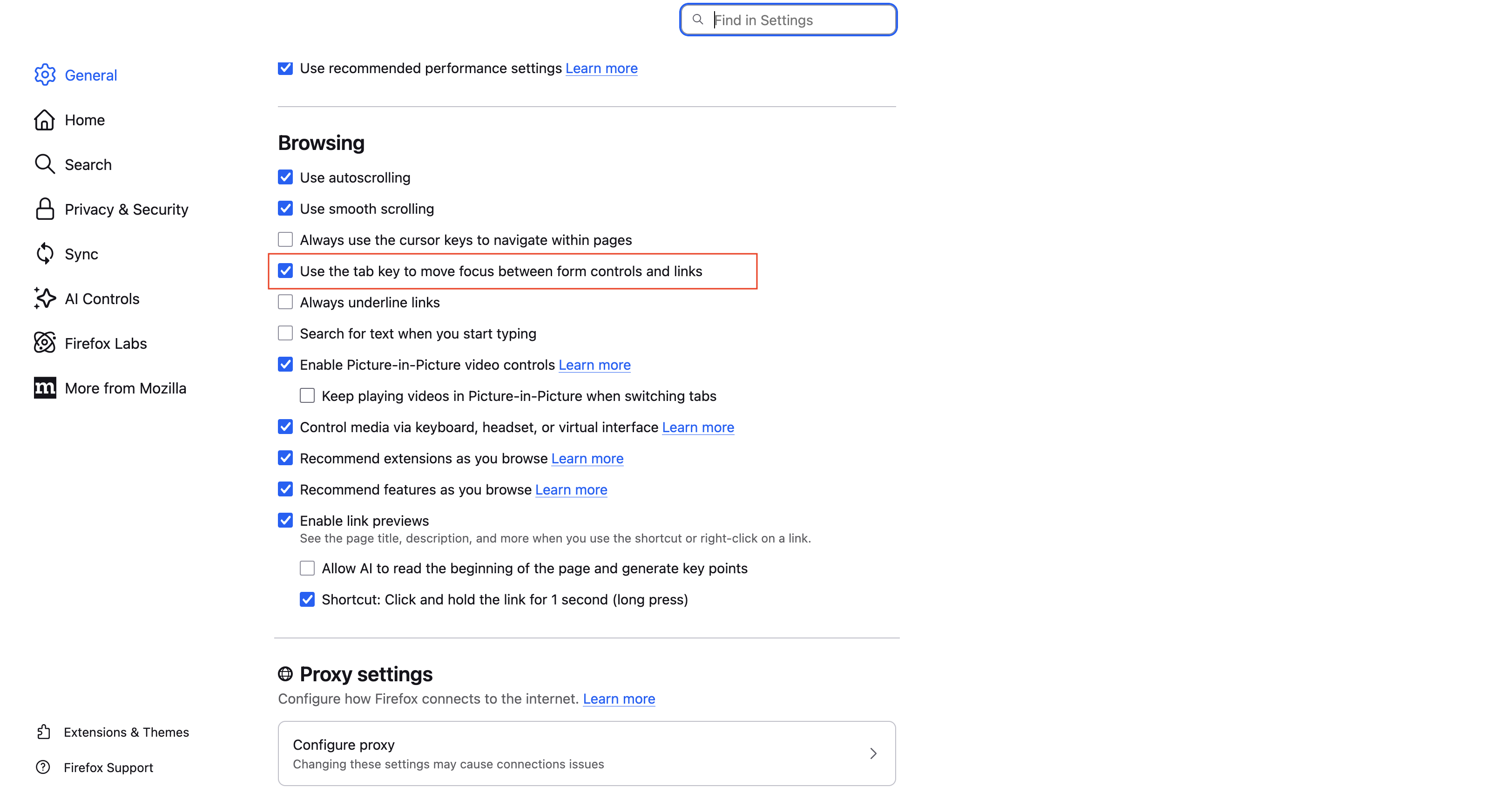
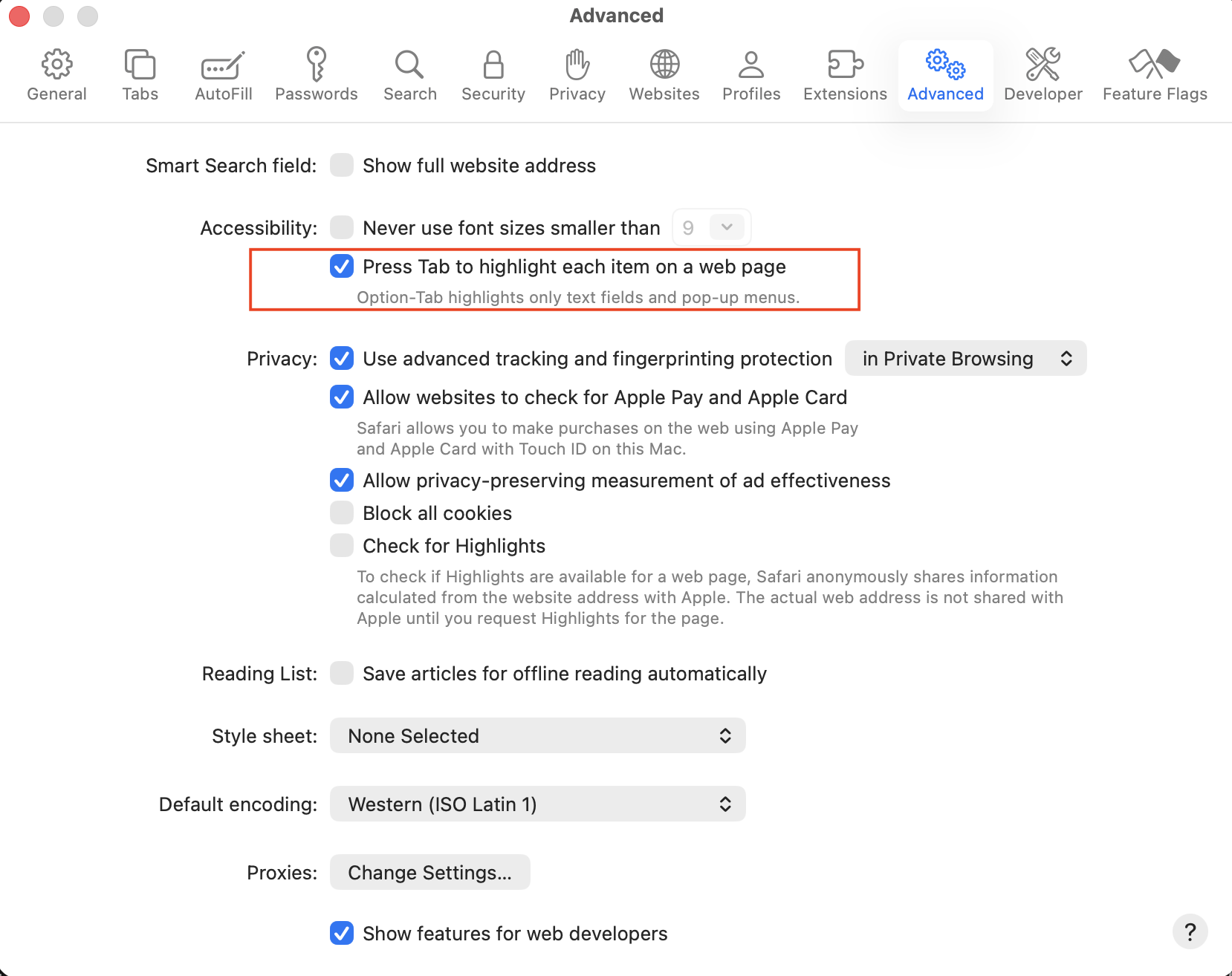
To enable full accessibility within the IQ interface, turn on keyboard navigation settings in your browser.
Firefox
Safari
Backend services
Service scope
- Traditional, non-containerized deployments, including hybrid configurations where DX Core is deployed on-premises, are not supported.
- The MCP server in its standalone configuration is the only IQ component supported outside a Kubernetes environment. All other IQ components must be deployed in Kubernetes.
- The IQ backend server is designed specifically for WebSocket-based AI integration and session management.
- The service manages only the session state, conversation messages, and orchestration between the client, LLMs, and Model Context Protocol (MCP) servers.
- The service does not replace or alter existing DX Core functionality.
AI model
- Knowledge of HCL DX architecture, APIs, and configurations is restricted to documentation available prior to the model's training data cutoff date and excludes subsequent updates, features, or best practices. For more information about the latest releases and features, refer to the official HCL DX and HCL DX Compose documentation.
- OpenAI reasoning model variants (for example, GPT-5.x decimal-versioned models such as
gpt-5.4,gpt-5.5, orgpt-5.6-sol) are not supported. The base models (gpt-5andgpt-5-mini) may work, but are not validated for production use. AWS Bedrock Claude models, such as Sonnet or Haiku, are recommended for production deployments. For more configuration details, refer to Step 4 of Deploying LiteLLM in-cluster.
Database
- Multi-pod and production deployments do not support in-memory SQLite due to session state inconsistency across instances. For multi-pod environments, use PostgreSQL to ensure consistent session state and conversation history across all service instances.
- Database names are fixed to
iqdbfor internal and Runtime Controller (RTC)-managed databases. External databases allow custom database names. - Multiple replica persistence node replicas are not supported due to incomplete IQ persistence connection pool configuration. IQ can write data only to the
dbHost: "<DX_RELEASE_NAME>-persistence-node-0.<DX_RELEASE_NAME>-persistence-headless-svc.<DX_NAMESPACE>.svc.cluster.local".
MCP Server
Deployment
- The MCP Server must be deployed within the same Helm chart as the Integrator to establish automatic network connectivity.
- WCM and DAM tools are unavailable to the MCP Server unless they are explicitly enabled through the
enableWcmandenableDamHelm configuration values. The MCP Server functions regardless of which tools are enabled. - The
standaloneModeparameter disables HCL DX user authentication integration, causing the MCP Server to function in isolation.
Scope and enablement
- Available tool domains depend on feature flags (
ENABLE_DAM,ENABLE_WCM,STANDALONE_MODE). Disabled domains are not exposed through the MCP Server. - Authentication tool behavior in standalone mode differs from integrated deployment behavior.
Response and output
- Token-Oriented Object Notation (TOON) encoding applies strictly to JSON text tool payloads. Non-JSON text and non-text content are not transformed.
- TOON encoder loading failures cause responses to automatically fall back to standard JSON text format.
- Response-detail modes (
summaryandfull) apply strictly to Digital Asset Management (DAM) and Web Content Manager (WCM) tools. Other tools do not expose mode selection.
Request and session behavior
- Stateless request processing prevents the use of session persistence or sticky-session configurations.
- Sequential requests in multi-replica environments route to any available pod rather than maintaining a connection to a specific instance.
Payload and transport
- The server rejects JSON-RPC requests that exceed the configured body-parser limit.
- The
BODY_PARSER_JSON_LIMITHelm chart configuration value controls payload capacity limits.
Context propagation
- Cookie and virtual portal contexts propagate from provided request parameters.
- Missing or invalid context values cause downstream requests to use default behavior.
Monitoring and readiness
- Liveness checks only confirm process availability, not full backend dependency health.