Administration
Learn how to use the Administration portlets that are provided with HCL DX to do various day-to-day administration tasks.
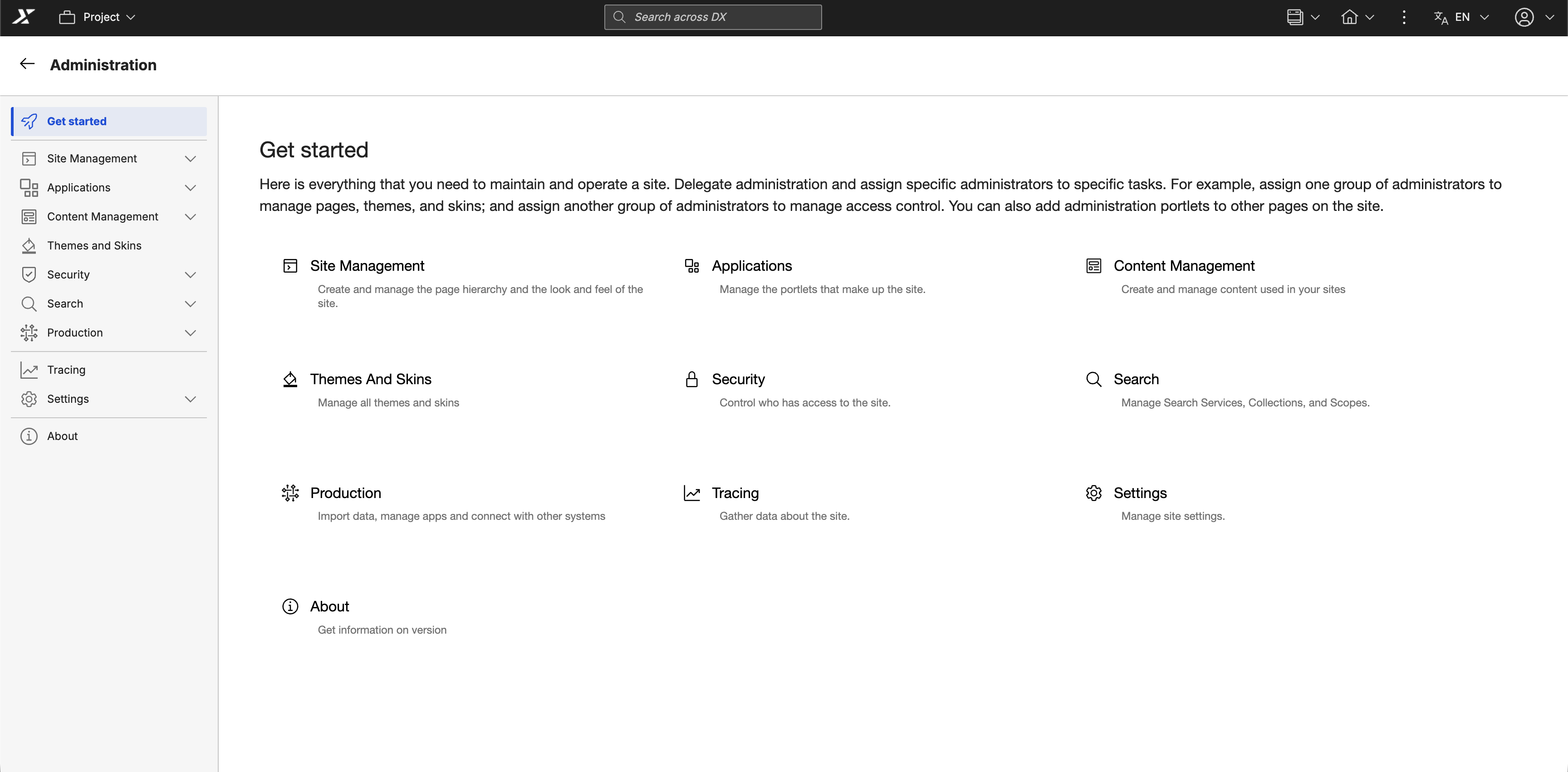
Site management
Manage the structure and foundation of your portal environment, including pages, virtual portals, and templates.
- Manage Pages portlet
Learn how to use the Manage Pages portlet to create, edit, activate, order, and delete pages, external web pages, and labels. - Virtual Portal Manager
Learn how to use the Virtual Portal Manager portlet to create, configure, and manage virtual portals, including default content, access rights, and administration settings. - Page templates
Learn how to use page templates to define the layout, style, and content structure for web content pages.
Applications
Deploy and administer portlets, web modules, and applications across your DX platform.
- Web Modules
Learn how to use the Manage Web Modules portlet to install, update, and manage portlets from web services or WAR files, and to view detailed information and access settings for each module. - Applications
Learn how to use the Manage Applications portlet to enable portlet applications as web services, view their portlets, and edit their properties. - Portlets
Learn how to use Portlet Management tools to install, configure, and manage portlets and web services, including creating, modifying, and controlling access to portlets across your HCL DX environment.
Themes and Skins
Manage the visual design of your portal using the Themes and Skins portlet.
- Themes and Skins
Learn how to use the Themes and Skins portlet to set default themes and skins, manage their associations, and add or remove theme elements to ensure a consistent user experience.
Content management
Synchronize, syndicate, and organize your web content efficiently using dedicated management tools and extensions.
- Syndicators and subscribers
Learn how to use syndication to transfer and synchronize web content between HCL DX environments by configuring, monitoring, and managing syndicators and subscribers. - Feed management
Learn how to use Web Content Feed Management to create, configure, schedule, and manage web content feeds across your environment. - Multi-locale Library Copy application
Learn how to use the Library Copy portlet extension to create a new locale by duplicating an existing library with a new name and locale. - WCM Support Tools
Learn how to use the HCL Web Content Manager Support Tools portlet to view, analyze, and troubleshoot Java Content Repository (JCR) nodes and content directly.
Security
Secure your portal by managing users, defining resource permissions, and safeguarding credentials for authentication.
- Users and Groups
Learn how to use the Users and Groups portlet to manage user accounts and group memberships, including creating, editing, deleting, and assigning roles and permissions. - Resource Permissions
Learn how to use the Resource Permissions portlet to manage access control by assigning roles, setting inheritance, and defining ownership or external security management. - User and Group Permissions
Learn how to use the User and Group Permissions portlet to assign roles and manage group memberships. - Credential Vault
Learn how to use the Credential Vault portlet to securely manage and access stored credentials for single sign-on authentication.
Search
Administer search collections, scopes, and tagging capabilities to enhance content discoverability across your site.
- Settings
Learn how to use the Manage Search portlet to configure and administer portal search services, collections, and scopes. - Tag Center
Learn how to use the Tag Center to search and browse portal resources by tags.
Production
Integrate web services, manage virtual applications, and handle configuration imports for your production environment.
- Web Services
Learn how to use the Web Service Configuration portlet to set up your portal to consume remote portlets through WSRP. - Virtual Application Manager
Learn how to use the Virtual Portal Manager portlet to create, configure, and administer virtual portals on demand. - XML Import
Learn how to use the XML Configuration portlet to import portal configuration files and review the import status.
Tracing
Monitor and troubleshoot your portal using client-side logging, content reporting, and diagnostic support tools to capture and analyze system behavior.
- HCL Content Composer
Learn how to use HCL Content Composer to create and manage site content. - HCL Content Reporting
Learn how to generate reports and update reported items in bulk. - HCL Web Content Manager Support Tools
Learn how to use the Web Content Manager (WCM) Support Tools portlet to investigate and analyze Java Content Repository (JCR) nodes. - Managing Syndicators and Subscribers
Learn how to transport data between HCL Web Content Manager instances. - Web Content Feed Management
Learn how to create and manage content feeds.
Settings
Configure essential global properties, unique naming conventions, markup configurations, and client device support for your portal.
- Global
Learn how to set portal server options, including the default language, home page, Find URL, and behavior for unauthorized portlets. - Custom Unique Names
Learn how to configure unique naming conventions for portal resources to ensure consistent identification across environments. - Markups
Learn how to use Manage Markups to register markup types that the portal can support. - Clients
Learn how to define the types of devices that can access the portal and manage their client-specific settings.