People Service and Search V2 integration
Overview
You can integrate People Service with Search V2 to enhance user discoverability and search performance. This integration provides efficient access to user profile data with real-time update synchronization.
Key features
- User discovery: Enables searching profiles using attributes such as name, email, role, and organization.
- Real-time synchronization: Updates in People Service are reflected immediately.
Indexing capabilities
People Service provides indexing capabilities to ensure search results are up-to-date. Administrators can initiate a full index or retry indexing operations if needed. You can find API details for these operations in API documentation.
Configuration
People Service now supports Search V2. You can enable the Search V2 integration through the parameter configuration.search.middleware.enabled in the People Service Helm chart.
For configuration details, see Search configuration.
Indexing process
People Service automatically indexes data when changes occur. However, it does not initialize index data at system startup.
Regular indexing behavior
When creating and mutating users using the API or provisioning users through User synchronization, the user data is indexed as needed as part of the creation or mutation process.
-
- To create new user profile and index, trigger the
POSTendpoint named/dx/api/people/v1/people. - To update existing user profile and indexing, trigger the
PUTendpoint named/dx/api/people/v1/people/{id}. - To delete existing user profile and indexing, trigger the
DELETEendpoint named/dx/api/people/v1/people/{id}.
- To create new user profile and index, trigger the
-
User Synchronization API endpoint
- To start user synchronization and indexing, trigger the
POSTendpoint named/dx/api/people/v1/user-directories/sync.
- To start user synchronization and indexing, trigger the
On-demand indexing
If immediate processing is required, People Service provides an indexing API that fully resynchronizes the index with the People Service user data.
-
- To get details of all pending and failed user index operations, trigger the
GETendpoint named/dx/api/people/v1/search/index/pending. - To retry pending and failed user index operations, trigger the
POSTendpoint named/dx/api/people/v1/search/index/pending. - To start full indexing for all users available in the people database, trigger the
POSTendpoint named/dx/api/people/v1/search/index.
- To get details of all pending and failed user index operations, trigger the
Upgrading to CF226 or later
If the People Service already persisted user data, a manual triggering of the indexing API is required.
Searching for a user in HCL DX
To search for a user via HCL Digital Experience (DX):
- Click the search box located at the top of the DX interface.
- In the Search field, enter the name, role, email address, or other relevant attributes of the user you are looking for.
- In the Select a content source field, select the relevant content source.
- In the Select an attribute field, select the relevant attribute.
- Click Search. Review the search results and click the desired user to open their profile.
The following image shows the Search Center where you can search for a user:
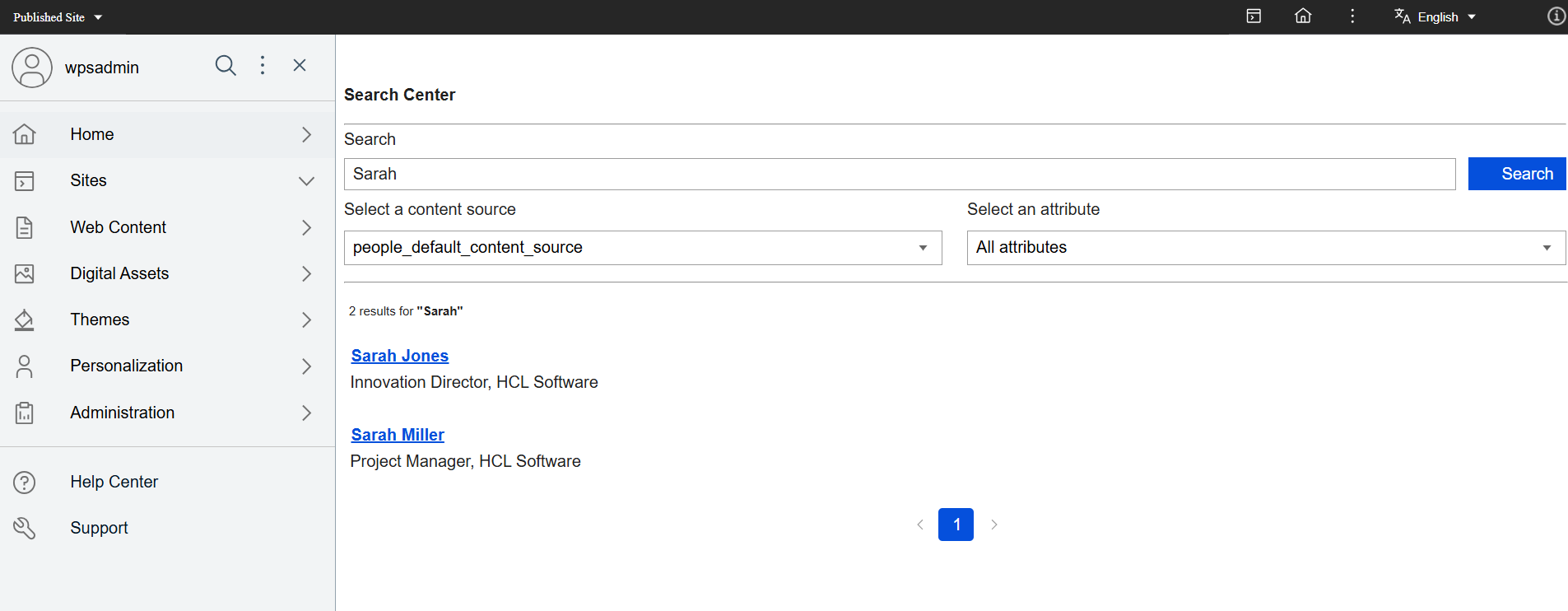
For more information, refer to the Search V2 End User Guide.