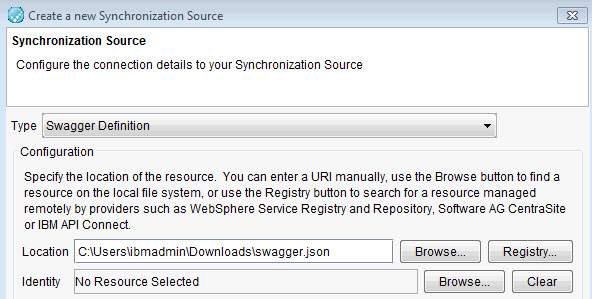
Adding a Swagger definition as a synchronization source
You can add a Swagger definition to automatically create the resources that are required
for testing the API that the definition describes.
About this task
Resources that are generated from a Swagger definition can include operations and WebForm,
JSON, and URL schemas.
Security information about basic-authentication and API-keys in Swagger
definitions are included when you synchronize.
Basic Authentication
An HTTP transport is created with Basic Authentication enabled.
API key
After you synchronize with the Swagger definition that defines at least one API key, an
environment tag is created for each API key security scheme. Each created tag's usage depends on the
security scheme in property header or query.
A header field is created in the associated operation with the environment tag as the fields
default value.
A query segment is created in the produced rest schema with the environment tag as the default
value.
OAuth2
Not supported.
Procedure
Launch the Create a new Synchronization Source wizard in one of the
following ways:
On the toolbar of the Synchronization view of the Architecture School perspective , click Web > Swagger Definition.
Click the Create Synchronization Source icon () and select Swagger Definition from
the Type list.
Paste a URL or file location that points to a Swagger definition into the workspace for the
Logical View.
Note: If you are browsing to find a Swagger definition file with an extension other
than swagger, make sure you select All Files for the file type.
The Create a new Synchronization Source wizard is displayed. Go to step
2.
Complete the information on the first page of the Create a new Synchronization
Source wizard that is unique to the Swagger source.
That information consists of the location for the definition file to use as a sync source. In
the Location field enter a URL that points to a Swagger definition file, or
click Browse to find a Swagger definition file on your local network, or
click Registry to find a Swagger document in a Service Registry by providers
such as IBM API Connect. The Swagger definition can be in either JSON or YAML format.
Optional: Enter any authorization values for one or more operations that are using the listed security
schemes.
Starting from HCL DevOps Test Integrations and APIs (Test Integrations and APIs) Version 10.0.0, the
Authorizations page is displayed only if the Swagger definition includes one or
more operations that use one or more security schemes. You can enter authorization values now or
enter the values later by editing the values of the named environment tags, the HTTP transport, or
both.

 ) and select Swagger Definition from
the Type list.
) and select Swagger Definition from
the Type list.