Adding a WSDL document as a synchronization source
You can add a WSDL document to automatically create the resources that are required for
testing the API that the document describes.
Note: Only SOAP 1.1 and SOAP 1.2 bindings are supported. Any schema definitions that are not
referenced by an operation that uses at least one of these bindings is ignored.
About this task
Resources that are generated from a WSDL document can include operations and optional tests
and virtual services (stubs).
Procedure
Launch the Create a new Synchronization Source wizard in one of the
following ways:
Drag a WSDL file from the file system into the Logical view of the Architecture School
perspective.
Click General > WSDL on the menu bar in the Logical or Synchronization view.
Click Web > WSDL on the menu bar in the Synchronization view.
Click the Create Synchronization Source icon () and select WSDL from the
Type list in the Create a new Synchronization Source
wizard.
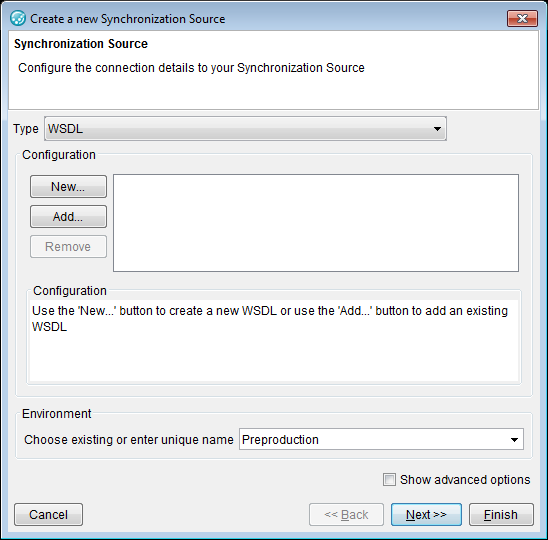
Complete the information on the first page of the Create a new Synchronization
Source wizard that is unique to the WSDL source.
That information consists of the following options:
Add
To add an existing WSDL resource from the current project. Locate and select a WSDL document in
the Select a Resource window and click OK.
New
To import a new WSDL document into your project. You can import the information from a file on
the local network, from a URL, or from a WebSphere® Service Registry and Repository server
instance (see Setting up a new synchronization source).
To remove the selected sync source file from the display. You can specify multiple WSDL source
files, which are displayed in the text box next to the buttons.
The resources that are required for testing the API described by the
WSDL document are created.
Note:HCL OneTest™ API
does not support operations associated with HTTP GET and POST bindings. When you try to synchronize
a WSDL document that contains these bindings, you will receive a warning message that the operations
will not be synchronized.

 ) and select WSDL from the
Type list in the Create a new Synchronization Source
wizard.
) and select WSDL from the
Type list in the Create a new Synchronization Source
wizard.