Adding a registered CentraSite WSDL as a synchronization source
The integration between HCL OneTest™ API
and CentraSite relies on the testing of the services (WSDLs) that are in the CentraSite
registry that uses HCL OneTest™ API.
The registered WSDLs can be imported into HCL OneTest™ API
from CentraSite (by using UDDI), then tests and test suites can be created and
executed.
Note: Only SOAP 1.1 and SOAP 1.2 bindings are supported. Any schema
definitions that are not referenced by an operation that uses at least one of these bindings
is ignored.
About this task
Resources that you can generate from the WSDL include tests, test suites, and stubs that
are used for certification.
Procedure
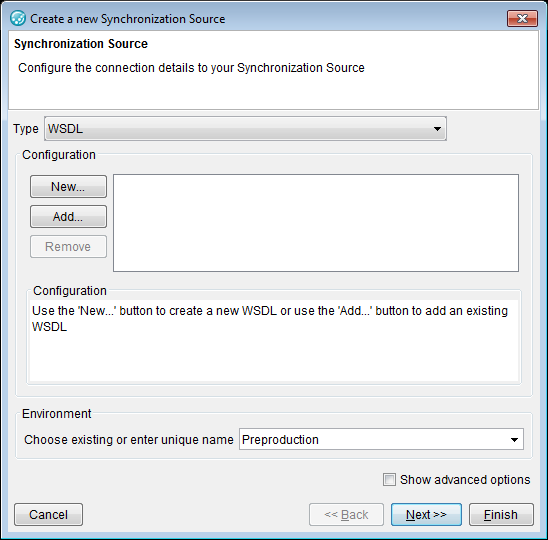
Launch the Create a new Synchronization Source
wizard in one of the following ways:
Drag a WSDL file from the file system into the Logical view of
the Architecture School perspective.
Click Web > WSDL on the menu bar in the Logical or Synchronization view.
Click the Create
Synchronization Source icon ()
and select WSDL from the
Type list in the Create a new Synchronization
Source wizard.
Complete the information on the first page of the
Create a new Synchronization
Source wizard that is unique to the CentraSite WSDL source.
That information consists of the following fields:
In the Configuration section of the wizard, click New.
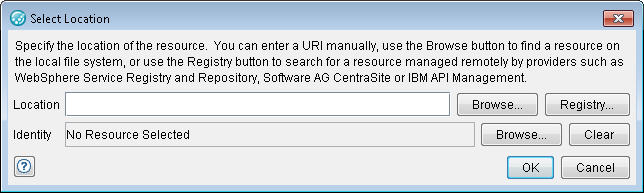
In the Select Location dialog, click
Registry.
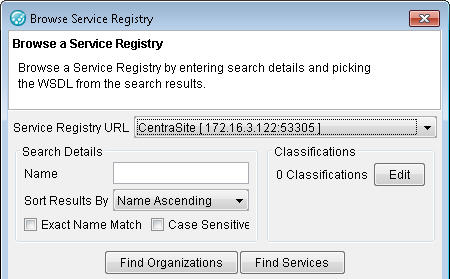
In the Browse Service Registry dialog,
ensure that the correct CentraSite server is selected under Service Registry URL.
If you want to filter your search of the registry,
enter the search criteria and conditions by using the name, sort, and match options,
then click Find
Organizations or Find
Services to display a list of matching items.
In the list of organizations or services that is
returned, locate and select a service, then click OK. Click OK in the Select Location and New WSDL dialogs to return to the
Create a new Synchronization
Source wizard.
The selected WSDL appears in the
Configuration text
box.

 )
and select WSDL from the
Type list in the Create a new Synchronization
Source wizard.
)
and select WSDL from the
Type list in the Create a new Synchronization
Source wizard.