
Trivy security scanning
A Control repository that is created as part of creating a Loop will be automatically configured to perform security scanning with Trivy. This ensures that every pull request is automatically scanned for problems such as vulnerabilities, security breeches, misconfigurations, etc. before code reaches the main branch. Use this procedure when you want to enforce severity-based merge protection across your team.
Before you begin
Before you begin, ensure that you have:
- Administrator access to your team space.
- Created a teamspace. See Creating a teamspace.
- Created a DevOps Loop so that the Control repository, webhook, branch protection, and default .devops-loop/code-config.jsonc are provisioned automatically. See Creating a loop.
- Read the Code Genie topic to understand how Code genie works with features like Trivy.
- Familiarized yourself with the Trivy CLI reference for available scan parameters.
- Ensured your team follows a branching strategy with a protected main branch.
About this task
Trivy scans every pull request for vulnerabilities (CVEs), IaC
misconfigurations, leaked secrets, and license violations. Code Genie
(service-account-devopscode-genie) posts the scan results as
pull request comments and blocks merges when findings equal or exceed the configured
rejection threshold. You can customize the scan behavior in
.devops-loop/code-config.jsonc by setting the rejection
threshold (--reject), the scanner types
(--scanners), and types of severity issues to scan for.
TrivyScan dev
container associated with it is automatically terminated. Any other open pull
requests waiting for Code Genie scan results at that point may not receive their
comments because the container is no longer running.These are temporary limitations in the current release.
Procedure
-
Validate the end-to-end Trivy workflow by creating a test branch with a
vulnerable dependency and opening a pull request to the main branch.
-
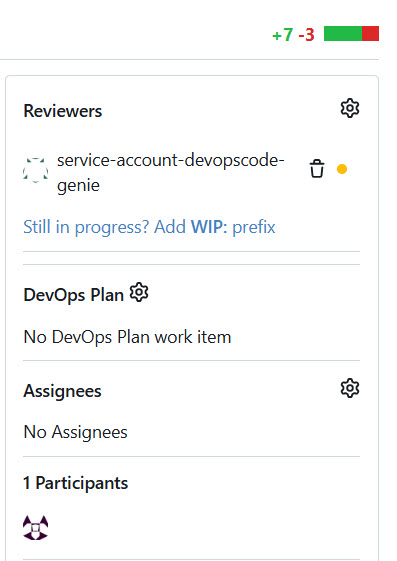
Confirm that Code Genie shows a yellow dot next to its name, indicating
the scan is running, and that the merge button is disabled.

-
Wait until a pop-up appears that tells Trivy scanning is completed. It
usually takes around 20 seconds, but it depends on the size of the
Control repository.

-
Review the Code Genie pull request comments and confirm that HIGH or
CRITICAL findings are blocking the merge, if the
--rejectis set to high.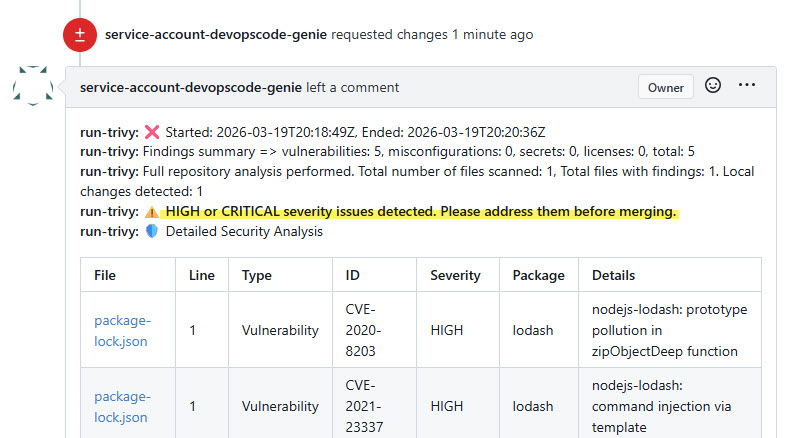
-
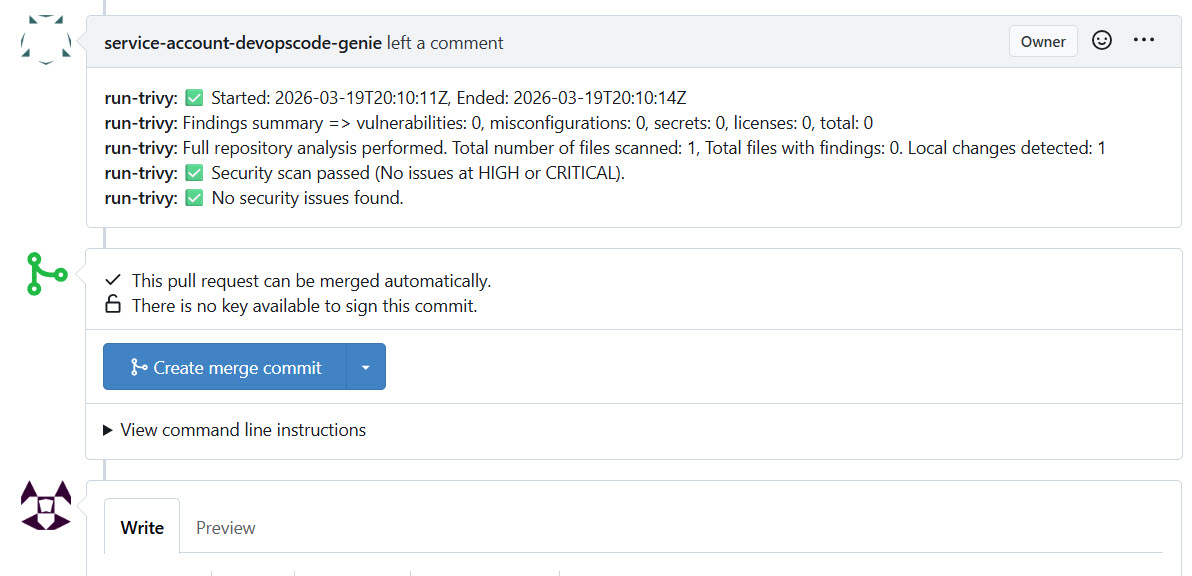
Confirm that Code Genie approves the pull request after the clean scan
and that the merge button becomes active.
-
Confirm that Code Genie shows a yellow dot next to its name, indicating
the scan is running, and that the merge button is disabled.
-
Verify the webhook that was automatically configured during Loop
creation.
-
Open .devops-loop/code-config.jsonc in the Control
repository and customize the Trivy scan parameters to match your security
policy.
The default configuration is as follows:
{
  "code-genie": {
    "pull-request": {
      "dev-container": "TrivyScan",
      "custom-commands": [
        {
          "run-trivy": "cp /opt/run-trivy.sh /usr/code/ && \
                        chmod +x /usr/code/run-trivy.sh && \
                        REPO_URL=https://${platform-fqdm}/control/${repo-owner}/${repo}/src/branch/${pr-branch}/ \
                        /usr/code/run-trivy.sh ${code-folder} ${result-json} \
                        --reject=high \
                        --trivyArgs=\"--scanners vuln,misconfig,secret,license --license-full --severity UNKNOWN,LOW,MEDIUM,HIGH,CRITICAL\""
        }
      ]
    }
  }
}
You can adjust the following parameters:
--reject— sets the minimum severity level that blocks a pull request merge. Accepted values arenever,low,medium,high, andcritical. Also,nevermeans that the PR will never be rejected, and that only Trivy scan results will be provided as PR comments.--scanners— sets the scanner types to run.--severity— sets the severity levels that Trivy reports on.
-
Verify branch protection rules and Code Genie reviewer (auto-configured during
Loop creation)
- Commit and push the updated code-config.jsonc to the main branch.
Results
You have configured Trivy security scanning on your Control repository. Every pull
request to the main branch now triggers an automatic Trivy scan. Code Genie approves
or blocks the merge based on the --reject threshold you defined in
code-config.jsonc.
What to do next
After completing this configuration, you can:
- Adjust the
--rejectthreshold or--scannerslist in code-config.jsonc as your security policy evolves. - Add further dev container blocks to run additional capabilities such as unit testing or static code analysis alongside Trivy. See Code Genie.
- Review the Trivy CLI reference for the full list of available scan arguments.