AI code reviewing with Code Genie
A Control repository that is created as part of creating a Loop will be automatically configured to enable AI-assisted code review using Code Genie with the Copilot dev container. Use this procedure when you want to enable interactive, AI-powered code suggestions on pull requests across your team.
Before you begin
Before you begin, ensure that you have:
- Administrator access to your team space.
- Created a teamspace. See Creating a teamspace.
- Created a DevOps Loop so that the Control repository, webhook, branch
protection, and default
.devops-loop/code-config.jsoncare provisioned automatically. See Creating a loop. - Read the Code Genie topic to understand how Code Genie works with AI-integrated features.
- Obtained GitHub Copilot or an IBM Bob AI agent token and save it under Manage Coding CLI section. This token is required for the Copilot or Bob dev container to authenticate with the AI service.
- Ensured your team follows a branching strategy with a protected main branch.
About this task
Code Genie runs the Copilot dev container on each
pull request to perform AI-assisted code reviews. When a pull request is
opened, Code Genie (service-account-devopscode-genie)
launches an AI agent using the configured model, such as
claude-sonnet-4.5, and analyzes the pull request diff in
the context of the repository.
During the review process, the AI agent reads the pull request diff, examines
modified files, checks for repository-specific guidance in .github
or .agents folders, and evaluates the changes for potential
security vulnerabilities, logic defects, input validation issues, edge cases,
maintainability concerns, and overall code quality. Review findings are posted
directly to the pull request as both summary comments and
line-level annotations.
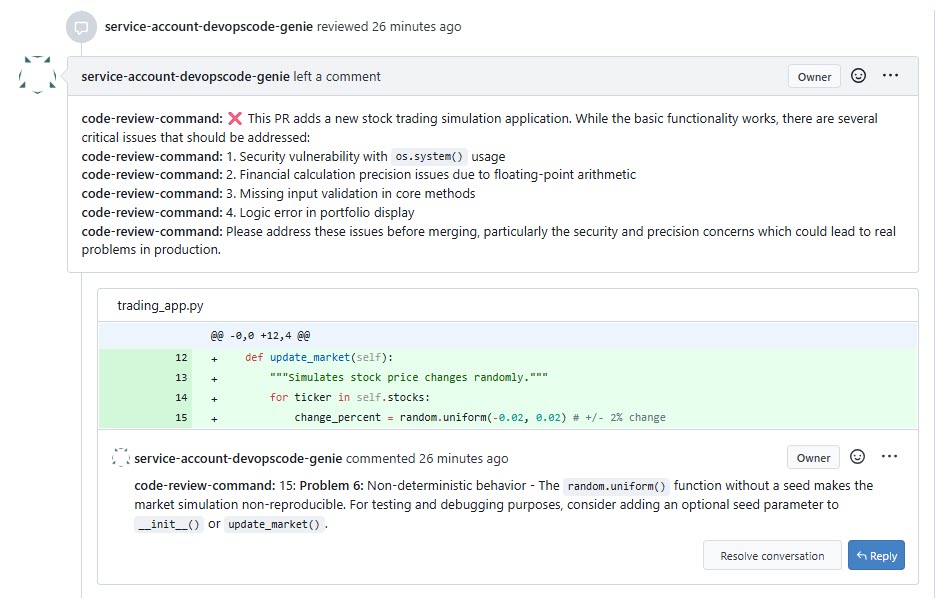
Code Genie also provides a detailed CLI execution log that records the review workflow, including prompt generation, repository inspection, file reads, tool usage, code analysis steps, output generation, and validation. These logs provide transparency into how the AI agent arrived at its review findings and can be used for troubleshooting and audit purposes.
Copilot dev container associated with it is automatically
terminated. Any other open pull requests waiting for Code Genie results at
that point may not receive their comments because the container is no
longer running. This is a temporary limitation in the current release.Procedure
-
Open
.devops-loop/code-config.jsoncin the Control repository. -
Replace the existing configuration with the following, which enables the
Copilot AI code generation container:
{
  "code-genie": {
    "pull-request": [
      {
        "dev-container": "Copilot",
        "interactive": true,
        "custom-commands": [
          {
            "code-review-command": "export GH_TOKEN=${loop_property:copilotclitoken} && cp /opt/run-copilot.ts /usr/code/ && tsx /usr/code/run-copilot.ts --prompt-file=${promptFile} --llm_args=\"--allow-all-tools --model claude-sonnet-4.5\""
          }
        ]
      }

      /* Uncomment this block to use IBM Bob Shell for code reviews
      ,
      {
        "dev-container": "Bob",
        "interactive": true,
        "custom-commands": [
          {
            "code-review-command": "export BOBSHELL_API_KEY=${loop_property:bobtoken} && cp /opt/run-bob.ts /usr/code/ && tsx /usr/code/run-bob.ts --prompt-file=${promptFile} --bob_args=\"--yolo --accept-license --auth-method api-key\""
          }
        ]
      }
      */
    ]
  }
}
You can adjust the following parameters for the
Copilotcontainer:interactive- Set to
trueto enable communication of code-genie with user using Pull Request comments. loop_property:copilotclitoken- The Loop property key that holds your Copilot CLI authentication token. Ensure this property is set on the Loop before enabling this container.
--prompt-file- Path to the prompt file that instructs the AI model what to generate
or review. The
${promptFile}variable is resolved at runtime by Code Genie. --model- The AI model to use for code generation. Defaults to
claude-sonnet-4.5. You can substitute another supported model as required by your organization's policy. --allow-all-tools- Grants the AI model access to all available Copilot CLI tools during code generation. Remove this flag to restrict tool access.
-
Commit and push the updated
code-config.jsoncto the main branch. -
Validate the end-to-end Code Genie workflow by creating a test branch
and opening a pull request to the main branch.
- Create a test branch in the Control repository, make a minor change, commit and push the changes, and open a pull request targeting main.
-
Confirm that Code Genie shows a yellow dot next to its name,
indicating the
Copilotcontainer is starting. - Confirm that Code Genie adds it comments to the pull request after the Copilot review completes and that the merge button becomes active.
- Verify the webhook that was automatically configured during Loop creation.
- Verify branch protection rules and Code Genie reviewer settings that were auto-configured during Loop creation.
Results
You have configured AI-integrated Code Genie on your Control repository. Every pull request to the main branch now triggers an interactive Copilot AI code review session. Code Genie posts AI-generated code suggestions as pull request comments for developer review.
What to do next
After completing this configuration, you can:
- Switch to a different AI model by updating the
--modelargument in the Copilot container command in Code Genie'scode-config.jsonc. - Enable the IBM Bob Shell container as an alternative AI reviewer by
uncommenting the
Bobdev container block incode-config.jsonc. - Add further dev container blocks to run additional capabilities such as unit testing or static code analysis alongside Copilot. See Code Genie.