Example plug-in
A plug-in consists of one or more steps. A step represents a unit of functionality that a user can configure and combine with other steps into a process. Creating a plug-in consists of defining its individual steps and then grouping them for presentation in Build.
Plug-in steps are run by an agent that is installed in the target environment. This means that plug-ins can be written in any scripting language provided that the agent can access the required scripting tools on the host.
The mechanics of plug-ins are covered by examining a plug-in step in detail. The example plug-in is Shell, which contains several steps that are related to shell scripts. The Shell plug-in comes with Build.
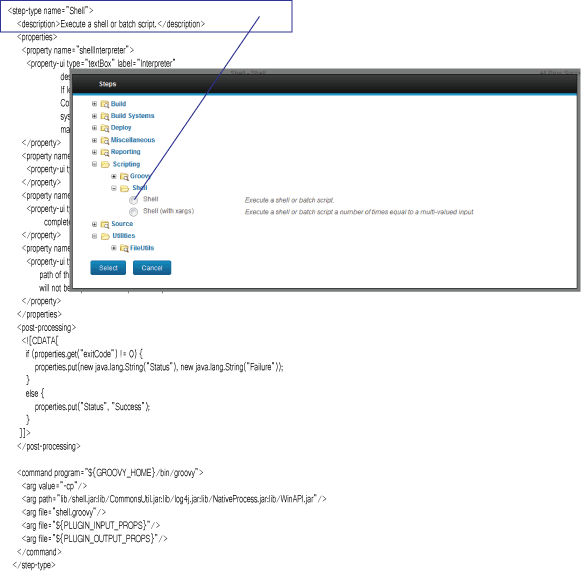
Each plug-in step is an individually configurable object. In the following illustration, you can
see Shell plug-in’s individual steps in the Steps window. The Shell step's
label is derived from the description element in the plug-in file.
Plug-ins in the Steps window
This example covers the Shell step. The Shell step executes a shell script or batch file that that you supply.
Each step (step-type element has the same structure:
- The
propertieselement can contain any number ofpropertychild elements. Property values can be supplied at design time or run time. - The
post-processingelement provides error-handling functions and sets property values that can be used by other steps. - The
commandelement performs the step's function. The function can be defined completely by the element, or be constructed in part or entirely from the step's properties at design time or run time.
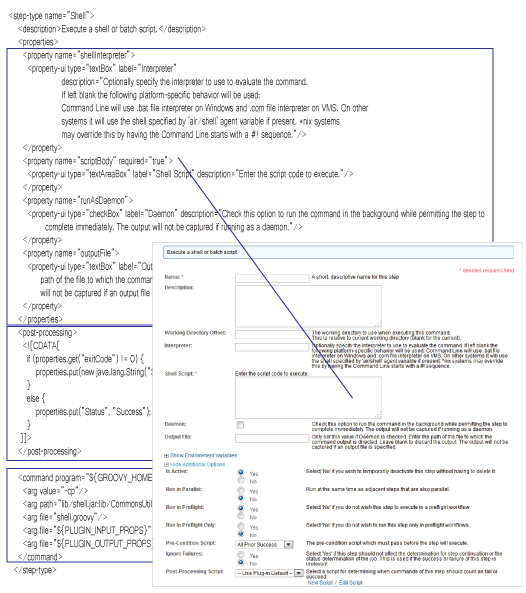
The following figure shows how the Shell plug-in property definitions are displayed in the plug-in window.
Plug-in elements in the plug-in window