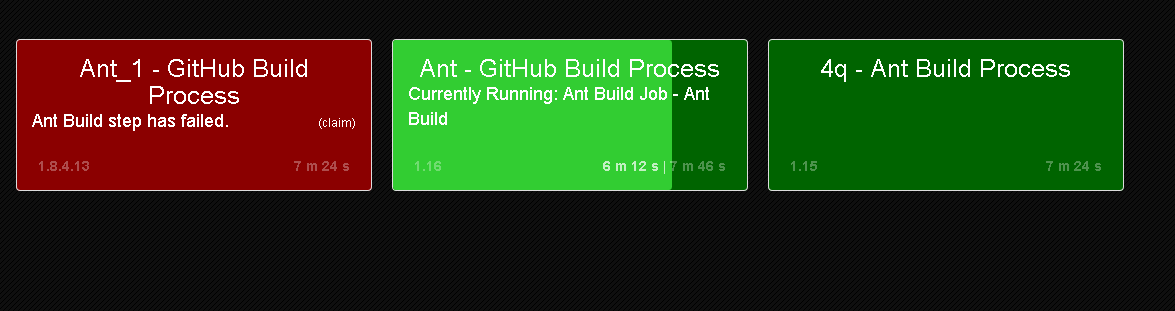
Information Radiator dashboard
The Information Radiator dashboard provides real-time information about project builds.
The build processes are color-coded by build status, so that you can see at a glance the status of a build. When a build process runs, the status color changes to indicate the build's progress.
Each build process has a separate entry in the dashboard. If a project has several processes that are defined for it, each one has an entry. Build information is updated approximately every 5 seconds. The dashboard displays the following information for each build process:
- Project name and build process.
- Build time. The time is an average of previous builds. If the build process is running, the current build time is also displayed.
- A link to the Main tab for the build process.
- A link to the last or current build ID or stamp.
- A link that you can use to claim failed or aborted builds.
- The name of the failed build step for failed builds.
- A list of users who contributed source changes to a failed build.
- The name of the currently running build step for running builds.
The background color of a build entry indicates the build's final status. The dashboard uses the following color coding for build processes:
- Succeeded: dark green
- Failed: dark red
- Aborted: dark gray
You can customize the information that is displayed on the dashboard, and filter the information too. For information about customizing the Information Radiator dashboard, see Monitoring builds with the Information Radiator dashboard
Real-time build information
The background color of a build process changes when a build runs. The lighter-colored progress bar indicates the build's progress. Progress is calculated by comparing the current build time to the average time of previous builds. The name of the build's currently running job step is also displayed.
4q - Ant Build Process. You can see
that the GitHub build process for the Ant project, Ant - GitHub Build Process, is
running. The build's progress is shown by the lighter-colored progress bar. The name of the
currently running step, Ant Build Job - Ant Build, is also displayed. The
Ant_1 - GitHub Build Process build process failed, which is indicated by the
dark-red color of the entry. The claim link is available for the failed
build. If source changes were committed, the users who committed changes to the failed build are
also listed. For information about claiming builds, see Monitoring builds with the Information Radiator dashboard.