
About the HCL Compass Report Server for Crystal Reports

Use the HCL Compass Report Server for Crystal Reports to run data-pull reports on the Compass Web server. Use the Report Launcher for HCL Compass to provide access to reports on a shared file server.

Attention: SAP has changed the name of Crystal Report viewer, from "Crystal Reports Java Reporting Component (JRC) to "Crystal Reports, version for Eclipse". Compass still works with JRC, but it is recommended that you upgrade to the latest Eclipse version. If you upgrade, you should also upgrade Crystal Rerport Designer "SAP Crystal Reports 2025".

You can use the HCL Compass Report Launcher to run Crystal Reports by deploying it on the same WebSphere® server where the HCL Compass Report Server for Crystal Reports is deployed.

The following figures provide examples of how you might configure the HCL Compass server components. You might decide to configure these components based on the server load, or your preference to have a dedicated WebSphere® Application Server for reporting.

In the first figure, the HCL Compass Report Server for Crystal Reports and the HCL Compass Web server reside in the same IBM® WebSphere® Application Server instance.
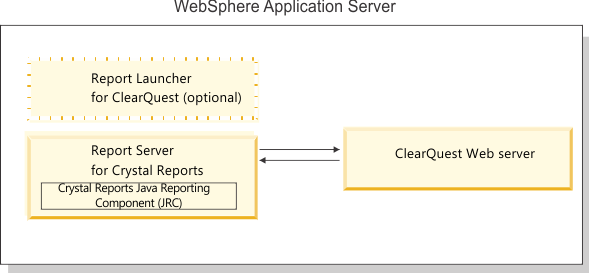
This figure shows the HCL Compass Report Server for Crystal Reports, configured with the Crystal Reports Java Reporting Component, in a box on the left. The HCL Compass Report Server for Crystal Reports communicates with the ClearQuest Web server, represented by a box on the right. Both the ClearQuest Report Server for Crystal Reports and the HCL Compass Web server reside in a single WebSphere Application Server instance, represented by an outer box. A dashed box with the Report Launcher for ClearQuest shows that this optional component can also be installed to run and view reports.

In the next figure, the HCL Compass Reports Server for Crystal Reports and the Compass Web server reside in separate WebSphere® Application Server instances.
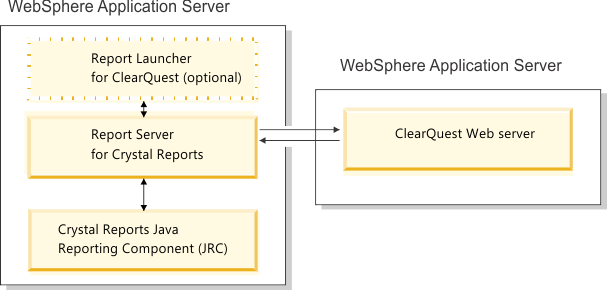
This figure shows two WebSphere Application Server instances; one on the left and another on the right. The WebSphere Application Server instance on the left contains the Report Server for Crystal Reports, configured with the Crystal Reports Java Reporting Component. The WebSphere Application Server instance on the right contains the HCL Compass Web server. The Report Server for Crystal Reports communicates with the HCL Compass Web server.