Workflows
Workflows is a centralized service used to define, execute, and govern business process flows across projects, workspaces, and business entities.
The primary purpose of Workflows is to route work from draft through validation, approval, completion, and publishing in a consistent, auditable manner. You can use Workflows to coordinate complex operational processes without relying on manual follow-up, inconsistent handoffs, or disconnected tools.
Benefits
- Standardized execution: Creates a repeatable operating model for how work is initiated, reviewed, approved, and completed across teams.
- Stronger governance: Ensures authorized personnel review and approve work, with complete auditability and clear workflow state tracking.
- Faster delivery: Reduces delays by centralizing workflow actions such as transitions, approvals, and publish readiness.
- Better visibility: Provides teams with a clear view of project, workspace, and entity status to help address bottlenecks early.
Data flow
Workflows manages business processes by applying configurable templates to projects and workspaces, then guiding related entities through defined stages and statuses. It combines lifecycle controls, task logic, approvals, and publishing actions so you can advance work with clarity and governance.
The operational data flow follows these sequential lifecycle stages:
- Create a project.
- Create a workspace.
- Apply a workflow template.
- Execute tasks and transitions.
- Record the approval decision.
- Verify completion eligibility.
- Publish and broadcast state changes to connected systems.
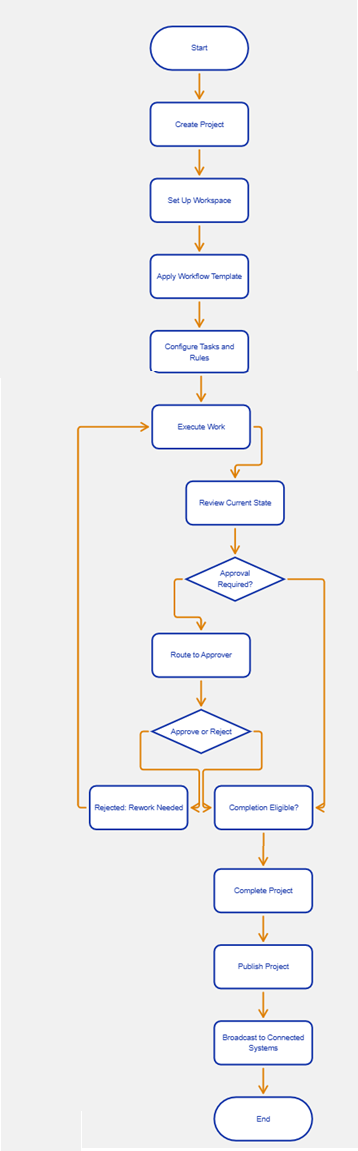
Solving business challenges with data flows
| Business objective | Recommended capability | Operational tasks | Data flow logic |
|---|---|---|---|
| Establish structured project and workspace coordination | Project and workspace management | Create or edit a project; add a workspace; view or update workspace details; assign or update connected PBCs | Start by creating a project that defines the scope of work. Then create one or more workspaces inside that project, configure the correct business capability context, and prepare each workspace for execution. |
| Control workflow execution and approvals | Workflow lifecycle and approvals | Review current workflow state; execute transitions; route approval tasks; approve or reject work; use the approvals dashboard to track pending decisions | After a template is applied, work progresses through defined stages and statuses. Rules, tasks, and approval routing determine whether work can move forward, needs review, or must return for rework before continuing. |
| Publish work safely and synchronize downstream systems | Project lifecycle, completion updates, and broadcast sync | Schedule publish actions; validate publish eligibility; complete the project; auto-complete when criteria are met; broadcast changes to connected systems | When all required conditions are satisfied, the workflow marks the work as completion eligible. The project can then be completed, published immediately or on schedule, and synchronized to downstream services that depend on the final state. |
Prerequisites
Before you begin, ensure you have:
- Administrative or designated workflow-management access to create projects, manage workspaces, configure templates, and execute approvals.
- Access to Workflow Service and connected business capability services, including integrations that consume published project and workspace state.
- Existing project or workspace definitions, workflow templates, task configurations, approval routing rules, and any entity metadata required to determine publish or completion eligibility.
Technical Details
- Workflows depend on configurable workflow templates that define the execution model for projects, workspaces, and related entities.
- The template structure supports a stage and status hierarchy, allowing workflow transitions to be evaluated using both broad lifecycle stages and more granular statuses.
- The service includes a task library with reusable task definitions such as approval, notification, UI field control, allow-transition, gate-condition, schedule-publish, and auto-transition-time.
- Workflow state is tracked at the entity level and can be retrieved or updated as work progresses through lifecycle checkpoints.
- Approval processing includes dashboard support, approval record creation, decision execution, and audit-friendly routing logic.
- Completion logic evaluates whether all required workflow conditions are satisfied before a project is marked complete or ready for publish.
- Publish and broadcast actions synchronize project and workspace state changes to connected PBCs and downstream services.
Related information
- Deploy
- Download and deploy the Workflows feature
- Upgrade
- Upgrade the Workflows feature
- Customize
- Customize workflow templates, task configurations, and routing rules
- Integrating
- Integrate Workflows with connected services and downstream systems
- Performance
- Optimize workflow queries, state evaluation, and broadcast operations
- Security
- Manage permissions, approval governance, and audit-sensitive workflow actions
- Troubleshoot
- Investigate workflow state issues, transition failures, approval routing errors, and publish sync problems
- API Reference
- Technical specifications for workflow lifecycle, templates, tasks, approvals, and synchronization operations