Workspace state flows
Workspaces can be used in a variety of states. State-flow diagrams can help you understand the allowed actions during various states in workspaces, task groups, and tasks.
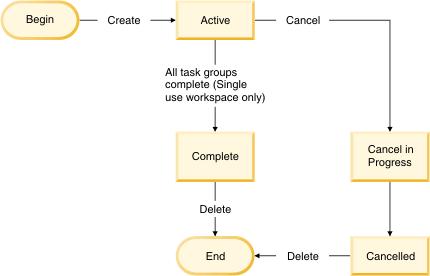
Workspace states
The following state-flow diagram describes the typical
workflow of workspace states:
Task group states
The following state-flow diagram describes the typical
workflow of task group states:
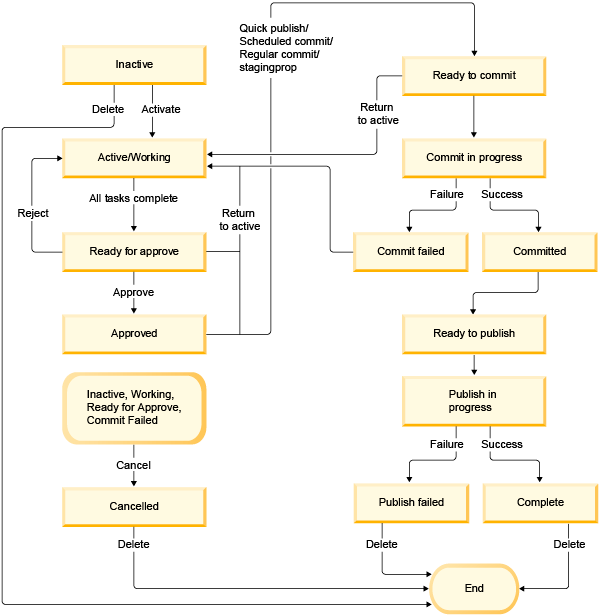
Task groups contain 14 states, categorized into the following groups:
| State groups | Technical state | Allowed actions |
|---|---|---|
| Inactive | 0: Inactive | Activate, Delete, Cancel |
| Working | 1: Working | Cancel |
| Ready for approval | 2: Ready for approval | Approve, Reject, Cancel, Return to Active |
| 3: Approved | Return to Active | |
| Approved | 4: Ready to commit | Return to Active |
| 8: Commit in progress | ||
| 9: Committed | ||
| 10: Ready to publish | ||
| 11: Publish in progress | ||
| Commit/Publish (ongoing) | 12: Published | |
| 7: Commit failed | Cancel, Return to Active | |
| Commit/publish failed | 13: Publish failed | Delete |
| Complete | 5: Complete | Delete |
| Canceled | 6: Canceled | Delete |
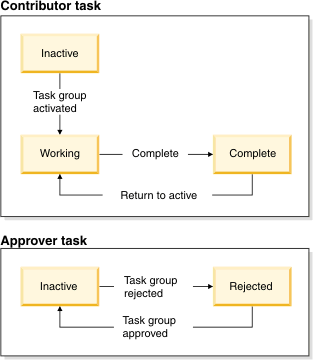
Task states
The following state-flow diagram describes the typical
workflow of task states: