Caching strategies for REST services
REST services use both server-side caching and client-side caching. Server-side caching is achieved by using dynacache, and client-side caching is achieved by using cache directives in the response header.
REST cache framework
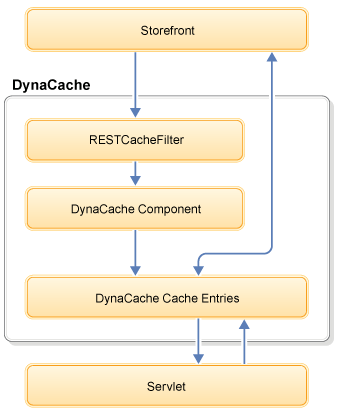
Where:
RESTCacheFilterparses the request URI, tokenize it, and adds it to the attribute. It also gets the other attributes, such aspreviewToken, from the HTTP header.The path token is taken from the URL and set to the attribute with the servlet cache filter.
- The
cache-idin the cachespec.xml file defines the rule for caching the REST request. The cache entry of a specific resource is generated with thecache-id. - The
dependency-id inin the cachespec.xml specifies the additional cache identifiers and associates them with existingdependency-idtypes. - If the
identifier-idneeds to be converted,RESTMetaDataGeneratorgenerates thedependency-idwith an ID. - If the
cache-idexists in the DynaCache instance, it returns the cache entry directly from the cache. If thecache-iddoes not exist in the DynaCache instance, it calls the backend servlet to create the cache entry and returns the data to the requester.
- Define the
dependency-idfor identifier, such asCategoryDisplay:storeId:categoryIdentifier, and find the existing relateddependency-id, such asCategoryDisplay:storeId:categoryIdentifier. This ensures that the current invalidation function can invalidate the cache entry. - In
RESTMetaDataGenerator, it gets the current cache entry-relateddependency-idwhen the request is received. - In
RESTMetaDataGenerator, it sends the query to the backend system to get the ID of the item with the identifier as a query parameter, such asstoreId, andcategoryIdentifier. To improve the performance of queries, it can use the local data cache to cache the query. - In
RESTMetaDataGenerator, set the ID as thedependency-idsuch asCategoryDisplay:storeId:categoryId.
dependency-id in
RESTMetaDataGenerator:
Enumeration dataIds = fragmentInfo.getDataIds();
    while(dataIds.hasMoreElements()){
         String dataId = (String)dataIds.nextElement();
         String covertedDataId = convertDataId(dataId, req);

        if(covertedDataId!=null){
       fragmentInfo.addDataId(covertedDataId);
    }
}
Generating dependencies on the HCL Commerce search server is not supported, because there is no default meta generator for mapping partNumber and categoryIdentifier to their corresponding product ID or category ID.
The com.ibm.commerce.rest.caching.RESTKeyListMetaDataGenerator class can split multiple IDs in REST request queries into multiple dependency IDs for each individual ID. This class can be used on both the HCL Commerce and HCL Commerce search servers.
Server-side caching
- Transaction server REST API
- WCDE_installdir\components\foundation\samples\dynacache\REST
com.ibm.commerce.rest.caching.RESTCacheFilter extracts the path parameters
and sets it as request attributes. The request attributes are then used to build cache-ids. The
cache-id rules are then applied to determine which of the following URLs are cacheable:- /wcs/resources/store/storeID/categoryview/@top
- /wcs/resources/store/storeID/categoryview/categoryIdentifier
- /wcs/resources/store/storeID/categoryview/byId/categoryId
- /wcs/resources/store/storeID/categoryview/byIds
- /wcs/resources/store/storeID/categoryview/byParentCategory/parentCategoryId
- /wcs/resources/store/storeID/productview/partnumber
- /wcs/resources/store/storeID/productview/byId/productId
- /wcs/resources/store/storeID/productview/byCategory/categoryId
- /wcs/resources/store/storeID/productview/bySearchTerm/searchTerm
- /wcs/resources/store/storeID/espot/espotIdentifier
- /wcs/resources/store/storeID/espot/espotIdentifier/category/categoryID
- /wcs/resources/store/storeID/espot/espotIdentifier/product/productID

- The Solr search REST API
-
The Solr server container includes a sample file cachespec.xml that contains REST caching configurations. The Solr server container includes the sample file cachespec.xml.sample at the following location:
/profile/apps/search-ear.ear/search-rest.war/WEB-INF/cachespec.xml.rest.sample.Implement the extended caching by merging the caching rules into the search-rest.war/WEB-INF/cachespec.xml.rest.sample at the /profile/apps/search-ear.ear/search-rest.war/WEB-INF/cachespec.xml location.
com.ibm.commerce.rest.caching.RESTCacheFilter extracts the path
parameters and sets it as request attributes. The request attributes are then used to build
cache-ids. The cache-id rules are then applied to determine which of the following URLs are
cacheable:- /search/resources/store/{storeId}/categoryview/@top
- /search/resources/store/{storeId}/categoryview/{categoryIdentifier}
- /search/resources/store/{storeId}/categoryview/byId/{uniqueID}
- /search/resources/store/{storeId}/categoryview/byIds?id={uniqueID1}&id={uniqueID2}
- /search/resources/store/{storeId}/categoryview/byParentCategory/{category_unique_id}
- /search/resources/store/{storeId}/productview/{partnumber}
- /search/resources/store/{storeId}/productview/byPartNumbers?partNumber={partnumber1}&partNumber={partnumber2}
- /search/resources/store/{storeId}/productview/byId/{uniqueID}
- /search/resources/store/{storeId}/productview/byIds?id={uniqueID1}&id={uniqueID2}
- /search/resources/store/{storeId}/productview/byCategory/{category_unique_id
- /search/resources/store/{storeId}/productview/bySearchTerm/{searchTerm}?pageNumber={pageNumber}&pageSize={pageSize}
- /search/resources/store/{storeId}/productview/bySearchTerm/{searchTerm}?metaData={metaDataValue}
- /search/resources/store/{storeId}/sitecontent/webContentsBySearchTerm/{searchTerm}
- /search/resources/store/{storeId}/sitecontent/suggestions
| Request attribute | Path parameter in REST URL |
|---|---|
| storeId | storeID |
| catalogId | catalogID |
| productId | The product ID of the partnumber, productID, and uniqueID of the product URL |
| categoryId | The category ID of the groupID, categoryID, category_unique_ID, and uniqueID of the category URL |
| espotId | espotIdentifier |
| searchTerm | searchTerm |
| action | Accepted values:
|
| urlType | Accepted values:
Note: The urlType request attribute is not
used. |
Server-side caching for REST services that are provided by the HCL Commerce server that uses servlet cache and JSP files cannot be used due to local binding on the store web application. However, external applications outside the HCL Commerce EAR can use the server-side caching that is provided by the HCL Commerce server. In contrast, the REST services that are provided by the Search server can be cached by using server-side caching because they are deployed outside the HCL Commerce server. For more information, see Storefront JSP files that use client-side caching.
Client-side caching
- Expires
- Cache-Control
<cache>
  <!--
  Setting isPrivate to true will prevent caching in crs.
  Setting expiresAfter controls how long a normal client can cache the result.
  Setting crsExpiresAfter controls how long crs can cache the result.
  If crsExpiresAfter is missing, it defaults to the value for expiresAfter.
  crsExpiresAfter and expiresAfter values are in minutes.
  resource name="catalog" crsExpiresAfter="60" expiresAfter="0" isPrivate="true|false"
  -->
  <resource name="categoryview" crsExpiresAfter="60" expiresAfter="0" isPrivate="false"/>
  <resource name="productview" crsExpiresAfter="60" expiresAfter="0" isPrivate="false"/>
  <resource name="espot" crsExpiresAfter="60" expiresAfter="0" isPrivate="false"/>
  <resource name="configuration" crsExpiresAfter="60" expiresAfter="0" isPrivate="false"/>
  <resource name="store" crsExpiresAfter="60" expiresAfter="0" isPrivate="false"/>
  <resource name="currency_format" crsExpiresAfter="60" expiresAfter="0" isPrivate="false"/>
  <resource name="country" crsExpiresAfter="60" expiresAfter="0" isPrivate="false"/>
  <resource name="page" crsExpiresAfter="60" expiresAfter="0" isPrivate="false"/>
</cache>
The caching directives for the REST resources can be overwritten or added to. To overwrite the expiration time or enable client caching for more REST resources, create or modify a customized WEB-INF/config/com.ibm.commerce.rest-ext/wc-rest-clientCaching.xml file.
Storefront JSP files that use client-side caching
Storefront JSP files
can use client-side caching when you call REST services by using the <wcf:rest> tag
library.
- Client-side caching is enabled for the REST service. To set up client-side caching, see the previous section.
- The
cached="true"attribute must be specified. For example:<wcf:rest var="sdb" url="store/{storeId}/databean" cached="true"> <wcf:var name="storeId" value="${storeId}" encode="true"/> <wcf:param name="profileName" value="IBM_Store_Details" encode="true"/> <wcf:param name="langId" value="${langId}" encode="true"/> <wcf:param name="jspStoreDir" value="${jspStoreDir}" encode="true" /> </wcf:rest>
<wcf:rest> tag to start REST services must
mark its cache entry's consume-subfragments to true
in the store's cachespec.xml file. If not done,
cached JSP files or JSP file fragments might incorrectly start REST
services and cause runtime errors.
Configure HTTP response headers
<components>
  ...
  <component
      compClassName="com.ibm.commerce.foundation.rest.util.HttpResponseHeaderConfigurationHelper"
      enable="true"
      name="HttpResponseHeaderConfiguration">
    <property display="false">

      <RestTemplateToHttpHeaderMapping>
        <SetHeaderIfEmpty
            name="Cache-Control"
            value="no-store, no-cache, s-maxage=0, max-age=0, must-revalidate"/>
        <SetHeaderIfEmpty
            name="Pragma"
            value="no-cache"/>
      </RestTemplateToHttpHeaderMapping>

      <RestTemplateToHttpHeaderMapping
            httpMethods="GET"
            responseCodes="200"
            restTemplates="store/{storeId}/contract">
        <SetCacheControlDirective name="private"/>
        <SetCacheControlDirective name="max-age" value="600"/>
      </RestTemplateToHttpHeaderMapping>

      <RestTemplateToHttpHeaderMapping
            httpMethods="GET"
            responseCodes="200"
            restTemplates="
              store/{storeId}/adminLookup
              store/{storeId}/associated_promotion
              store/{storeId}/configuration
              store/{storeId}/country/country_state_list
              store/{storeId}/currency_format
              store/{storeId}/espot/{name}
              store/{storeId}/espot/{name}/type/{type}
              store/{storeId}/features
              store/{storeId}/marketplace-sellers
              store/{storeId}/online_store
              store/{storeId}/page
              store/{storeId}/page_design
              store/{storeId}/seo/token
              store/{storeId}/seo/urlkeyword
              store/{storeId}/seo/urls">
        <SetCacheControlDirective name="max-age" value="0"/>
        <SetCacheControlDirective name="s-maxage" value="600"/>
      </RestTemplateToHttpHeaderMapping>
    </property>
  </component>
  ...
</components>SetHeaderIfEmpty- specifies a header value to use only when the transaction server does not otherwise set a value for the specified header name.SetHeader- specifies a header value that overrides any values set by the transaction server.httpMethods- specifies a space-separated list of HTTP methods to which the configuration applies.responseCodes- specifies a space-separated list of HTTP response codes to which the configuration applies.restTemplates- specifies a space-separated list of REST endpoint templates to which the configuration applies.SetCacheControlDirective- specifies a directive to add or override in theCache-ControlHTTP response header.
HttpResponseHeaderConfiguration settings. The transaction
server also reduces max-age and s-maxage values if a cached response must expire sooner
than the configured duration, such as when price or promotion information is about to
expire.
Enabling caching for Solr search APIs
Caching for Solr Rest APIs is disabled by default, and the sample remains inactive. To
enable this feature, modify the cachespec.xml configuration file to specify
the REST APIs that you intend to cache. Ensure that you maintain the
cachespec.xml file to include any future changes you make to your caching
policies.
To enable caching for Solr Search, merge the caching rules in the search-rest.war/WEB-INF/cachespec.xml.rest.sample into the /profile/apps/search-ear.ear/search-rest.war/WEB-INF/cachespec.xml configuration file. For instructions on how to edit this file, see Configuring the dynamic cache service in cachespec.xml.
Solr search - Extended caching configurations
- Solr REST caching
- The Transaction server container includes a sample cachespec.xml file that contains REST caching configurations for Emerald (B2C) store. Implement the extended caching by merging the caching rules from /profile/apps/search-ear.ear/search-rest.war/WEB-INF/cachespec.xml.rest.sample into the in the /profile/apps/search-ear.ear/search-rest.war/WEB-INF/cachespec.xml location.
 Note: Search extension projects do not automatically add REST cache
entries. To capture these entries, add a restcachefilter property in
the web.xml configuration file, under extension project of the Search
server. In the runtime environment, you can find the file at this
location:
Note: Search extension projects do not automatically add REST cache
entries. To capture these entries, add a restcachefilter property in
the web.xml configuration file, under extension project of the Search
server. In the runtime environment, you can find the file at this
location:/opt/WebSphere/Liberty/usr/servers/default/apps/search-ear.ear/search-rest-ext.war/WEB-INF/web.xml <filter>
<filter-name>RestCacheFilter</filter-name>
<filter-class>com.ibm.commerce.rest.caching.RESTCacheFilter</filter-class>
</filter>
<filter-mapping>
<filter-name>RestCacheFilter</filter-name>
<servlet-name>com.ibm.commerce.cf.rest.SimpleApplication</servlet-name>
</filter-mapping>