Store Locator
The store locator feature is used
by customers to locate a nearby store, where a list of nearby stores
is given based on the inputted location. The resulting
store list can be customized to display a set number of stores. Customers
can select multiple store locations when checking the availability
of a product, however, the store locator must be used before the availability
of a product can be checked.
Using the Store Locator
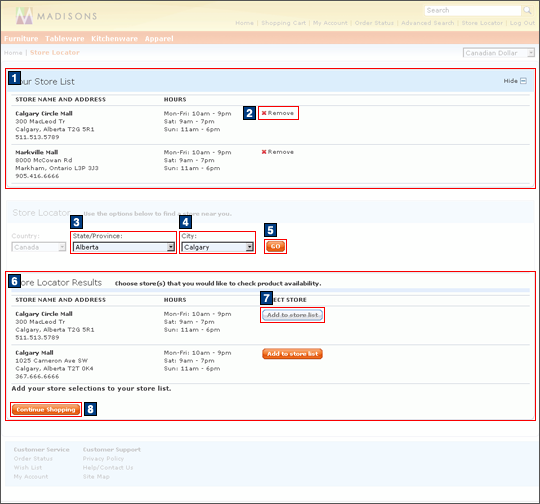
- The customer navigates to the Store Locator page and selects the appropriate , and clicks GO.
- The store location results are displayed, with the store name
and address, hours, and the option to add the store to the store list.If the store locator is accessed from the Product Details availability page, two additional options are available:
- A store location can be chosen as the pickup location when buying online and picking up in-store.
- The availability of all items in the shopping cart can be checked.
- Optional: Any store result can be added to Your Store List, for quickly accessing the selected store locations. Adding a store to the store list is required when checking out and choosing to pick up the items in-store:
Elements of the Store Locator Page
JSP files
- StoreLocatorDisplay.jsp represents the entire page.
- StoreLocator.jsp displays the headers and content of the store list, store locator selection, and store location results sections.
- 1 SelectedStoreList.jsp
- 3 ProvinceSelectionDisplay.jsp
- 4 CitySelectionDisplay.jsp
- 6 StoreLocatorResults.jsp
e-Marketing Spots
- There are no e-Marketing Spots on the Store Locator Page.
Store functions
- There are no options on the Store Locator page.
Links and buttons
- 2 When Remove is clicked, removePhysicalStore(physicalStoreId) is called.
- 5 When GO is clicked, refreshResultsFromCity(form, fromPage) is called.
- 7 When Add to store list is clicked, addPhysicalStore(physicalStoreId, optionIndex) and refreshStoreList(fromPage) are called.
- 8 When Continue shopping is
clicked:
- ProductDisplayURL is called if clicked from the Product Details page.
- TopCategoriesDisplayURL is called if clicked from the Store Locator page.