
Saved Orders List
Customers can use the Saved Orders list to view their current order, or to view a list of their saved orders and perform actions on those orders.
For example, customers can:- Create an order
- Delete a saved order
- Copy a saved order
- Set a saved order as the current order
- Add a saved order to a new requisition list
- Edit the description of a saved order
Elements of the Saved Orders List page
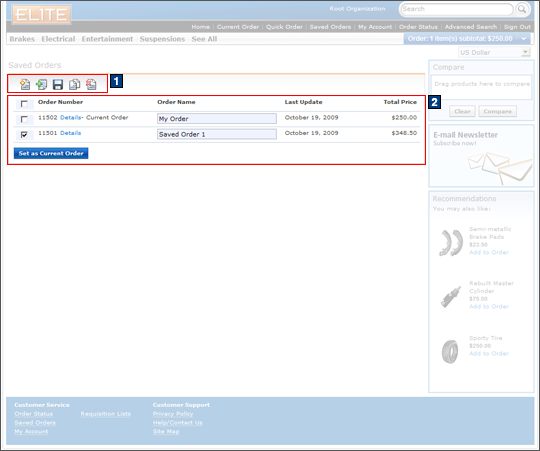
JSP files
- ListOrdersDisplay.jsp represents the entire
page which displays the saved orders list and the header, footer,
and sidebar.Includes:
- 1 SavedOrdersToolbar.jspf displays the toolbar buttons. This toolbar can be reused on other pages, such as the Current Order details page and the Saved Order details page.
- 2 ListOrdersDisplayTable.jsp displays the table of saved orders, pagination controls, and the Set as Current Order button.
e-Marketing Spots
- RightSideBarAds is the Sidebar Ad e-Marketing Spot that displays a Customer Support image.
- RightSideBarFeaturedProducts is the Featured Products e-Marketing Spot that displays a list of three product recommendations.
Store functions
- MultipleActiveOrders can be enabled or disabled. When this function is enabled, a link to the Saved Orders list displays in the footer of the store.
Links and buttons
- When the Create New Saved Order button is clicked, the AjaxOrderCreate command is called to create a new saved order.
- When the Delete Saved Order button is clicked:
- The AjaxOrderCancel command is called to cancel the selected saved orders.
- The AjaxSingleOrderCancel command
is called to cancel a saved order when only one order is selected. Note: The AjaxOrderCancel service calls the AjaxSingleOrderCancel command to cancel a saved order when all of the selected orders, except one, have been deleted.
- When the Copy button is clicked:
- The AjaxOrderCopy command is called to copy a saved order. When the AjaxOrderCopy action successfully completes in the ServiceDeclaration.js file, the AjaxOrderCalculate command is called to calculate the contract prices of the newly copied order and updates the price that is displayed in the Saved Orders table for the copied order.
- The AjaxSingleOrderCopy command
is called to copy a saved order when only one order is selected. Note: The AjaxOrderCopy service calls the AjaxSingleOrderCopy command to copy a saved order when all of the selected orders, except one, have been copied.When the AjaxSingleOrderCopy action successfully completes in the ServiceDeclaration.js file, the AjaxSingleOrderCalculate command is called to calculates the contract prices of an order and updates the price that is displayed in the Saved Order table for the newly copied order.
- When the Set as Current Order button is clicked, the AjaxSetPendingOrder command is called to update the current shopping cart with the saved order.
- The AjaxUpdatePendingOrder command is called to update the current order without triggering any refresh actions when the current order is initialized from the Saved Orders list.
- When the Add to Requisition List button
is clicked:
- AjaxLogonForm is called if AJAX My Account is enabled to display the saved order in the New Requisition List page.
- RequisitionListDetailView is called if AJAX My Account is disabled to display the saved order in the New Requisition List page.
- When the Save Order button is clicked:
- The AjaxOrderSave command is called to save multiple updated order descriptions. This command is called for each updated order description that needs to be saved. When all of the order descriptions, except one, have been saved, the AjaxSingleOrderSave command is called to save the single remaining unsaved order description.
- The AjaxSingleOrderSave command is called to save a single updated order description.