
My Account: New Requisition List
Customers can use the new requisition list page to create a new requisition list and add items to that list.
Elements of the My Account: New Requisition List page
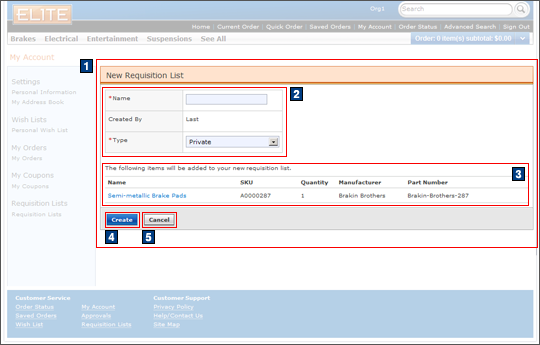
JSP files
- AjaxRequisitionListAdd.jsp represents the
entire page if AJAX My Account is enabled.Includes:
- 1 AjaxRequisitionListDetailDisplay.jsp represents the area that contains information for the creation of the requisition list.
- 2 RequisitionListAddForm.jsp displays the Name and Type fields for the new requisition list.
- 3 RequisitionListDetailTable.jsp represents the table portion of the requisition list, displaying a list of the items that will be added to the new requisition list.
- NonAjaxRequisitionListAdd.jsp represents
the entire page if AJAX My Account is disabled.Includes:
- 2 RequisitionListAddForm.jsp displays the Name and Type fields for the new requisition list.
- 3 RequisitionListDetailTable.jsp represents the table portion of the requisition list, displaying a list of the items that will be added to the new requisition list.
e-Marketing Spots
- There are no e-Marketing Spots on the My Account: New Requisition List page.
Store functions
- AJAX My Account can be enabled or disabled.
Links and buttons
- 4 When the Create button is clicked, the RequisitionListCreate command is called.
- 5 When the Cancel button is clicked, the browser navigates back to the previous page.