Opening mail
If you're an on-premises user (you use an HCL Domino® server at your company site), you can open your mail in HCL iNotes®.
Procedure
Open your mail in any of the following ways:
| Method | Image |
|---|---|
| Click the Mail icon on the Home page. |
 |
| Click the Mail icon in the header. |
 |
| Open the Workspace and then click the Mail file icon. | 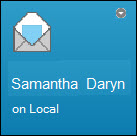 |
| (Windows™ only) Select . | Mail is opened directly. |