
PeerNest
Click the PeerNest tab to view the PeerNest activity information for all BigFix Clients 11.0.6 and later versions.
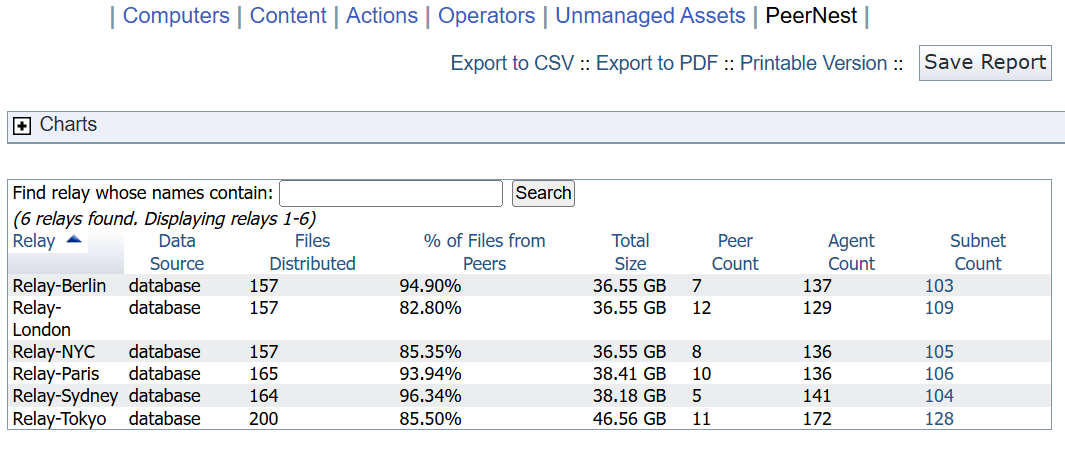
As with all typical views and reports, you can click a column header to sort the data (click again to change the direction of the sort).
You can also create charts.
The following section displays the PeerNest site gather data in your environment.
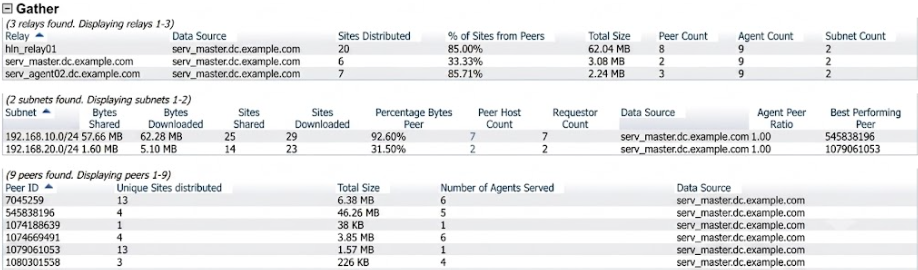
- Bytes Downloaded: Total data, in bytes, delivered to BigFix agents managed by this relay, from any source (peer or non-peer).
- Bytes Shared: Total data delivered to BigFix agents managed by this relay, from peers.
- Sites Shared: Number of distinct sites downloaded from peers under a subnet.
- Sites Downloaded: Number of distinct sites downloaded from any source under a subnet.
- Peer Host Count: Number of distinct BigFix agents in this subnet that acted as peers at least once.
- Requestor Count: Number of distinct agents in this subnet that downloaded from a peer host.
- Agent Peer Ratio: The ratio of the requestor count in a subnet to the peer host count in a subnet.
- Best Performing Peer: The computer ID of the peer host that contributed the most in terms of bytes shared.
- Unique Sites Distributed: Number of distinct sites distributed by the peer hosts.
- Total Size: Sum of bytes shared by the peer host.
For more details about how to enable the PeerNest feature, see Working with PeerNest and Peer to peer mode.
To enable the BigFix Client to collect the PeerNest activity data, use the
_BESClient_PeerNest_StatisticsEnabled setting (default value is 1).
To enable the PeerNest site gather, use the
_BESClient_PeerNest_EnableGather setting (default value is 0).