BigFix Application Control: System Architecture
The system architecture of Application Control v2.x introduces a centralized WDAC Integration Model in which all policy authoring, compilation, signing, and publication are consolidated on a dedicated WDAC Management Node. This topic describes the current v2.x architecture components, the end-to-end policy lifecycle, and contrasts it with the deprecated distributed architecture.
Current Application Control v2.x System Architecture
The latest version of Application Control v2.x introduces a centralized WDAC Integration Model. Instead of distributing policy creation and signing across individual endpoints, all WDAC policy authoring, generation, and signing is consolidated on a dedicated WDAC Management Node. The BigFix platform continues to handle deployment execution, endpoint management, and telemetry collection.
The following diagram illustrates the v2.x proposed architecture:
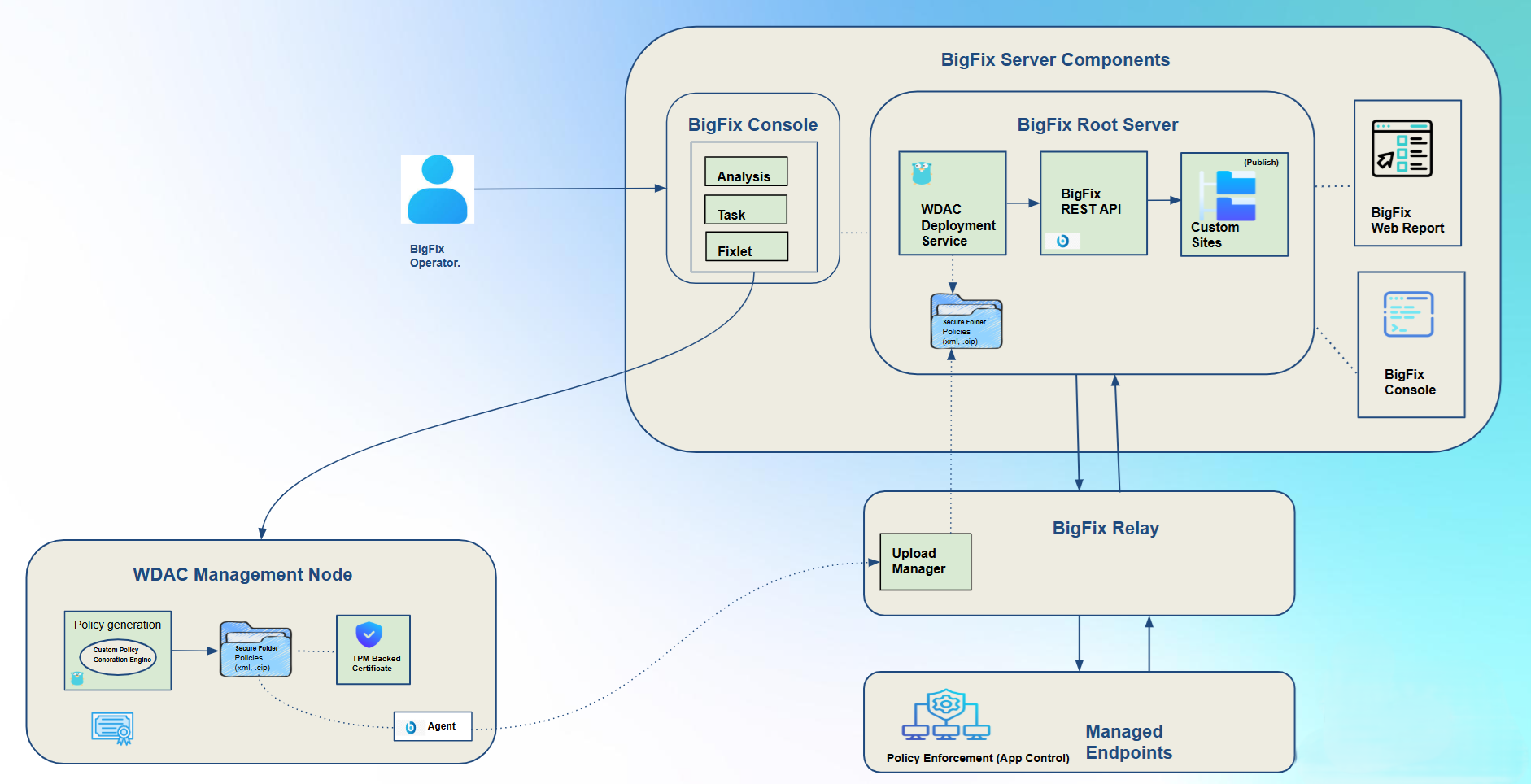
- Created and managed by an authorized Application Control Administrator or Operator.
- Generated, compiled, validated, and digitally signed on the dedicated WDAC Management Node.
- Protected using the TPM-backed signing key where applicable.
- Transferred through the controlled Secure Folder handoff to the BigFix Root Server.
- Published to the designated BigFix Custom Site.
- Deployed to targeted Windows endpoints through the native BigFix Agent and Fixlet/Task workflow.
- Processed and enforced locally by Windows Code Integrity.
- Reported through BigFix deployment status, endpoint analysis, and Application Control reporting.
For Application Control v2.x to work properly, the following major components are involved:
-
- BigFix Console / Fixlets & Tasks
-
Provides the operational interface through which an authorized Application Control Administrator or Operator initiates policy creation, signing, publication, and endpoint deployment workflows.
-
- Dedicated WDAC Management Node
-
A dedicated Windows machine used for Application Control policy management. It hosts:
- wdacmanager.exe (Policy generation and compilation engine)
- The TPM-backed signing certificate and private key where TPM-backed signing is configured.
- Approved reference binaries(applications) used during policy creation and validation.
- A BigFix Agent.
- The Management Node Secure Folder used for the controlled handoff of signed policy artifacts.
-
- Upload Manager
-
Transfers the signed policy artifact from the Secure Folder on the WDAC Management Node to the designated Secure Folder on the BigFix Root Server.
This provides a controlled handoff between the policy-management environment and the BigFix publication environment.
-
- BigFix Root Server / WDAC Deployment Service
-
Hosts the WDAC Deployment Service and its Watcher functionality. The Watcher monitors the Root Server Secure Folder for newly available signed policy artifacts. When a new artifact is detected, the WDAC Deployment Service validates the expected publication workflow and publishes the artifact to the designated BigFix Custom Site. The service uses protected credentials when authentication to the BigFix REST API is required.
-
- BigFix Custom Site & Central Policy Repository
-
The BigFix Custom Site serves as the centralized distribution mechanism and single source of truth (SSOT) for enterprise WDAC policies, staging published policy binaries (.cip), Base policy XMLs, Supplemental policy XMLs, and reference schemas.
- Central Policy Repository: Acts as the common repository hosting active policy XML states and compiled binaries, preventing version fragmentation across primary management nodes, emergency recovery nodes, and managed endpoint fleets.
- Policy XML Review & Staging: Enables authorized administrators to inspect active policy XML rules directly within the site environment prior to deployment.
- Offline Customization Workflow: Supports out-of-band policy authoring by allowing administrators to extract active XML templates from the site, perform necessary rule modifications offline, and ingest the modified XML into the compilation pipeline on the Dedicated WDAC Management Node.
- Temporary Node Site Subscription: To access or update repository XML templates, a Master Operator temporarily subscribes the Dedicated WDAC Management Node (or Emergency Node) to the Custom Site. Once policy artifacts are retrieved, staged, or synchronized, the operator unsubscribes the management node to preserve minimal attack surface boundaries and maintain strict site targeting isolation.
-
- BigFix Agent / Managed Windows Endpoints
-
The BigFix Agent executes the Deploy Policy Fixlet/Task on targeted Windows endpoints. The deployment action retrieves the published policy and:
- Places the policy in the required Windows Code Integrity policy location.
- Uses the EFI-mounted policy path where applicable.
- Invokes the applicable policy refresh mechanism, including RefreshPolicy.exe.
- Handles the defined fallback behavior, including restart when required for policy activation.
-
- Windows Code Integrity
-
Windows Code Integrity processes the deployed policy and performs the actual application authorization and enforcement on the endpoint. BigFix deploys and monitors the policy, but enforcement decisions remain the responsibility of Windows Code Integrity.
WDAC Policy Management Workflow: Policy authoring and version assignment are performed on the WDAC Management Node. The Custom Policy Generation Engine compiles the policy to a binary (.cip) and the TPM-backed certificate signs it. The WDAC Deployment Service publishes the signed artifact to a Custom Site, and BigFix Actions deploy it to target endpoints via the BigFix Relay. The OS kernel on each endpoint validates and enforces the policy, while BigFix Analysis collects enforcement state and telemetry for reporting.
Policy Governance: All WDAC policies are treated as immutable, version-controlled artifacts — existing policy versions cannot be modified in place. Every update produces a new version, preserving full history for audit and rollback. Supplemental Policies are scoped per department; cross-department policy reuse requires explicit administrative approval.
Centralized vs. Distributed Architecture: Key Improvements in v2.x
The following table summarizes the key improvements introduced in the newer Application Control v2.x compared to the distributed model used previously:
| Area | Older v2.x (Distributed Model) | Current v2.1.0 (Centralized Model) |
|---|---|---|
| Policy Creation | PowerShell (ConfigCI) runs on each individual endpoint; may be unavailable or restricted in hardened environments. | Centralized on the dedicated WDAC Management Node using a Custom Policy Generation Engine — no endpoint PowerShell dependency. This also benefits hardened/locked-down endpoint configurations |
| Code Signing and Trust | Self-signed certificates generated per machine, leading to distributed trust fragmentation and inconsistent trust roots. | Single TPM-backed RSA certificate on the WDAC Management Node; private key never leaves the TPM, eliminating trust fragmentation. |
| Policy Governance | No centralized versioning; supplemental policies are used for per-endpoint exceptions, making enterprise-wide policy updates complex and error-prone. | Immutable, version-controlled policy artifacts with full audit history and rollback capability. Supplemental Policies are scoped per department; cross-department reuse requires explicit administrative approval. |
| Policy Artifact Handoff | No controlled handoff mechanism; policy binaries are managed locally per endpoint or distributed without a defined integrity checkpoint. | Controlled Secure Folder handoff between the WDAC Management Node and BigFix Root Server via the Upload Manager, providing a defined integrity boundary between the policy-management and publication environments. |
| Communication Security | No standardized secure communication model between endpoint tooling and the BigFix Server for policy operations. | mTLS between BigFix Console and WDAC Management Node; TLS with TPM-signed JWT authentication between WDAC Management Node and Deployment Service. |
| Operational Stability | Administrative actions on endpoints can inadvertently disrupt locally deployed WDAC configurations, causing inconsistencies across machines. | Clear operational boundaries — WDAC policy lifecycle is owned by the WDAC Management Service; BigFix platform owns deployment and endpoint management, reducing risk of inadvertent disruption. |
| Scalability | Each endpoint independently manages its own policy, making fleet-wide updates slow and coordination complex. | Centralized policy publication via Custom Sites and BigFix native deployment workflow allows consistent, scalable rollout across the entire managed fleet. |
| Reporting and Compliance | Limited centralized visibility; enforcement state and events are not systematically collected or correlated. | Centralized compliance dashboards, deployment reporting, Code Integrity event collection, and policy lifecycle history via BigFix Web Reports. |
| User Access Model | Administrative actions may be performed directly on endpoints, bypassing centralized access control. | All WDAC operations are accessible exclusively through BigFix UI, governed by native BigFix RBAC; direct access to the WDAC Management Node is not permitted. |
| Attack Surface Management | No node isolation model; endpoint tooling remains persistently accessible. | Temporary site subscription model — the WDAC Management Node (or Emergency Node) is subscribed to the Custom Site only when retrieving or staging policy artifacts, then unsubscribed to maintain strict targeting isolation and minimal attack surface. |
| Central Policy Repository | No single source of truth; policy binaries and XMLs are fragmented across endpoints with no canonical reference. | BigFix Custom Site acts as the SSOT for all active policy binaries (.cip), Base/Supplemental XMLs, and reference schemas — preventing version fragmentation across management nodes, recovery nodes, and the managed endpoint fleet. |
Deprecated Application Control v2.x System Architecture
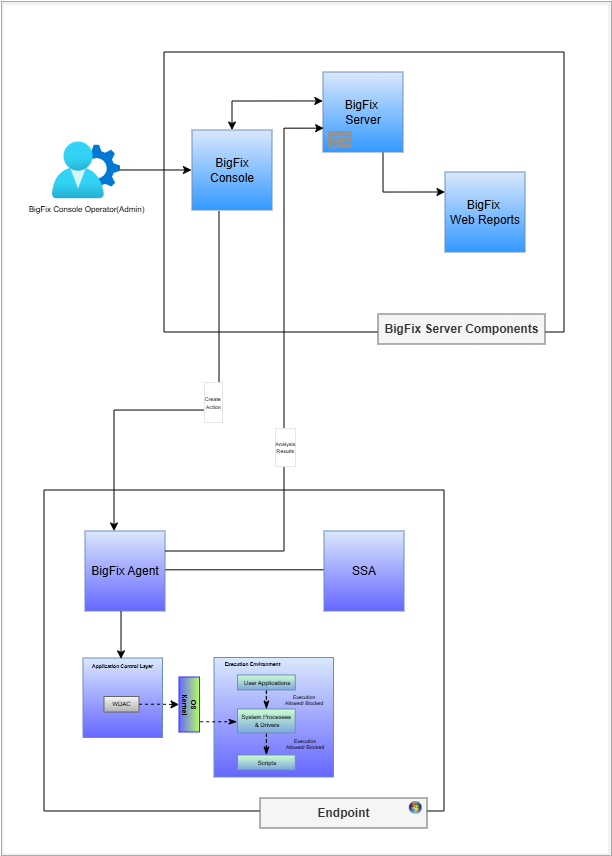
The above diagram shows how the BigFix Server components interact with BigFix endpoints and other components.
The system architecture diagram illustrates the interaction between BigFix Server components and BigFix endpoints. This visual representation aids in understanding the structure and functionality of the BigFix Application Control system.
-
- BigFix Server Components
- Application Control mainly utilizes the following three BigFix® Server Components:
-
- BigFix® Core Server
- This is the central processing component for this solution. It manages all communications with the BigFix clients (agents), distributes content (like Fixlets, tasks, and analysis), and enforces policies.
-
- BigFix® Console
- The console is the primary administrative interface for BigFix Application Control. It is a key part of the server-side infrastructure used to manage all aspects of the environment, including creating content and deploying actions. All BigFix Console integrations will be in the External Site.
-
- BigFix® Web Reports
- It provides a web-based interface for
reporting and data visualization. The BigFix Agent
on the endpoint runs an analysis and sends the
result to the BigFix server. Below administrative
report(s) that are shown for Application Control:
- Effective Policy on Endpoint
-
-
- Endpoints
- On the endpoints the BigFix agent is installed which communicates with Application Control Layer to enforce allowlisting or blocklisting of applications using kernel-based WDAC.
WDAC Enforcement Model: The Application Control policy is authored in XML, then compiled to binary, and then is digitally signed. The digitally signed certificate is then deployed to <EFI System Partition>\EFI\Microsoft\Boot\CiPolicies\Active\. The OS kernel validates the policy and only the allowlisted applications are allowed to execute.