在 AppScan 整合自訂 Script 以增強 DAST 掃描功能
使用 AppScan 將自訂 Script 整合至 DAST 掃描,藉此動態操作 HTTP 要求和回應,並提升安全測試的彈性與效益。
在 AppScan 啟動自訂 Script
若要停用自訂 Script:
- 移至工具 > 選項 > 進階標籤。
- 將 CustomScripts.Enable 設定設為 "False"。
實作並管理自訂 Script 以增強 DAST 掃描
- 選擇配置設定的「進階」區段下的「自訂 Script」。
- 按一下 + 新增按鈕。
- 視需要,編輯預先填入的「名稱」欄位。
- 為 Script 選擇合適的「執行環境定義」::
- 「要求前」適用於在傳送要求前執行的 Script。
- 「回應後」適用於在接收回應後執行的 Script。
- 「參數」適用於需要多重步驟或填寫表單的作業。您可以搭配
setResultValue方法使用此環境定義,讓 Script 傳回結果至 AppScan。
- 在 JavaScript 欄位(程式碼編輯器)輸入 JavaScript,並在 AppScan 環境中使用
Ctrl+Space 以取得自動完成的建議。
驗證 Script 的語法是否準確,以及是否與 AppScan 支援的 JavaScript 版本相容。如需詳細指南,請參閱 JavaScript 程式碼。
Tip: 儘管無法防止執行錯誤的語法,但在程式碼編輯器內會反白顯示錯誤語法,亦有工具提示可識別。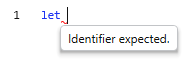
範例 1:將登入詳細資料自動新增至您的要求(不使用登入管理配置)。
// Before each request
if(request.method == "POST") {
    request.body = JSON.stringify({
        "username": "jsmith",
        "password": "demo1234"
    })
}
範例 2:將來自回應的 API 金鑰儲存於廣域變數中。
// After each response
try {
        var result = JSON.parse(response.body)
        log(`parsing: ${JSON.parse(response.body).Authorization}`)
        if(result.Authorization) {
            environment.globalVariables.addOrUpdate("Authorization", result.Authorization)
            log(`key = ${result.Authorization}`)
        }
}
catch (error) {
        log(error)
}
範例 3:若有授權 API 金鑰,請將其附加至標頭。
範例 4:添加另一個具有不同值的標頭。// Before each request var authorization = environment.globalVariables.get("Authorization") if(authorization) { request.headers.set("Authorization", authorization) log(`authorization is ${authorization}`) }
在每個請求函數之前添加唯一標頭 function addUniqueHeader(headerName, value) { if(!(request.headers[headerName] != null && request.headers[headerName].includes(value))) { request.headers.add(headerName, value) } } addUniqueHeader(“headerName”,”Value”) - 按一下新增以儲存 Script。Script 會新增至清單且預設為啟用。Note: 在 DAST 掃描期間,每個 HTTP 要求或回應都會執行這些 Script。睿智運用此功能,便可提升掃描效率和效益。在上線部署前,先於控制環境中測試 Script,以確保如預期運作。
- 您可利用啟用勾選框,從自訂 Script 清單選擇啟用或停用 Script。
- 使用「啟用」勾選框管理 Script,或在 Script 清單中編輯、刪除或重新排序。

- 按一下開始完整掃描以執行掃描。
- 結果:每項要求或回應都會執行啟用的 Script。您可以從資料 > 要求標籤 > 要求/回應,檢視 Script 的詳細資料。Note: 匯出範本中的自訂 Script 時,其預設為加密。若要停用加密,請在掃描配置中,將「一般:加密機密資料」設定調整為 False。
AppScan 的自訂 Script 範例
AppScan 的自訂 Script 範例已上傳至 GitHub 儲存庫。
在 AppScan 中編寫有效 JavaScript 程式碼的準則
環境定義
要求:先修改要求資料,再將其傳送至伺服器。每個要求物件都包含標頭、內文、路徑和方法等內容,可進行操作以自訂 DAST 掃描。- 標頭:包含所有要求標頭。您可新增、移除或修改預設標頭以外的任何標頭。
// 添加新的標頭如果不存在;如果存在則覆蓋
request.headers.set(key, value)
// 添加標頭
request.headers.add(key, value)
CAUTION: 由於腳本可能在每個請求中執行多次,因此建議使用set方法新增標頭,因為它會取代現有標頭並防止重複。僅在需要具有相同名稱但不同值的多個標頭時使用add方法。add方法不會添加標頭,如果已經存在具有相同名稱和值的標頭。小心避免重複標題,因為這可能會導致錯誤。// Remove header request.headers.remove(key)
// Modify header
request.headers[key]
// Examples
request.headers.add("Authorization", "MyCoolApiKey")
request.headers.set("Authorization", "SecondApiKey")
request.headers.remove("Authorization")
request.headers['Authorization'] = "myapikey3"
預設標頭(不分大小寫):這些標頭為唯讀且無法修改。- 主機:識別傳送要求至的主機。
- 內容長度:計算要求大小,並將此資訊傳送至伺服器。
- 內文:包含要求內文的相關資訊。內文屬於「字串」類型。
// Access body
request.body
// Example
request.body = "{ "username":"user" }"
- 路徑:包含要求預定所用端點的相關資訊。端點格式排除基本 URL(例如
/api/v1/test)。此內容為唯讀;即使您嘗試在執行 Script 前對其進行變更,該內容仍與第一次設定時相同。// Access url path request.path
// Example if (request.path.startsWith("api/v1/test")) - 查詢:包含現行要求的查詢字串和參數(若有的話)。您可以從此物件新增或移除查詢參數。每個值都視為單一物件處理,例如 'key=value'。您使用 'getQueryString' 時,系統會給您一個字串,該字串會以 '&' 符號串連所有項目。此字串是項目的複本,因此若您變更字串,也只會變更查詢的複本。Note: AppScan 在查詢參數為空白時,會省略查詢定界字元 (‘?’) 。
// Retrieve the current query string
request.query.getQueryString()
// Example
// Add new value (or update existing one)
request.query.addOrUpdate("appscan","appscanvalue")
// Check if value exist
request.query.contains("appscan") // for key only check
request.query.contains("appscan=appscanvalue") // for key and value check
// Remove an item
request.query.remove("appscan") // for key only check
request.query.remove("appscan=appscanvalue") // for key and value check
request.query.clear() // remove all values
- 方法:要求的方法(例如 GET/POST/etc)。此內容為唯讀;即使您嘗試在執行 Script 前對其進行變更,該內容仍與第一次設定時相同。
// Access to the method
request.method
// Example
if (request.method == "GET")
- 內文:包含要求的回應內文。回應採用字串格式,因此您必須視需要手動轉換(例如轉換至 JSON)。此內容為唯讀;即使您嘗試在執行 Script 前對其進行變更,該內容仍維持相同。
// Access body
response.body
// Example
let json = JSON.parse(config.response)
- 路徑:包含回應端點的相關資訊。
// Access to the relative url
response.path
// Example if (response.path.startsWith("api/v1/test")) - 狀態:儲存回應狀態的詳細資料。狀態是具有以下內容的物件:
// Access status
response.status.statusCode // A numeric representation of the status
response.status.statusDescription // The description of the status code
response.status.statusLine //the whole status line including the http version
// Example
if (response.status.statusCode == 200) // check only the number
if (response.status.statusDescription == "OK") // Check only the description
if (response.status.statusLine == "HTTP1.1 200 OK") // Full line
- 標頭:包含所有回應標頭。您可新增、移除或修改預設標頭以外的任何標頭。
// Add header
response.headers.add(key, value)
// Override header if exist
response.headers.set(key, value)
// Remove header
response.headers.remove(key)
// Modify header
response.headers[key]
// Examples
response.headers.add("Authorization", "MyCoolApiKey")
response.headers.set("Authorization", "SecondApiKey")
response.headers.remove("Authorization")
response.headers['Authorization'] = "myapikey3"
- 上層要求:包含在回應前所傳送要求的物件。要求資料為唯讀。要求具有先前用於定義要求物件的所有內容。
// Example
response.request.path //- access to the path from the request
環境資料
短期資料物件會儲存重要資訊,直到作業結束為止,例如在您暫停、停止或完成掃描、登入或執行手動測試時。
- 廣域變數:廣域變數資料具有金鑰-值資料結構,專為儲存使用者特有的資料配對而設計。金鑰為獨一無二(表示兩個元素不會有相同金鑰,但多重元素可共用相同值),這一點對於在執行 Script 之間共用資料而言非常實用。
每次完成新掃描或重新掃描時,即會清除此資料。
// Add data to the globals or update existing one
environment.globalVariables.addOrUpdate(key, value)
// Remove key data from the globals
environment.globalVariables.remove(key)
// Read data - retrieves the value for the current key (without removing it)
environment.globalVariables.get(key)
- 掃描狀態:包含現行掃描的相關資訊。
// determine if the current phase is explore phase
environment.status.isInExplore()
// determine if the current phase is test phase
environment.status.isInTest()
記載
啟用 Script 的記載功能,以協助除錯和識別問題。'console.log' 指令在此處無法運作。請改用 'log' 這個字,後面接續著引號中的訊息。此外,如果在引擎運作期間,發生無關 JavaScript 語法或使用的錯誤,該錯誤會記載在引擎追蹤日誌中。
// Log message to file
log("my cool logging")

// Log message with custom source
log("message", "my-cool-source")
結果
設定執行自訂 Script 的結果,並搭配「參數」執行內容運作。AppScan 將視需要使用此結果。
// Sets the script execution result
setResultValue("result")
限制
- 避免在 Script 中使用限制方法,以避免執行失敗及錯誤。
- eval
- 函數(建構子)
- setTimeout
- setInterval
若使用上述任一方法,將導致 Script 失敗且產生錯誤。
- 遵循 Script 執行限制以確保最佳效能,並避免資源過度使用。
- 執行時間為 5 秒(最長)
- 64 MB 記憶體配置
如果這些限制至少有一項超出,Script 將會失敗。
錯誤處理
如果 Script 使用任何受限功能,並發生錯誤或異常狀況,則會停止運作。此失敗會暫停目前的掃描,並將錯誤詳細資料記錄在「UserScript.log」檔案中以供進一步檢閱。
載入以 Script 配置的範本
您可以載入透過已啟用 Script 進行配置的範本來開始掃描。使用 Script 預先配置 demo.testfire 說明檔的範例範本,可在 Program Files (x86)\HCL\AppScan Standard\Templates 取得。
AppScan 支援的 JavaScript 版本
- ES6 (2015)
- 產生器
- 尾呼叫
- ES8 (2017)
- 共享記憶體與 Atomic
- ES15 (2024)
- Atomics.waitAsync
- 正規表示式標誌 \v