Integrating custom scripts in AppScan for enhanced DAST scanning
Integrate custom scripts into your DAST scans with AppScan to manipulate HTTP requests and responses dynamically, enhancing the flexibility and effectiveness of your security testing.
Activating custom scripts in AppScan
To deactivate custom scripts:
- Go to Tools > Options > Advanced tab.
- Set the CustomScripts.Enable setting to "False".
Implementing and managing custom scripts for enhanced DAST scans
- Select Custom scripts from the Advanced section in the configuration settings.
- Click the + Add button.
- Edit the prepopulated Name field as necessary.
- Choose the appropriate Execution context for your
script: :
- Before requestfor scripts to run before sending requests.
- After response for scripts to run after receiving responses.
- Parameter for tasks that involve
multiple-steps or filling out forms. You can use this context in
conjuction with the
setResultValuemethod to allow scripts to return results to AppScan.
- Enter your JavaScript in the JavaScript field
(code-editor) and use Ctrl+Space for auto-complete
suggestions within the AppScan environment.
Verify your script for syntax accuracy and compatibility with the supported JavaScript version in AppScan. For detailed guidelines, refer to JavaScript code.
Tip: Syntax errors are highlighted within the code editor and can be identified by tooltips, although they do not prevent script execution.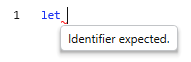
Example 1: Automatically add login details to your requests (without using Login Management configuration).
// Before each request
if(request.method == "POST") {
    request.body = JSON.stringify({
        "username": "jsmith",
        "password": "demo1234"
    })
}
Example 2: Store API keys from responses in global variables.
// After each response
try {
        var result = JSON.parse(response.body)
        log(`parsing: ${JSON.parse(response.body).Authorization}`)
        if(result.Authorization) {
            environment.globalVariables.addOrUpdate("Authorization", result.Authorization)
            log(`key = ${result.Authorization}`)
        }
}
catch (error) {
        log(error)
}
Example 3: Append the authorization API key to the header if it exists.
Example 4: Add another header with a different value.// Before each request var authorization = environment.globalVariables.get("Authorization") if(authorization) { request.headers.set("Authorization", authorization) log(`authorization is ${authorization}`) }
// Before each request function addUniqueHeader(headerName, value) { if(!(request.headers[headerName] != null && request.headers[headerName].includes(value))) { request.headers.add(headerName, value) } } addUniqueHeader(“headerName”,”Value”) - Click Add to save your script. The script is added to
the list and enabled by default. Note: These scripts are executed for each HTTP request or response during the DAST scan.Use this feature wisely to enhance the efficiency and effectiveness of your scans. Test your scripts in a controlled environment before live deployment to ensure they function as expected.
- You can choose to enable or disable a script from the list of custom scripts using the Enable checkbox.
- Manage your scripts using the Enable checkbox or by
editing, deleting, or reordering them in the script list.

- Click Start full scan to run the scan.
- Result: The enabled scripts are executed for each request or
response. You can view the details of the scripts from
Data > Requests tab >
Request/Response. Note: Custom scripts are encrypted by default when exported in a template. To disable encryption, adjust the General: Encrypt sensitive data setting to False in the scan configuration.
Examples of custom scripts for AppScan
Examples of custom scripts for AppScan are uploaded to the GitHub repository.
Guidelines for writing effective JavaScript code in AppScan
Context
Request: Modify request data before it is sent to the server. Each request object includes properties such as headers, body, path, and method, which you can manipulate to customize your DAST scans.- Headers: Contains all the request headers. You can add, remove or modify
any header except the default headers.
// Adds new header if absent; overrides if present
request.headers.set(key, value)
// Adds header
request.headers.add(key, value)
CAUTION: Since the scripts might execute multiple times per request, it is advisable to use thesetmethod to add new headers, as it replaces existing headers and prevents duplicates. Use theaddmethod only when you need multiple headers with the same name and different values. Theaddmethod will not add a header if one with the same name and value already exists. Be careful to avoid duplicating headers, as this can cause errors.// Remove header request.headers.remove(key)
// Modify header
request.headers[key]
// Examples
request.headers.add("Authorization", "MyCoolApiKey")
request.headers.set("Authorization", "SecondApiKey")
request.headers.remove("Authorization")
request.headers['Authorization'] = "myapikey3"
Default headers (not case-sensitive): These are read-only and cannot be modified.- Host: Identifies the host that the request is being sent to.
- Content-Length: Calculates the size of the request and sends this information to the server.
- Body: Contains information about the body of the request. The body is of
type 'string'.
// Access body
request.body
// Example
request.body = "{ "username":"user" }"
- Path: Holds the information about the endpoint to which the request is
intended. The endpoint format excludes the base-url (e.g.
/api/v1/test). This property is read-only; it remains the same as when it was first set, even if you attempt to change it before running the script.// Access url path request.path
// Example if (request.path.startsWith("api/v1/test")) - Query: Holds the query string and parameters (if there are any) for the
current request. You can add or remove query parameters from this object. Each
value is treated as a single object, like 'key=value'. When you use
'getQueryString', it gives you a string that has all the items concatenated with
an '&' sign. This string is a copy of the items, so if you change the
string, you're only changing a copy of the query.Note: AppScan omits the query delimiter (‘?’) if the query parameter is empty.
// Retrieve the current query string
request.query.getQueryString()
// Example
// Add new value (or update existing one)
request.query.addOrUpdate("appscan","appscanvalue")
// Check if value exist
request.query.contains("appscan") // for key only check
request.query.contains("appscan=appscanvalue") // for key and value check
// Remove an item
request.query.remove("appscan") // for key only check
request.query.remove("appscan=appscanvalue") // for key and value check
request.query.clear() // remove all values
- Method: Method of the request (e.g. GET/POST/etc). This property is
read-only; it remains the same as when it was first set, even if you attempt to
change it before running the script.
// Access to the method
request.method
// Example
if (request.method == "GET")
- Body: Holds the response body from the response. The response is in
string format, so you need to convert it manually if needed (to JSON for
example). This property is read-only; it remains the same even if you
attempt to change it before running the script.
// Access body
response.body
// Example
let json = JSON.parse(config.response)
- Path: Contains the information about the response endpoint.
// Access to the relative url
response.path
// Example if (response.path.startsWith("api/v1/test")) - Status: Stores details about the response status. The status is an
object with the following properties:
// Access status
response.status.statusCode // A numeric representation of the status
response.status.statusDescription // The description of the status code
response.status.statusLine //the whole status line including the http version
// Example
if (response.status.statusCode == 200) // check only the number
if (response.status.statusDescription == "OK") // Check only the description
if (response.status.statusLine == "HTTP1.1 200 OK") // Full line
- Headers: Contains all the response headers. You can add, remove or
modify any header except the default headers.
// Add header
response.headers.add(key, value)
// Override header if exist
response.headers.set(key, value)
// Remove header
response.headers.remove(key)
// Modify header
response.headers[key]
// Examples
response.headers.add("Authorization", "MyCoolApiKey")
response.headers.set("Authorization", "SecondApiKey")
response.headers.remove("Authorization")
response.headers['Authorization'] = "myapikey3"
- ParentRequest: An object that contains the request that was sent
prior to the response. The request data is read-only. The request has all
the properties as the previously defined request object.
// Example
response.request.path //- access to the path from the request
Environment Data
A short-term data object stores important information until the task ends, like when you pause, stop, or complete a scan, log in, or run a manual test.
- Global variables: The global variables data is a key-value
data structure designed to store user-specific data pairs. The keys are
unique (meaning no two elements can have the same key, though
multiple elements can share the same value), which is useful for sharing
data between running scripts.
This data is erased every time a new scan or rescan is done.
// Add data to the globals or update existing one
environment.globalVariables.addOrUpdate(key, value)
// Remove key data from the globals
environment.globalVariables.remove(key)
// Read data - retrieves the value for the current key (without removing it)
environment.globalVariables.get(key)
- Scan status: Contains information about the current scan.
// determine if the current phase is explore phase
environment.status.isInExplore()
// determine if the current phase is test phase
environment.status.isInTest()
Logging
Enable logging features in the script to help with debugging and identifying problems. The command 'console.log' does not function here. Instead, use the word 'log' followed by a message in quotes. Also, if there's an error during the engine's operation that is not related to JavaScript syntax or usage, this error is recorded in the engine trace log.
// Log message to file
log("my cool logging")

// Log message with custom source
log("message", "my-cool-source")
Results
Sets the result of the custom script execution and works in conjunction with the 'Parameter' context. AppScan will use this result when necessary.
// Sets the script execution result
setResultValue("result")
Constraints
- Avoid using restricted methods in your scripts to prevent execution failures and
errors.
- eval
- Function (constructor)
- setTimeout
- setInterval
Using any of these methods will cause the script to fail and produce an error.
- Adhere to script execution limits to ensure optimal performance and avoid
resource overuse.
- 5 seconds (max) of execution time
- 64 MB of memory allocation
If at least one of these limits is exceeded, the script will fail.
Error handling
If the script uses any restricted functions and encounters an error or exception, it stops working. This failure pauses the current scan and the error details are recorded in the ‘UserScript.log’ file for further review.
Loading template configured with scripts
You can start a scan by loading a template configured with scripts enabled. A sample template, pre-configured with scripts for the demo.testfire description file, is available at Program Files (x86)\HCL\AppScan Standard\Templates.
JavaScript versions supported by AppScan
- ES6 (2015)
- Generators
- Tail calls
- ES8 (2017)
- Shared memory and atomics
- ES15 (2024)
- Atomics.waitAsync
- Regular expression flag \v