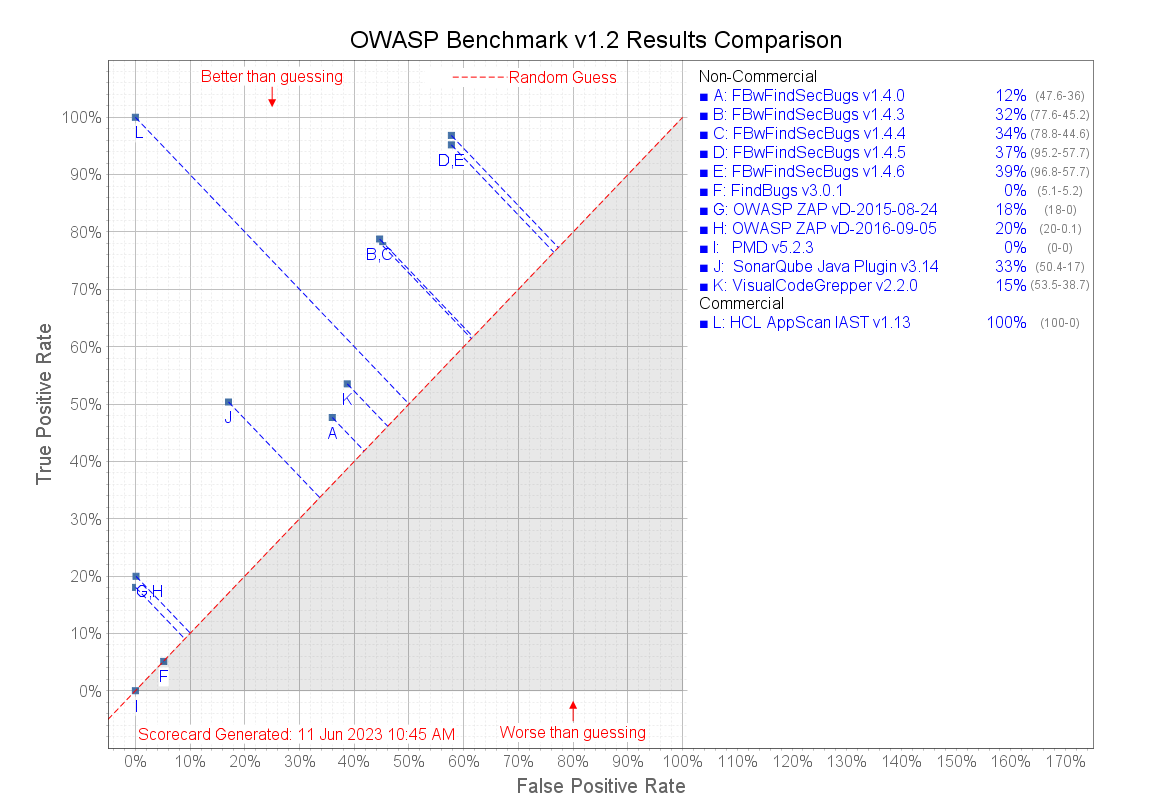
The OWASP Benchmark Project is a Java test suite designed to evaluate software
vulnerability detection tools. The HCL AppScan IAST Java Agent is fully compliant with the OWASP
Benchmark.
Procedure
To run OWASP Benchmark with AppScan IAST Java agent:
-
Clone
BenchmarkJava and BenchmarkUtils from https://github.com/OWASP-Benchmark.
-
Open a command prompt, change to the
BenchmarkUtils directory and, run
mvn install -DskipTests.
-
In AppScan Enterprise: Start an IAST Java session and download the agent zip as described
in Downloading and deploying Java IAST agent on the Web server.
-
Extract the contents of the
zip file.
-
In the extracted
JAR, locate secagent.jar in the
jar_deployment folder and copy it to
BenchmarkJava\tools\HCL.
-
From a command prompt, run
runBenchmark_wHCL.bat, and wait for a few
moments until the message '[INFO] Press Ctrl-C to stop the container...'
is displayed.
-
Open another command prompt and run
BenchmarkJava\runCrawler.bat.
-
After the crawl is complete, press Ctrl+C to stop the Benchmark
Tomcat instance. When asked
'Terminate batch job (Y/N)?', enter
N.
-
Run
BenchmarkJava\createScorecards.bat
The test results can be found in:
       BenchmarkJava\scorecard\Benchmark_v1.2_Scorecard_for_HCL_AppScan_IAST_v{IAST_version}
       files
Figure: OWASP Benchmark v1.2 result comparison