Custom Parameters tab
The Custom Parameters tab of Parameters and Cookies view in the Configuration dialog box.
About this task
Parameters and Cookies view lets you create and manage custom parameters with formats that AppScan® would not be able to recognize automatically.
AppScan® automatically recognizes parameters in standard HTML format, but if parameters are in other formats (for example within the path or within another parameter), you need to define them in AppScan® so it can recognize, follow and manipulate them during scanning.

Procedure

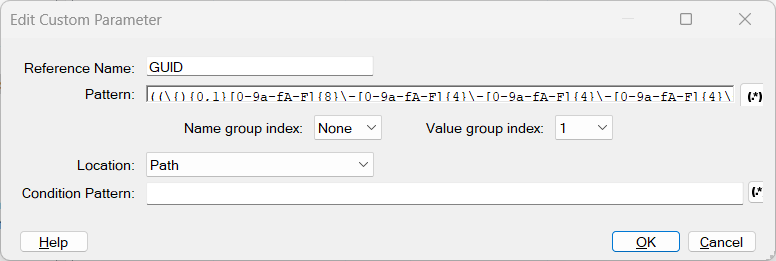
The Add Custom Parameter dialog box opens. Its fields and options are described in the table following.
|
Setting |
Description |
|---|---|
|
Reference Name |
Assign the parameter an easily recognizable name. Custom parameters appear on the Application Data tree with the prefix "__patternParameter__" followed by the parameter name. |
|
Pattern |
A regular expression containing one or more groups that defines the parameter. A "group" is a section of the regular expression delineated by parentheses. One of the groups contains the parameter value, and there may also be a group that contains the name. You can open the Expression Test PowerTool by clicking |
|
Name group index |
(Optional) If the name is included in the regular expression, indicate which group (1,2,3...) contains it. AppScan® uses this value to "count through the groups" and locate the parameter name (see example below). |
|
Value group index |
Indicate which group (1, 2, 3...) in the above regular expression contains the parameter's value. AppScan® uses this value to "count through the groups" and locate the parameter value (see example below). |
|
Location |
Indicate which component of the request contains this parameter: Body / Path / Query. Note: The selection you make here will apply to both the Pattern and the Condition Pattern (if any), but not to the Response Pattern. |
|
Condition Pattern |
(Optional) You can enter a regular expression that defines the whole component (Body, Path or Query) containing the parameter. AppScan® will create the parameter only when the whole component matches this pattern; saving scan time. For example, if the parameter is located in the Body, and the Body must be XML, you could set as the Condition Pattern a regex that verifies that the Body starts and ends with XML tags. In cases where it does not, AppScan® will not create the parameter. |
 , which opens the Expression Test PowerTool, to help you verify the syntax of the
regular expression.
, which opens the Expression Test PowerTool, to help you verify the syntax of the
regular expression.Group indexes
To understand the indexing system for groups in the Pattern regular expression, consider the following example:
Pattern: (abc)((def)(ghi))Group 1: (abc)
Group 2: ((def)(ghi))
Group 3: (def)
Group 4: (ghi)