
Subflow tasks
The task type that sets or references a valid workflow within a task. It is a workflow that is nested within a task. You can extend the functionality by adding multiple subflow tasks in a workflow, with each task containing a single workflow. The subflow task facilitates simultaneous submission of multiple workflows.
- Overview
- The following hierarchical chart shows how multiple workflows
are managed under a single workflow
using subflow tasks.
Figure 1. Subflow task_Hierarchical view 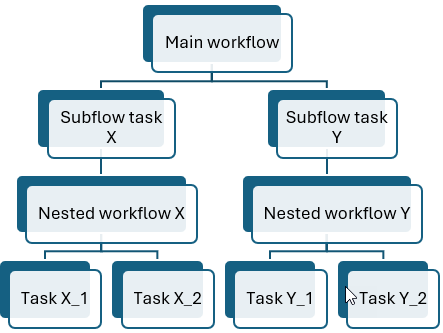
A subflow task can contain a single workflow (nested workflow). The tasks in the nested workflow can be either any plug-in type or another subflow task. You can add more subflow tasks to the main workflow, or under existing nested workflows creating one more level, to include more nested workflows. The subflow task can simplify complex processes with numerous workflows and tasks, by consolidating them into a single task.
In a nested workflow, only the time and external dependencies at the workflow level are ignored. When submitted, the dependencies of the tasks within the nested workflows are not ignored and are taken into account along with the main workflow dependencies. The status of a subflow task is in sync with the nested workflow and reaches its final status when the nested workflow completes.
When you rename a workflow that is referenced in any subflow tasks, all those instances are also updated with the new name. The deletion of such referenced workflows is also prevented, ensuring data integrity.
You can create subflow tasks by adding specific attributes of subflow tasks with the mandatory attributes of a task definition. The specific attribute for the subflow task is the workflow key or workflow ID. You can provide any one or both to create a subflow task.
You can also provide key-value pairs as variables for the task. It transfers data from the main workflow to subflow tasks. The values can contain JSONata expressions that are resolved after the task is completed. This key-value pairs are resolved when the task is run. Any terms in the subflow task definition that matches the key in the key-value pair is replaced with their corresponding values, effectively resolving the subflow task definition.
| Attribute | Description | Mandatory option |
|---|---|---|
| Workflow key or Workflow ID | Specify a valid workflow key (workstation folder with workstation name) or workflow ID. You can specify both or any one of them. | Yes |
| key-value | Specify key-value pairs and you can provide JSONata expressions as values. If the specified keys are available in the subflow task definition, then it is replaced by the corresponding values to resolve the definition. | No |
If you add the main workflow itself as a nested workflow in a subflow task and submit, it still runs. This creates an infinite loop and can be prevented by using the maxNestinglevel attribute in the values.yaml file. You can specify a positive integer and the maximum supported value is 2147483647. It defines the maximum level a subflow task can nest, when the main workflow itself is referenced as a nested workflow, preventing infinite loops. After this level, the subflow task moves to FAIL.
The attribute is not just to use in this scenario, it sets the maximum nesting level that a main workflow can contain and run without fail. A nested workflow can contain another nested workflow, and that one can contain yet another, facilitating multiple levels of nesting. This hierarchy can continue within a specified a limit, defined by the maxNestinglevel attribute, after which the task moves to FAIL.
Subflow tasks in a single workflow can share data between each other. For more information, see Output properties and data transfer between workflows.
- Cancelling subflow tasks
-
You can stop (kill) a subflow task after submitting only when it is in one of the following statuses:
- INTRO
- READY_SUBMITTED
- EXEC
If the task is of the subflow type and is in INTRO, or READY_SUBMITTED, or EXEC status, then it moves to ABEND/ERROR. For any other status, the task moves to CANCELLED.
If the task is not of the subflow type and is in EXEC status, then it moves to ABEND/ERROR. For any other status, the task moves to CANCELLED.