
Managing matching criteria
In this topic you can find a description of matching criteria.
Matching criteria are resolution rules that identify the predecessor task or workflow when there is one or multiple instances of the same predecessor task or workflow in the plan. The successor runs when the dependency is satisfied by the predecessor task or workflow.
Matching criteria are defined at external follows dependency level. When no matching criteria is specified at external follows dependency level, by default the criteria defined at workflow level are evaluated. If no matching criteria has been defined, the closest preceding resolution rule applies.
Matching criteria select the possible resolution instances and, among them, the closest preceding instance resolves the dependency. If there is not a preceding instance, the dependency is resolved by the closest succeeding instance.
For more information about the time zone that is used to resolve dependencies, see Dependency resolution.
- Closest preceding
- Closest preceding matching criteria selects predecessors that have a start
time which is scheduled before the scheduled start time of the dependent
instance. This is the default criteria, so if no matching criteria is
specified at external follows dependency level or workflow
level, the closest preceding resolution rule is applied. Closest preceding matching
criteria shows a workflow
Js1that has a dependency on the closest instance of workflowJs2scheduled beforeJs1start time.Figure 1. Closest preceding matching criteria 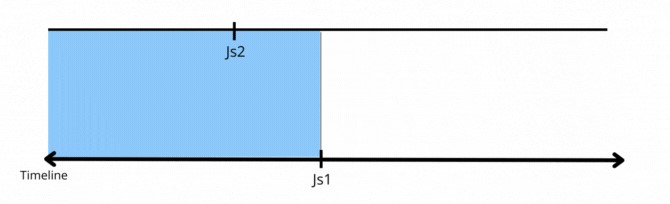
- Same day
- Same day matching criteria selects predecessors that have the same scheduled
date. The scheduled date corresponds to the day generated by the run cycle
before applying the start time. For instances generated by the submit
command, the scheduled date corresponds to the schedtime day. Same day matching criteria
shows a workflow
Js1that has a dependency on the instance of workflowJs2that is scheduled to run on the same day.Figure 2. Same day matching criteria 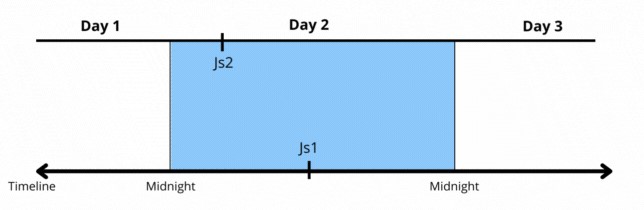
- Within a relative interval
- Within a relative interval selects predecessors that have a start time
within the specified time interval. Within a relative interval matching
criteria shows a workflow
Js1that has a dependency on the instance of workflowJs2that is scheduled to run in a time interval that goes from three hours beforeJs1scheduled start time and 6 hours afterJs1scheduled start time. HCL Universal Orchestrator searches for the closest instance that precedes the start time ofJs1in the defined time range. Such instance does not exist in the specified interval, so HCL Universal Orchestrator searches for the closest instance scheduled afterJs1start time.Figure 3. Within a relative interval matching criteria 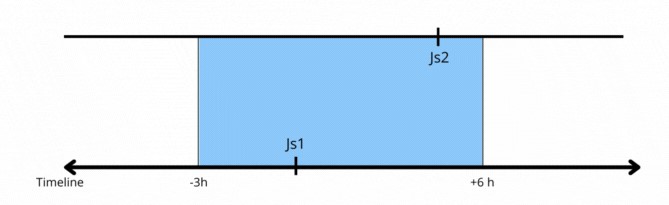
- Within an absolute interval
- Within an absolute interval criteria selects predecessors within the
specified time interval. Within an
absolute interval matching criteria shows a workflow
Js1that has a dependency on the instance of workflowJs2that is scheduled to run in a time interval that goes from 3 p.m. to 8 p.m.Figure 4. Within an absolute interval matching criteria 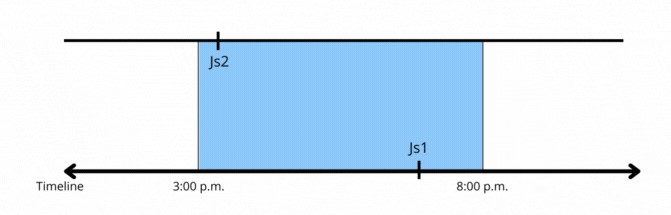
The following table shows the syntax of the matching criteria, both at workflow level and at external follows dependency level.
| Matching criteria | workflow | External follows dependency |
|---|---|---|
| Closest preceding | MATCHING
PREVIOUS |
FOLLOWS...PREVIOUS |
| Same day | MATCHING
SAMEDAY |
FOLLOWS...SAMEDAY |
| Within a relative interval | FROM [+/- n hour[s] minute[s]] TO [+/-
n hour[s] minute[s]]
|
FOLLOWS ... RELATIVE FROM [+/- n hour[s]
                                minute[s]] TO [+/- n hour[s]
minute[s]] |
| Within an absolute interval | FROM
time [+/-n day[s]] TO
time [+/-n day[s] |
FOLLOWS...FROM
                                time [+/-n day[s]] TO
time [+/-n day[s] |
Job1. Js2
contains the predecessor job2, so the start time of
Js2 is evaluated to resolve the external follows dependency.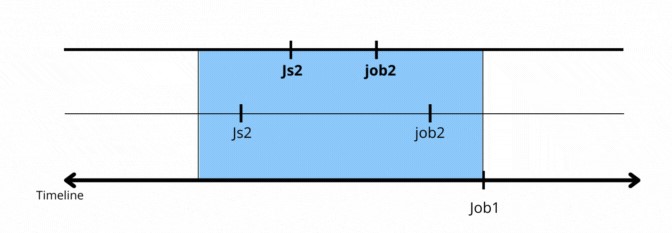
[P]
in the Dependencies column in ocli plan showjobs and ocli plan showsched command
outputs. A predecessor is marked as pending until it enters in the current
plan.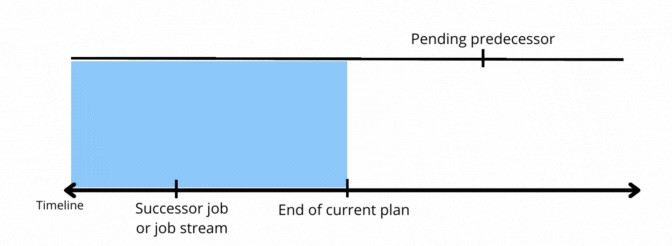
Examples
In this section you can find an example for each type of matching criteria.
JS_A is a
workflow
that contains a task named
JOB_A. JS_B is another workflow that has a
dependency on the closest preceding instance of JOB_A. The workflows are
defined as
follows:SCHEDULE WS_AGT_1#JS_A
ON RUNCYCLE RULE1 "FREQ=DAILY;"
(AT 0900)
ON RUNCYCLE RULE2 "FREQ=WEEKLY;BYDAY=TU"
(AT 1000)
:
WS_AGT_1#JOB_A
END
SCHEDULE WS_AGT_1#JS_B
ON RUNCYCLE RULE1 "FREQ=DAILY;"
(AT 1400)
FOLLOWS WS_AGT_1#JS_A.@ PREVIOUS
:
WS_AGT_1#JOB_B
AT 1800
END JS_A runs every day at 9 a.m. and it is
scheduled to run also on Tuesdays at 10 a.m. JS_B runs every day at
2 p.m. and it has an external follows dependency on the closest preceding instance
of JOB_A. When both workflows enter the
plan, the dependency is resolved as follows:- On Tuesdays there are two instances of
JS_A.JOB_Athat run before 2 PM The dependency ofJS_Bis resolved by the closest preceding instance ofJS_A.JOB_A, which is scheduled at 10 AM.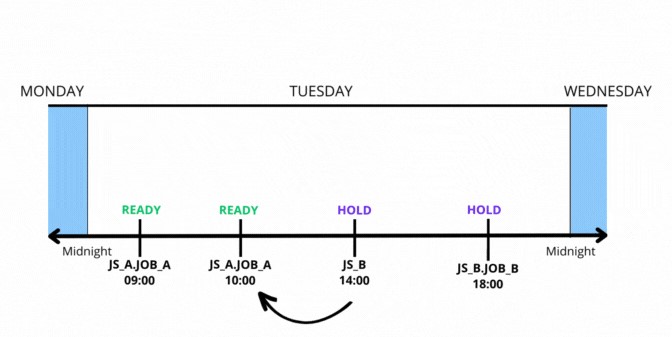
- On every other day of the week,
JS_Bhas a dependency on the only instance ofJS_A.JOB_A, which runs at 9 AM When the dependency is satisfied,JS_Bis put in READY status.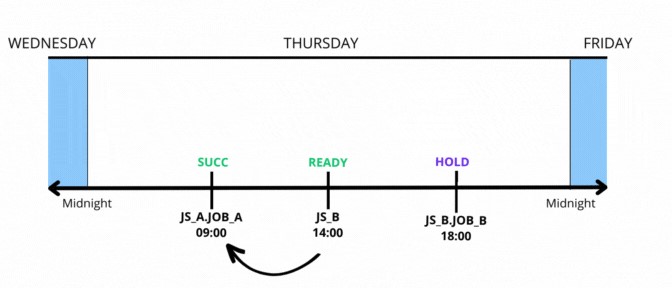
- On Tuesdays at 10 AM the second instance of
JS_A.JOB_Aruns. When the dependency is satisfied,JS_Bis put in READY status andJS_B.JOB_Bremains in HOLD status until the scheduled start time.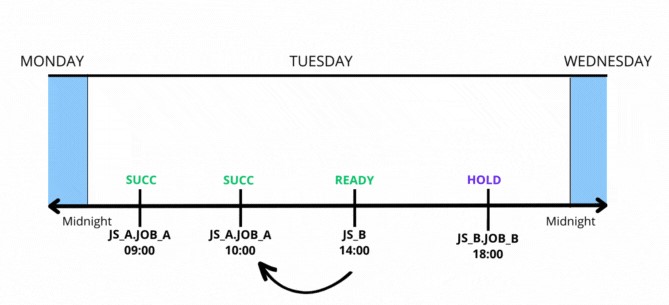
- Every day at 6 PM
JS_B.JOB_Bruns because the dependency on the instance ofJS_A.JOB_Ahas been satisfied.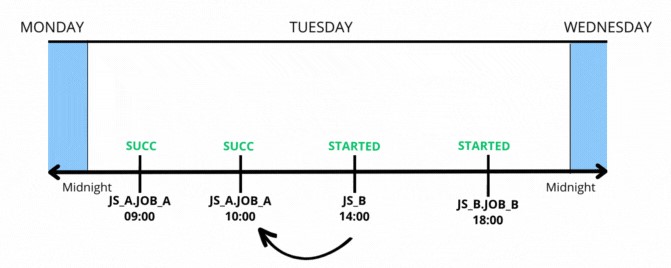
JS_A is a workflow that
contains a task named JOB_A. JS_A is scheduled to run every day
at 9 a.m. and on Wednesdays it is scheduled to run also at 8 a.m.
JS_A.JOB_A is scheduled to run at 10 a.m. JS_B
is another workflow that runs
at 6 a.m. and contains a task named
JS_B.JOB_B. JS_B.JOB_B is scheduled to run at
5 p.m. and has an external follows dependency on the closest preceding instance of
JS_A that has the same scheduled date. The workflows are
defined as follows:
SCHEDULE WS_AGT_1#JS_A
ON RUNCYCLE RULE1 "FREQ=WEEKLY;BYDAY=WE"
(AT 0800)
ON RUNCYCLE RULE2 "FREQ=DAILY"
(AT 0900)
:
WS_AGT_1#JOB_A
AT 1000
END

SCHEDULE WS_AGT_1#JS_B
ON RUNCYCLE RULE2 "FREQ=DAILY;"
(AT 0600)

:
WS_AGT_1#JOB_B
AT 1700
FOLLOWS WS_AGT_1#JS_A.@ SAMEDAY
END - On Wednesdays,
JS_Bhas a dependency on the instance ofJS_Awhich is scheduled to run at 8 AM On every other day of the week,JS_Bhas a dependency on the instance ofJS_Awhich is scheduled to run at 9 AM.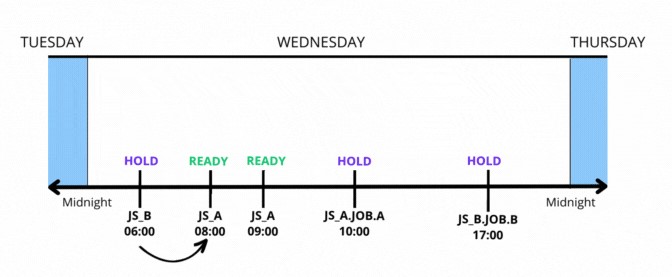
- At 8 AM
JS_Astarts and the instance ofJS_A.JOB_Ascheduled at 10 AM remains in HOLD status until the dependency is satisfied. At 10 AM,JS_A.JOB_Ais scheduled to run.JS_B.JOB_Bremains in HOLD status until the scheduled start time at 5 PM and the dependency fromJS_A.JOB_Ais satisfied.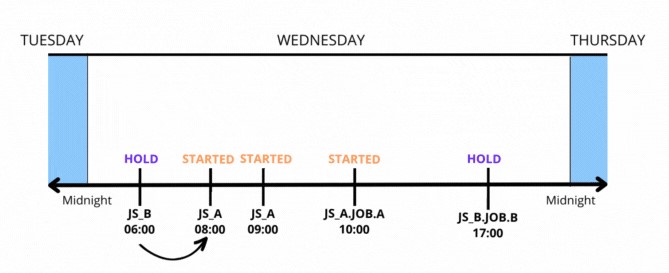
- On Wednesdays at 5 PM, all the dependencies are satisfied and
JS_B.JOB_Bruns.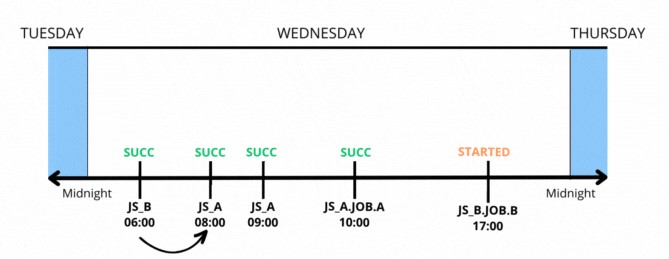
JS_A
is a workflow
that is scheduled to run daily at 4 p.m. and on Fridays also at 9 a.m.
JS_B is another workflow that is
scheduled to run daily at 2 p.m. and on Fridays also at 7 a.m. The instance that
resolves the dependency is defined within the relative interval of three hours
before and three hours after the workflow enters the
plan (-03:00 to +03:00). The workflows are
defined as follows:SCHEDULE WS_AGT_1#JS_A
ON RUNCYCLE RULE1 "FREQ=WEEKLY;BYDAY=FR"
(AT 0900)
ON RUNCYCLE RULE2 "FREQ=DAILY"
(AT 1600)
:
WS_AGT_1#JOB_A
END
SCHEDULE WS_AGT_1#JS_B
ON RUNCYCLE RULE3 "FREQ=WEEKLY;BYDAY=FR"
(AT 0700)
ON RUNCYCLE RULE2 "FREQ=DAILY;"
(AT 1400)
FOLLOWS WS_AGT_1#JS_A.@
RELATIVE FROM -0300 TO 0300
:
WS_AGT_1#JOB_B
END JS_B instance scheduled at 7 AM depends
on the instance of JS_A scheduled at 9 AM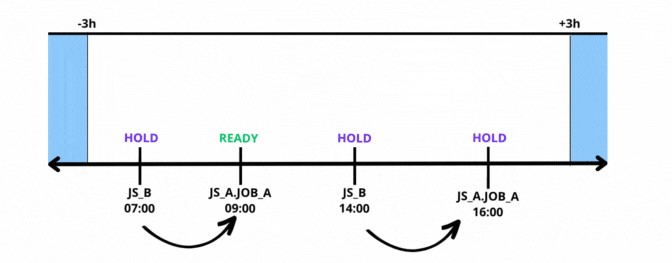
On Fridays at 9 AM, JS_B is put in HOLD status until
the dependency from the instance of JS_A is satisfied.
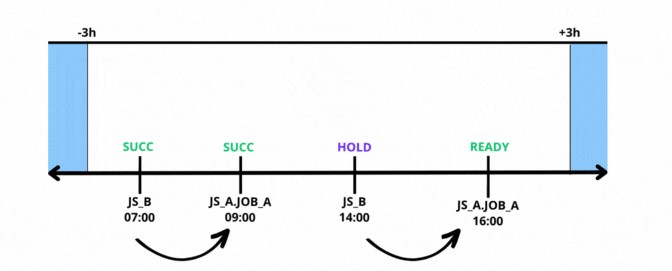
On Fridays at 2 PM, JS_A.JOB_A is ready and
JS_B is put in HOLD status until the dependency is
satisfied.
JS_A
is a workflow
that is scheduled to run daily at 10 a.m and also at 12.30 p.m.
JS_B is another workflow that is
scheduled to run daily at 12 p.m.
JS_B has a dependency on
an instance of JS_A within the time interval on the same day
between 6 a.m. and 3 p.m.
On Wednesdays, JS_A is scheduled to
run also at 8 a.m. and JS_B is scheduled to run also at 7
a.m.
SCHEDULE WS_AGT_1#JS_A
ON RUNCYCLE RULE1 "FREQ=WEEKLY;BYDAY=WE"
(AT 0800)
ON RUNCYCLE RULE2 "FREQ=DAILY"
(AT 1000)
ON RUNCYCLE RULE2 "FREQ=DAILY"
(AT 1230)
:
WS_AGT_1#JOB_A
END

SCHEDULE WS_AGT_1#JS_B
ON RUNCYCLE RULE3 "FREQ=WEEKLY;BYDAY=WE"
(AT 0700)
ON RUNCYCLE RULE2 "FREQ=DAILY;"
(AT 1200)
FOLLOWS WS_AGT_1#JS_A.@ FROM 0600 TO 1500
:
WS_AGT_1#JOB_B

END JS_A and
JS_B are scheduled to run. 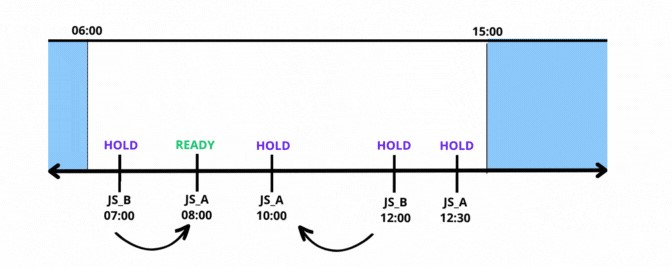
JS_A starts running. The workflow
JS_B that is scheduled to run at 7 a.m. remains in HOLD status
until all the dependencies of JS_A are satisfied.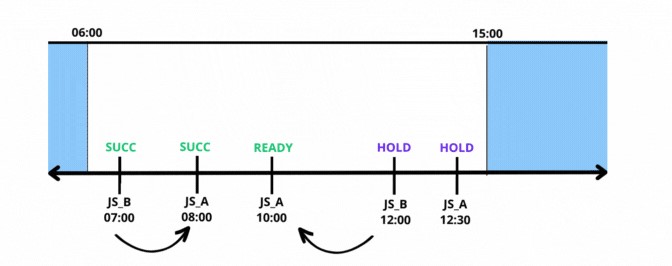
JS_A is READY. The example highlights
that the instance of JS_B scheduled at 12 p.m. depends on the workflow JS_A scheduled at 10 a.m. due to the closest preceding rule.
JS_B remains in HOLD status until the dependency is satisfied.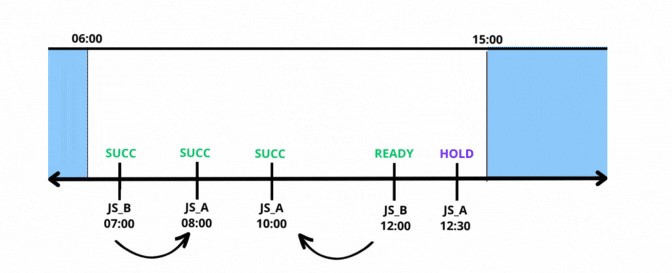
On Wednesdays at 12 AM, the dependency from JS_A is satisfied
and JS_B is put in READY status.