View smart strategies
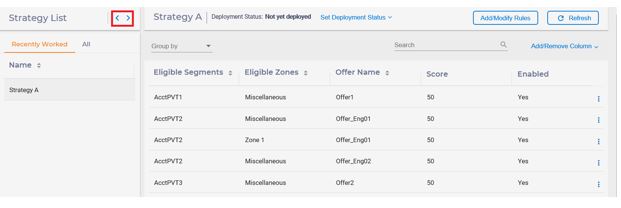
To view a smart strategy, select the Strategy tab on the Interactive Channel screen. The list of strategies is displayed in the order of their update time on the left panel. In addition, the rules of the most recently updated strategy are listed on the right panel.
You can use the left arrow to collapse the Strategy List pane and right arrow to expand the strategy list, which displays more fields of strategies. On Strategy List, you can edit. copy and delete individual strategy by hovering the cursor to the right end of that row.

- Group by segments, zones, offers, or rule groups. When you select this, the
rules are grouped by the selected field. Each groupcan be collapsed or
independently expanded to display its smart rules. The effective grouping field
is displayed above the grid.

- Sort by segments, zones, or offers: Click the up/down arrow provided next to
each column header. The effective sorting column and the sorting order is
identified by the highlighted arrow.

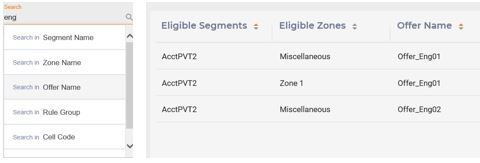
- Search can be performed using the ���Search��� box: You can type a target text and
then choose the field to be searched. Only the smart rule matching the search
criterion is listed in the view.
- Add/Remove columns: The display columns can be changed by using the ���Add/Remove
Column��� drop down. Except segments, zones, and offers, you can add or remove a
number of columns from the view.

- Advanced options of smart rule: You can view the advanced options of smart rule
in another window by hovering the cursor on the vertical ellipsis to the right
of the rule row and then clicking the gear icon.

You can refresh the contents of the rules by clicking the ���Refresh��� button. In this case, the data is loaded from the persistence store replacing the current contents.
