How do I delegate access to my mail, calendar, and contacts?
Delegate access to your mail, calendar, and contacts, or calendar and contacts only, and specify the level of access.
-
Click your profile image in the navigator bar and click Mail Settings > Delegation.
-
Search for the person to whom you want to grant access. Specify whether they have access to Mail, Calendar, and Contacts or only your Calendar and Contacts and the type of access.
Note: When you delegate to others, you also give access to your To Do items.
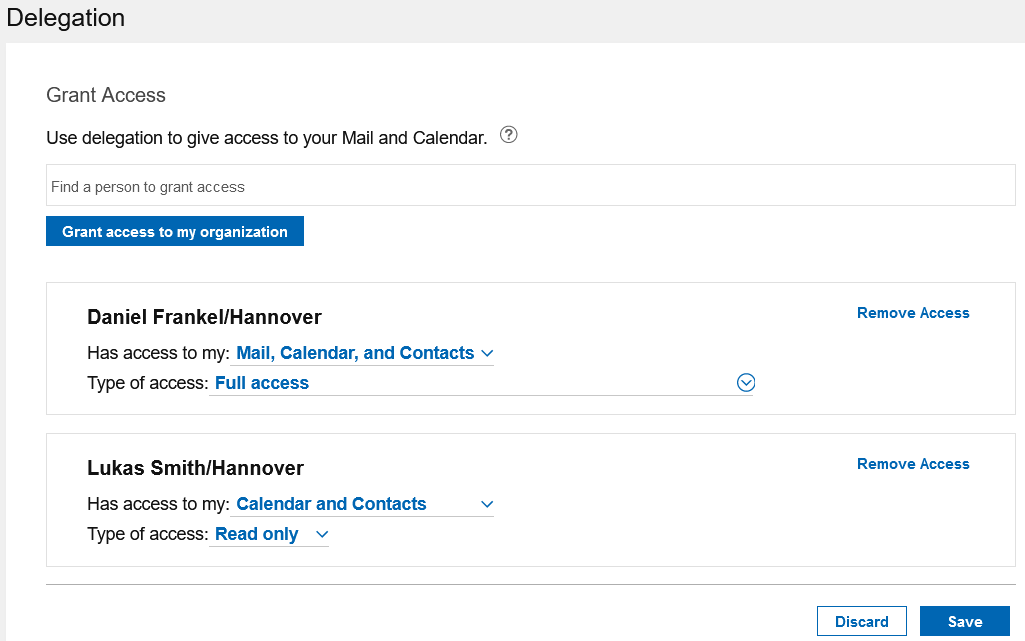
Note: Each time delegation settings are saved, a request is sent to process the changes and it may take some time for the updates to be applied. While this is going on, a Pending Changes banner displays next to the delegate list. Once this goes away, the list should be up-to-date. If any changes are made to the delegation settings while the Pending Changes banner displays, they will overwrite any previous changes made.
What does it mean to give access to an organization?
This option allows anyone within your organization to have the selected access rights to your Mail and Calendar. If you want to grant individuals a different access right, create a separate delegation setting entry for each person.
Parent topic: How do I use mail and calendar delegation?