How do I access mail and calendars delegated to me?
Set up Mail to view or manage other people's mail and calendars. The first step is to add a button to the navigation bar so you can open the delegation panel where you can add and access delegated accounts.
- Open Mail Settings > Delegation.
-
Select Add a button to the navigation bar to access delegated accounts and then click Done.

-
Click the
 icon in the navigation bar to open the delegation panel for Mail and Calendar Access list.
 -
Select the name of the account to open and click the mail or calendar icon to open it.
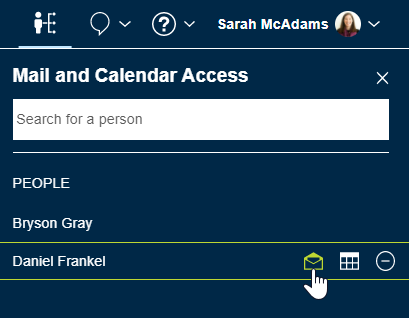
Managed mail and calendars open in separate browser tabs. Watch for red badges on the tabs to alert you when there are new messages or calendar notices.
Parent topic: How do I use mail and calendar delegation?