Architecture Considerations
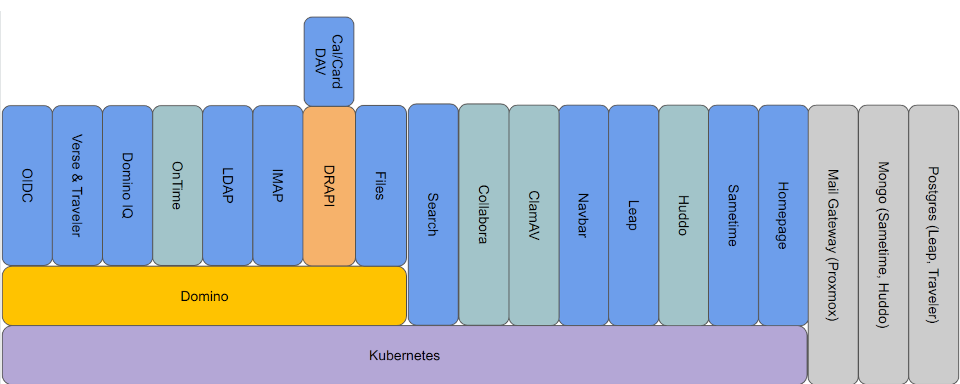
Domino Workspace consists of multiple components that work together to deliver a unified collaboration platform. These components are packaged as containers and deployed within a Kubernetes (K8s) environment.
Kubernetes provides the foundation for deploying and managing these components consistently. It supports service orchestration, automated deployment, scalability, and efficient use of infrastructure resources.
Prerequisites
Before deploying Domino Workspace, ensure that the required infrastructure components are in place. These include ClamAV, cert-manager, APISIX, kube-prometheus-stack, Linkerd, Alloy and Loki.
| Infrastructure component | Purpose | How to deploy and configure |
|---|---|---|
| ClamAV | AntiVirus scanning service | ClamAV |
| cert-manager | Certificate management | cert-manager setup |
| APISIX | Centralized cluster access | APISIX setup |
| kube-prometheus-stack | Monitoring stack using Prometheus and Grafana | kube-prometheus-stack setup |
| Linkerd | Service mesh for enhanced security, observability, and reliability | Linkerd setup |
| Alloy (optional) | Log Collection | Alloy setup |
| Loki (optional) | Log Aggregation | Loki setup |
Deployment planning should also account for high availability, backup, and recovery requirements.
Mail Gateway
HCL recommends that you run a mail gateway to protect the inbound and outbound email traffic of Domino Workspace. The mail gateway should provide:
- Spam protection
- Antivirus scanning
The following capabilities are also recommended:
- DMARC support
- DKIM support
Customers may use an existing mail gateway that meets these requirements. If a suitable solution is not already in place, Proxmox Mail Gateway has been tested and can be used with Domino Workspace.
Postgres Database
Domino Workspace requires a PostgreSQL database deployment. The database infrastructure should be appropriately sized based on the scale and expected workload of the Domino Workspace environment.
Sizing, availability, backup, and recovery requirements should be considered as part of the overall deployment design.
Mongo Database
Domino Workspace also requires a MongoDB database deployment. The database infrastructure should be appropriately sized based on the scale and expected workload of the Domino Workspace environment.
Sizing, availability, backup, and recovery requirements should be considered as part of the overall deployment design.
Deployment Overview
Domino Workspace can be deployed either in a self-hosted or in a managed Kubernetes environment. For a self-hosted environment, Domino Workspace was developed and tested to run on RKE2. It was also deployed and tested to run on a IONOS managed Kubernetes cluster.
Within the Kubernetes environment, APISIX provides ingress management, load balancing, and TLS termination.
Depending on the Domino Workspace edition and licensed capabilities, the deployment may include the following services.
Domino Workspace Communicate includes these communication and productivity features:
- Calendar
- Contacts
- Chat
- Meetings
- Files
- Forms
Domino Workspace Collaborate extends Domino Workspace Communicate with the following collaboration features:
- Editor
- Group Calendar
- Boards
Network Endpoints
Domino Workspace exposes a number of network endpoints required for user access, service communication, and administrative operations. Customers should place appropriate network controls, such as a firewall, in front of the deployment to manage and restrict access.
The deployment may expose the following endpoints:
| Address | Protocol | Notes |
|---|---|---|
| api-boards.<deployment-domain> | HTTPS | |
| apisix-admin.<deployment-domain> | HTTPS | Admin |
| auth.<deployment-domain> | HTTPS | |
| boards.<deployment-domain> | HTTPS | |
| chat.<deployment-domain> | HTTPS | |
| collabora.<deployment-domain> | HTTPS | |
| drapi.<deployment-domain> | HTTPS | |
| files.<deployment-domain> | HTTPS | |
| files-api.<deployment-domain> | HTTPS | |
| forms.<deployment-domain> | HTTPS | |
| grafana.<deployment-domain> | HTTPS | Admin |
| groupcal.<deployment-domain> | HTTPS | |
| homepage.<deployment-domain> | HTTPS | |
| longhorn.<deployment-domain> | HTTPS | Admin |
| mail.<deployment-domain> | HTTPS | |
| meetings.<deployment-domain> | HTTPS | |
| mobile.<deployment-domain> | HTTPS | |
| nomad.<deployment-domain> | HTTPS | Admin |
| search-middleware.<deployment-domain> | HTTPS | |
| * | IMAP | |
| * | LDAPS | |
| * | NRPC | Admin |
| * | SMTP |
Network access should be configured according to the organization's security and operational requirements.
For air-gapped deployments, additional planning is required for container image distribution and antivirus definition updates. By default, Domino Workspace relies on the HCL container registry hclcr.io to pull container images of Domino Workspace components. During deployment it also needs to pull container images for the required infrastructure components. In addition, the ClamAV service needs to periodically pull updated antivirus definitions.
High Availability
Domino Workspace supports high-availability deployments designed to improve service resilience and reduce the impact of infrastructure failures.
High availability for deployed services is typically distributed across two Availability Zones. However, a three-Availability-Zone configuration is required to provide appropriate Kubernetes control plane failover.
The final high-availability design should also account for infrastructure, database, storage, and backup requirements.
High Availability for Domino
Many parts of Domino Workspace are "self-healing" and will deploy new pods if/when a node experiences an outage or a pod terminates unexpectedly.
The exception to this rule is Domino server pods. These types of servers require more structure and persistence and so are managed as members of a StatefulSet.
If a node running a Domino server pod experiences an outage, a new pod cannot be spun up on another node automatically. For this reason, the Domino servers are clustered across different Availability Zones.
For example, mail servers: 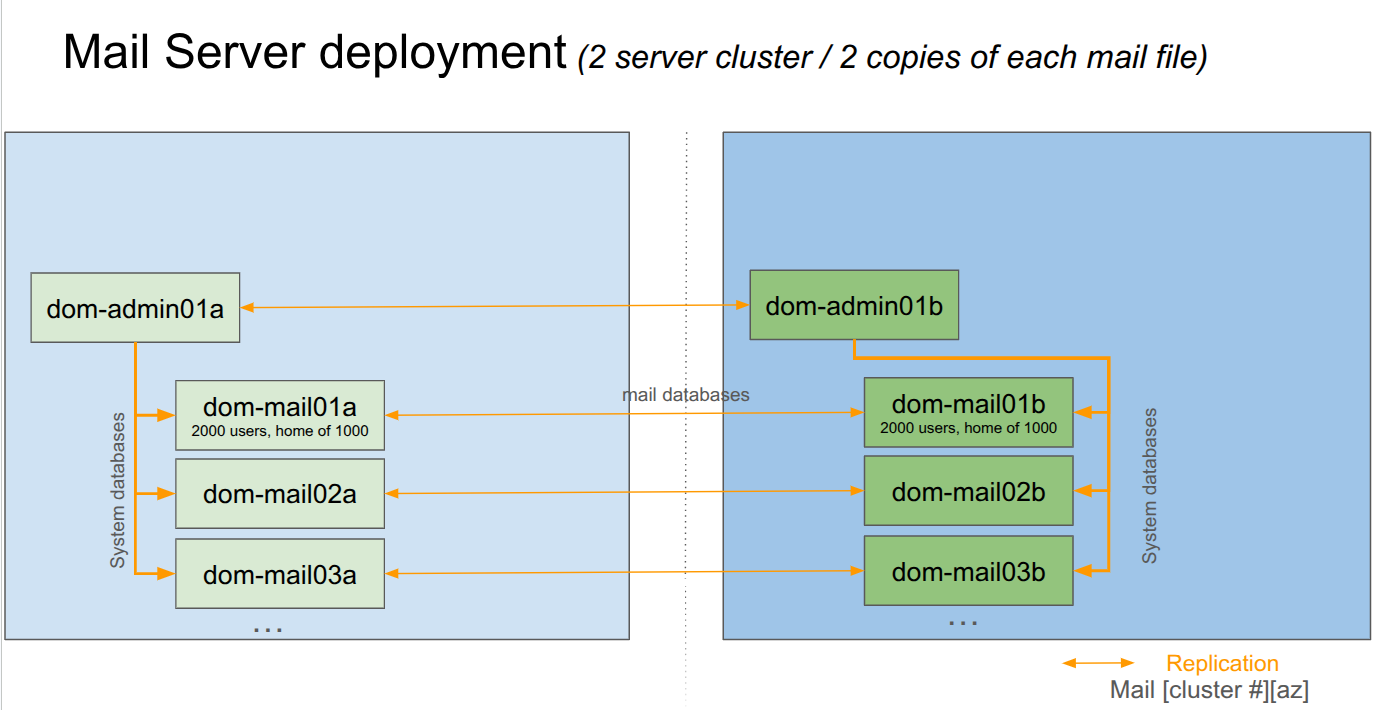
Certificate Management
Domino Workspace uses Kubernetes certificate management for public certificates. The certificate management infrastructure can integrate with certificate authorities such as Let's Encrypt.
Internal certificates are managed using a combination of Kubernetes certificate management and Domino Certificate Manager, depending on the component and communication path.
Communication between services is protected using TLS wherever supported. Where direct TLS encryption is not available, Linkerd provides encrypted communication between services.
Identity and Authentication
Domino Workspace uses Domino OIDC and Domino LDAP to provide identity and directory services within the environment.
For organizations that use an existing enterprise directory, Domino Workspace can leverage Domino's directory synchronization capabilities to integrate with and maintain existing directory sources.
Authentication is provided through Domino's OpenID Connect (OIDC) Provider. Organizations that use an existing identity provider can continue to use it by federating through the Domino identity provider using SAML or OIDC.