and application configurations
The provides a set of foundational React components for interacting with business logic that can be used as the basis for creating and managing your custom Store and allows front end developers to focus on customizing and replacing the display and view aspects of the store. All aspects of the React application, including the foundation, are customizable by front end developers and are provided as references to interact with HCL Commerce REST APIs and session management.
Environments for the
The provides a flexible environment in which a React web developer can create the Store UI. The development environment can be configured in the following modes:
- As a local environment without an Transaction server or using the mock API framework to emulate any REST responses.
- As a local environment with a local Transaction server ( toolkit) and local Search Docker service.
- As a connected environment with a local Transaction server ( toolkit) and a remote Search Docker service.
- As a connected environment with a remote Transaction server ( toolkit) and a remote Search Docker service.
For more information about how to configure the modes, see the Readme.md file that is included in the .
The
The comprises of the following packages:
- A pre-packaged Node environment with source code for a set of foundational components and framework customers, accompanying build tools, static assets for sample stores, and Node environment to build and start the React applications.
- A pre-packaged web-server docker container containing minimized static files representing the React application. The web-server docker container assets are created from the build process of the Node environment.
The node environment and store-web server also include a set of static assets for the sample stores including images for marketing assets, product category images, and web display assets.
The Node environment has a common code base and assets with an npm
install/start/build process that
can be used to deploy two distinct React applications that provide the
following sample stores:
- A B2C (Emerald) with a pre-wired page flow for B2C with an 'Emerald green' UI design.
- A B2B (Sapphire) with a pre-wired page flow for B2B with a 'Sapphire blue' UI design.
Setting up the development environment
You can custom build your using any web development IDE and deploy to the provided store-web server, any other web server, or choose your own deployment method. When using the store-web container, the names can be referenced by the stores/eSites thar are created by the site administrators.
The store-web environment includes both the Emerald and Sapphire .
You can start the npm environment with either the Emerald or the Sapphire application.
Each React application can serve one or more stores and accepts a parameter
storeId=<storeId>. If the storeId is not
specified, the application considers the <storeName> to be the
same name as the application.
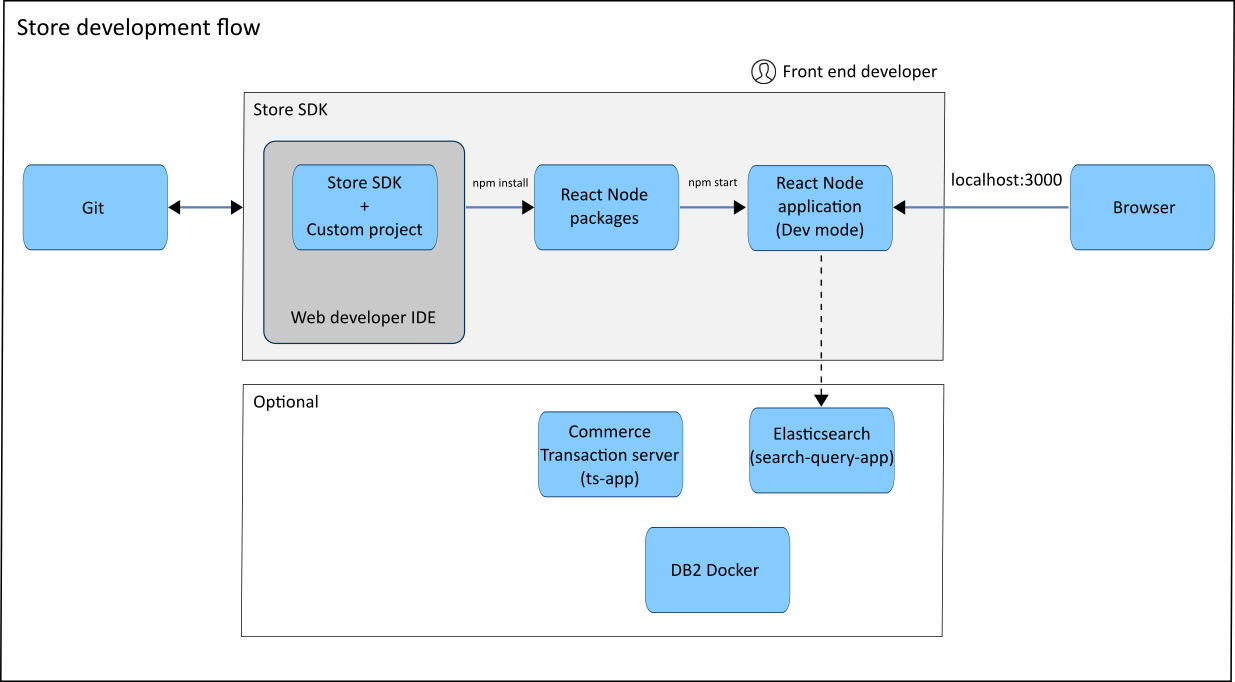
development flow
The following diagram shows the typical development flow.