How promotion data is stored and managed
If you are creating a new custom promotion type for , you should understand how the interacts with the promotion component, and how promotions are stored in the database.
Promotion XML
There are two types of promotion XML:- The authoring promotion XML contains the data about a promotion that business users input into the Promotions tool user interface when authoring promotions. The authoring promotion XML was introduced with Version 6 Feature Pack 4 to make promotions customization easier.
- The runtime promotion XML is used by the server to evaluate promotions during the shopping flow. The runtime promotion XML has not changed from previous feature packs.
When a business user activates a promotion, the following process transforms the authoring promotion XML into the runtime promotion XML:
- The promotion activation logic builds the authoring promotion XML from data stored in the promotion authoring tables. These tables contain the business user input about a promotion.
- A set of XSLT templates transform the authoring promotion XML into the runtime
promotion XML that the promotion engine requires to evaluate promotions. The
transformation involves several steps:
- The XSLT template files transform the authoring promotion XML to create four sections of the runtime promotion XML: the basePromotion section, the purchaseCondition section, the customCondition section, and the targetingCondition section.
- The transformation process uses the fromXML interface to initialize a promotion object.
- The transformation process uses the toXML interface to generate the runtime promotion XML and store it in the PX_PROMOTION table in the XMLPARAM column.
The following diagram illustrates this process:
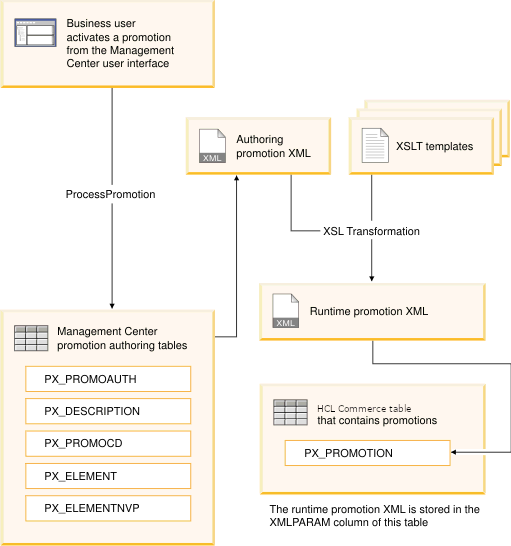
Note that until a promotion is activated, only placeholder promotion XML is stored in the PX_PROMOTION table.
XSLT templates
To add a new promotion type, developers can design widgets that gather the required input and save the input to the promotion authoring tables. As shown in the previous diagram, XSLT templates then transform the authoring promotion XML into the runtime promotion XML. Therefore, customizing the runtime support for a new promotion type only requires a custom XSLT template to support the user interface widgets; developers do not need to make backend Java code changes to compose the runtime promotion XML. This makes customizing promotion types simpler than customizing promotion types.
Each promotion type defined in the Lab Promotions tool is configured to work with certain XSLT templates. The Promotions tool provides the set of XSLT templates that transform the default promotions types. When you create a custom promotion type, you must create a new custom XSLT template; however, you can copy the content of an existing XSLT template into your new file and then customize only the sections that are different.
Promotion elements and variables
Promotion elements and their variables allow the Lab Promotions tool to manage the authoring data for the purchaseCondition section, the customCondition section, and the targetingCondition section of the runtime promotion XML in a generic framework.
| PX_ELEMENT_ID | PX_PROMOTION_ID | NAME | TYPE | SubType | Parent | Sequence |
|---|---|---|---|---|---|---|
| 1001 | 10101 | Name1001 | PurchaseCondition | UI_PurchaseCondition | NULL | 0 |
| 1002 | 10101 | Name1002 | DiscountRange | UI_DiscountRange | Name1001 | 0 |
| 1003 | 10101 | Name1003 | DiscountRange | UI_DiscountRange | Name1001 | 1 |
| PX_ELEMENTNVP_ID | PX_ELEMENT_ID | NAME | VALUE | Note |
|---|---|---|---|---|
| 1000000 | 1001 | Currency |
USD |
The currency is USD |
| 1000001 | 1002 | LowerBound |
100 |
For range of Name1002, the lowerbound=100 |
| 1000002 | 1002 | Percentage |
10 |
For range of Name1002, the Percentage=10 |
| 1000003 | 1003 | LowerBound |
500 |
For range of Name1003, the lowerbound=500 |
| 1000004 | 1003 | Percentage |
50 |
For range of Name1003, the Percentage=50
|
<PurchaseCondition>
   <DiscountRange></DiscountRange>
   <DiscountRange></DiscountRange>
</PurchaseCondition><PurchaseCondition>
<Data>
<Currency>USD</Currency>
</Data>
<DiscountRange>
<Data>
<LowerBound>100</LowerBound>
<Percentage>10</Percentage>
</Data>
</DiscountRange>
<DiscountRange>
<Data>
<LowerBound>500</LowerBound>
<Percentage>50</Percentage>
</Data>
</DiscountRange>
</PurchaseCondition>Predefined element types
<TargetedProfile>
   <CustomerProfileKey>
      <ProfileName>Customers who are under 40 years of age</ProfileName>
      <OwnerDN>ou=b2c,o=seller organization,o=root organization</OwnerDN>
   </CustomerProfileKey>
</TargetedProfile><TargetingCondition>
<IncludeMemberGroupIdentifier>
<Data>
<Id>8000000000000000551</Id>
<DN>ou=b2c,o=seller organization,o=root organization</DN>
<Name>Registered Customers</Name>
</Data>
</IncludeMemberGroupIdentifier>
<ExcludeMemberGroupIdentifier>
<Data>
<Id>8000000000000000555</Id>
<DN>ou=b2c,o=seller organization,o=root organization</DN>
<Name>Female Customers</Name>
</Data>
</ExcludeMemberGroupIdentifier>
<ExcludeMemberGroupIdentifier>
<Data>
<Id>8000000000000000553</Id>
<DN>ou=b2c,o=seller organization,o=root organization</DN>
<Name>Guest Shoppers</Name>
</Data>
</ExcludeMemberGroupIdentifier>
<IncludeMemberGroupIdentifier>
<Data>
<Id>8000000000000000554</Id>
<DN>ou=b2c,o=seller organization,o=root organization</DN>
<Name>Male Customers</Name>
</Data>
</IncludeMemberGroupIdentifier>
</TargetingCondition>- IncludeMemberGroupIdentifier
- A member group that is part of an inclusion condition in the rule.
- ExcludeMemberGroupIdentifier
- A member group that is part of an exclusion condition in the rule.
- IncludeCategoryIdentifier
- A category that is part of an inclusion condition in the rule.
- ExcludeCategoryIdentifier
- A category that is part of an exclusion condition in the rule.
- IncludeCatalogEntryIdentifier
- A catalog entry that is part of an inclusion condition in the rule.
- ExcludeCatalogEntryIdentifier
- A catalog entry that is part of an exclusion condition in the rule.
- GiftCatalogEntryIdentifier
- A catalog entry that is a free gift in the rule.
- IncludePromotionIdentifier
- A promotion that is part of an inclusion condition in the rule.
- ExcludePromotionIdentifier
- A promotion that is part of an exclusion condition in the rule.
- IncludeShipModeIdentifier
- A ship mode that is part of an inclusion condition in the rule.
- ExcludeShipModeIdentifier
- A ship mode that is part of an exclusion condition in the rule.
- IncludeStoreIdentifier
- A store that is part of an inclusion condition in the rule.
- ExcludeStoreIdentifier
- A store that is part of an exclusion condition in the rule.
- IncludeUserIdentifier
- A user that is part of an inclusion condition in the rule.
- ExcludeUserIdentifier
- A user that is part of an exclusion condition in the rule.
Idand the appropriate value as the primary key. Use these predefined element types whenever possible. When a promotion is activated, the Id values are also used to populate the CATENCALCD and CATGPCALCD tables to support the ShopcartDrivenAgendaBuilder.